Google has extended the lifespan of the Windows 11 Mica title bar flag in Chrome Canary, keeping the experimental feature active until Chrome version 160. The move confirms that Google continues to test deeper Windows design integration rather than quietly dropping the feature.
The Mica title bar recently disappeared from Chrome 143, which raised concerns among testers and Windows enthusiasts. Its return signals renewed development and long-term evaluation across upcoming Chrome releases.
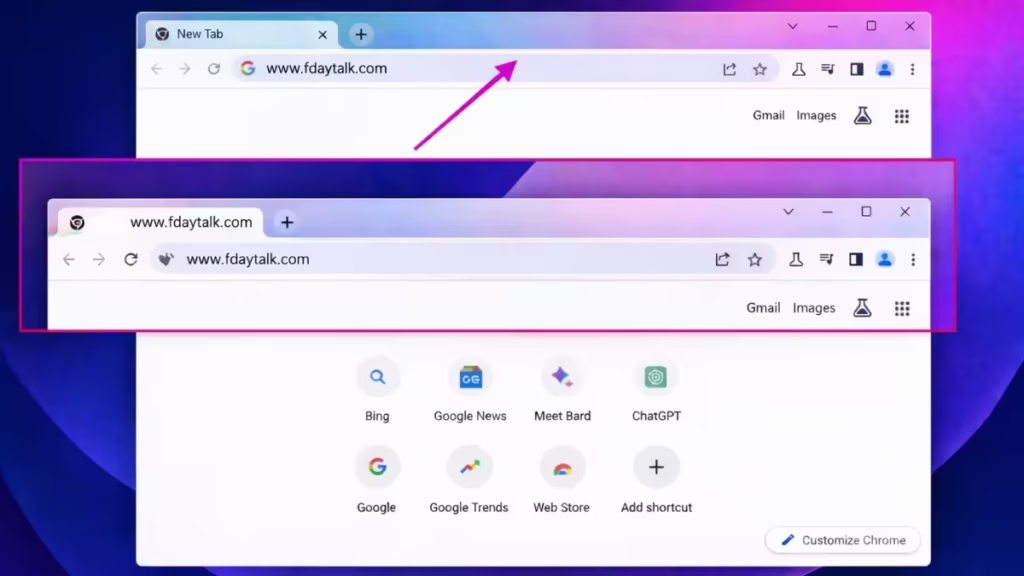
Mica is a Windows 11 design material that adds a subtle translucent layer to app surfaces such as title bars and system panels. The effect lightly reflects the desktop wallpaper and surrounding colors, which makes apps blend naturally with the operating system’s visual style.
When enabled in Chrome, the browser switches from its custom window frame to the native Windows system-drawn title bar. This change allows Chrome to match other Windows apps like File Explorer and Settings more closely.
The feature works on Windows 11 version 22H2 and newer.
Mica Flag Returns After Removal in Chrome 143
Google removed the Mica flag in Chrome 143, which suggested that the experiment might end permanently. The latest Canary builds bring the flag back, confirming that internal testing continues.
Google also updated the internal expiration milestone of the flag to Chrome 160. This change ensures that testers can continue experimenting with the feature across several future releases instead of losing access in the near term.
How to Enable the Windows 11 Mica Title Bar in Chrome
Users who want to test the feature can enable it in Chrome Canary:

- Launch Chrome Canary.
- Open the address bar and enter:
chrome://flags - Search for Windows 11 Mica title bar.
- Enable the flag.
- Relaunch the browser.
After restarting, the Chrome title bar may show the Mica visual effect on supported Windows systems.
The feature remains experimental and only appears in Canary builds. Stable Chrome users will not see it until Google finishes testing and approves wider rollout.
FAQs
Is the Mica title bar available in Chrome now?
Yes. The Windows 11 Mica title bar is active in Chrome Canary and remains available until Chrome version 160.
Can I use the Mica title bar in normal Chrome?
No. The feature currently works only in Chrome Canary through an experimental flag.
Which Windows versions support the Mica title bar?
The Mica title bar works on Windows 11 version 22H2 and newer.
Does the Mica title bar improve Chrome performance?
No. The Mica title bar only changes the visual appearance of the title bar.
How do I enable the Mica title bar in Chrome?
Open Chrome Canary, go to chrome://flags, enable “Windows 11 Mica title bar,” and relaunch the browser.
Will Google bring the Mica title bar to stable Chrome?
Google continues testing the feature, but it has not confirmed a stable release timeline.
Google also continues to experiment with other features in Chrome, including prompts that encourage users to explore AI extensions and possible support for Global Privacy Control signals. These tests indicate ongoing UI and privacy feature development across upcoming versions.

