Keeping your Fortnite account secure is more important than ever, especially if you’ve invested time into Battle Pass progress, exclusive skins, or competitive play. Epic Games uses Two-Factor Authentication (2FA) to add an extra security layer to your account, making sure only you can access it.
Fortnite 2FA is a security system tied to your Epic Games account. Instead of relying only on a password, 2FA requires a second verification code whenever you sign in from a new device or location.
After entering your password, Epic Games will ask for a one-time code sent through your chosen method, such as an authenticator app, email, or SMS. Without this code, access is blocked—even if someone knows your password.
Why Enabling 2FA Is Important in Fortnite
Before getting into the setup, it helps to understand why Epic strongly encourages players to enable 2FA:
- It protects your account from unauthorized access.
- It prevents theft of skins, V-Bucks, and progression.
- It is required to send gifts in Fortnite.
- It is mandatory for Fortnite competitive events and tournaments.
- It is required to claim certain free items on the Epic Games Store.
Epic Games also rewards players who enable 2FA, making it both a security upgrade and a gameplay benefit .
Where You Need to Enable Fortnite 2FA
Fortnite 2FA cannot be enabled directly inside the game. The setup is done through your Epic Games account settings using a web browser.
This applies even if you play Fortnite on:
- PlayStation
- Xbox
- Nintendo Switch
- PC
All platforms link back to the same Epic Games account.
Step-by-Step: How to Enable Fortnite 2FA
Once you’re signed into your Epic Games account, enabling 2FA only takes a few minutes.
Step 1: Sign in to Your Epic Games Account
Log in using the Epic Games website or Epic Games Launcher with the account connected to Fortnite.
Step 2: Open Account Security Settings
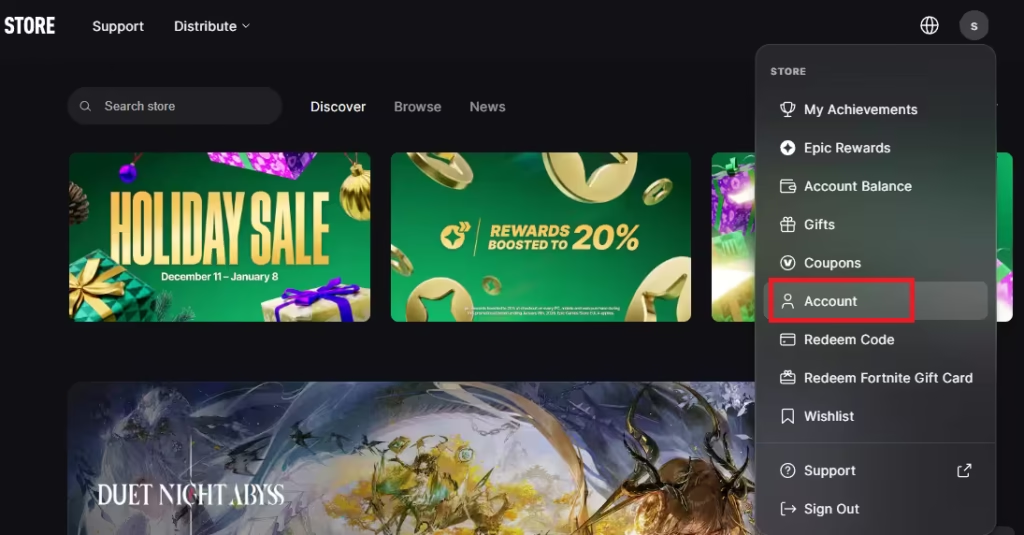
- Click your profile icon.
- Go to Account.
- Select Password & Security from the menu.
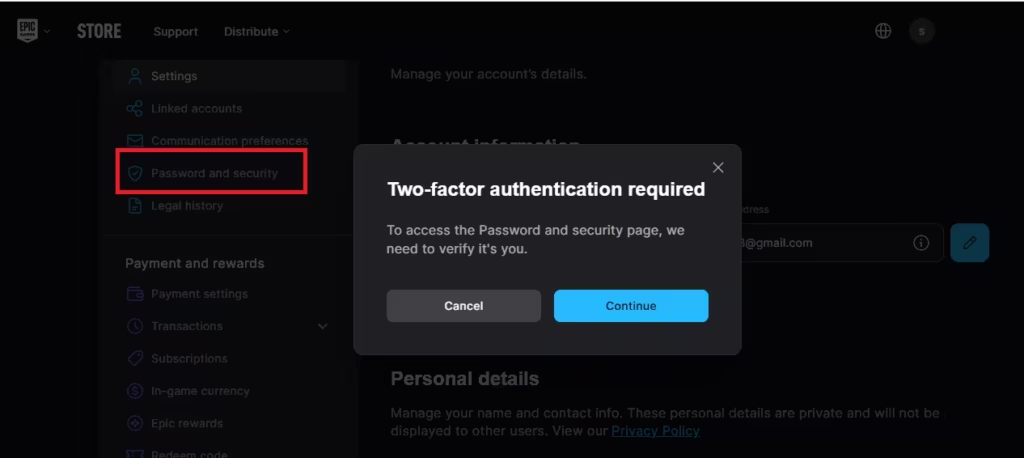
Step 3: Find the Two-Factor Authentication Section
Scroll down until you see the Two-Factor Authentication (2FA) section. This is where all available methods are listed.
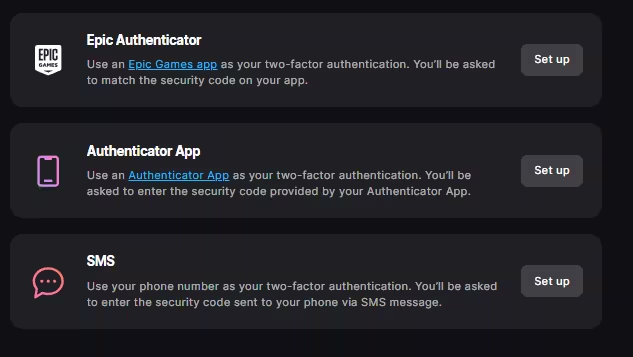
Step 4: Choose and Set Up a 2FA Method
Select one of the available authentication options and follow the on-screen instructions. Once confirmed, 2FA will be active on your account.
Epic Games will also send a confirmation email after successful activation .
Fortnite 2FA Methods Explained
Epic Games supports multiple 2FA methods, allowing you to choose what works best for you.
Authenticator App (Recommended)
This is the most secure and reliable option.
- Uses apps like Google Authenticator, Microsoft Authenticator, Authy, or similar.
- Generates time-based codes directly on your phone.
- Works even without internet or mobile signal.
After scanning the QR code and entering the generated code, the app becomes linked to your account.
Epic Games Authenticator
Epic also provides its own built-in authenticator inside the Epic Games mobile app.
- Uses a number-matching prompt instead of manual codes.
- Approves sign-ins directly through the Epic Games app.
- Simple and secure for regular Epic Games users.
Email Authentication
With this method, Epic Games sends a one-time code to your registered email address.
- No extra apps required.
- Easier for casual players.
- Less secure than app-based methods.
You’ll need access to your email every time a verification is required.
SMS Authentication
Epic can send a verification code to your phone via text message.
- Useful if you prefer phone-based verification.
- May not work in all regions.
- Requires a supported mobile number.
If SMS isn’t supported in your region, Epic recommends using an authenticator app instead .
Setting a Primary 2FA Method
If you enable more than one authentication method, Epic Games allows you to choose a primary 2FA option.
You can:
- Keep backup methods active.
- Set your preferred method as default.
- Switch methods anytime from account settings.
This helps ensure access even if one method becomes unavailable.
Fortnite Rewards for Enabling 2FA
Epic Games rewards players who enable 2FA with exclusive in-game items.
Free Reward
- Boogie Down Emote
Save the World Owners Also Receive
- 50 Armory Slots
- 10 Backpack Slots
- A Legendary Troll Stash Llama
These rewards are automatically added once 2FA is enabled on your account .
Can You Enable Fortnite 2FA on Console?
You cannot enable 2FA directly on PS5, PS4, Xbox, or Switch.
However:
- Your console Fortnite account is linked to Epic Games.
- Enabling 2FA on the Epic Games website protects your console progress automatically.
Once enabled, the security applies across all platforms.
Enabling Fortnite 2FA is one of the simplest and most effective ways to protect your account. It secures your skins, progress, and purchases while unlocking important features like gifting and competitive play.
Once set up, 2FA works quietly in the background—only stepping in when it’s needed. If you play Fortnite regularly, enabling it isn’t optional anymore; it’s essential.

