Apple has finally added a long-requested battery feature to macOS. With macOS Tahoe 26.4, MacBook users can now set a manual charge limit, allowing the battery to stop charging at a selected percentage instead of always pushing to 100%.
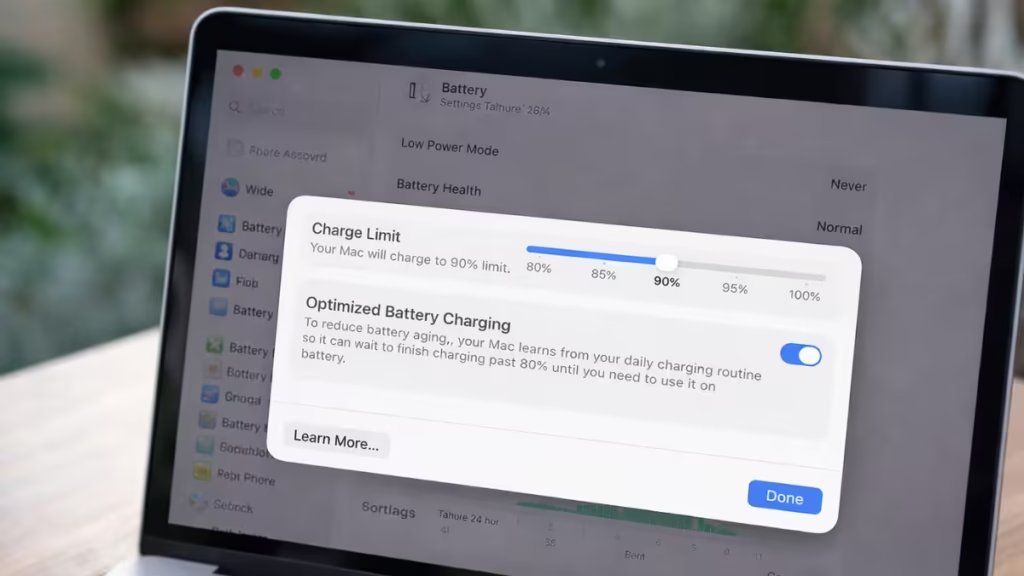
This update brings macOS in line with iPhone and iPad battery controls and removes the need for third-party charging utilities that many users relied on for years.
Charge Limit Comes to macOS for the First Time
macOS Tahoe 26.4 introduces a Charge Limit slider that lets users choose how much their MacBook charges. The available options include 80%, 85%, 90%, 95%, and 100%.
Once enabled, macOS enforces this as a hard limit. The system does not override it automatically, even if the Mac stays plugged in for long periods. This makes the feature especially useful for users who keep their MacBooks connected to power throughout the day.
You can enable it by going to:
System Settings → Battery → Charging (ⓘ)
How Charge Limit Is Different From Optimized Battery Charging
Before this update, macOS only offered Optimized Battery Charging. That feature uses machine learning to study your charging habits and delay charging past 80% until it predicts you will need the extra battery.
The new Charge Limit feature works differently.
- Optimized Battery Charging is adaptive and temporary
- Charge Limit is manual and permanent until you change it
You can use both features together. In that case, the Charge Limit acts as the final ceiling, while Optimized Charging manages how and when charging approaches that limit.
Does macOS Charge Limit Improve MacBook Battery Lifespan?
Lithium-ion batteries experience the most stress when they remain at full charge for extended periods. Keeping a battery at 100% every day accelerates chemical aging and reduces long-term capacity.
By limiting charging to 80–90%, users can:
- Slow battery degradation
- Preserve maximum capacity for more years
- Maintain consistent performance over time
This matters most for MacBooks used as desktop replacements or left plugged in overnight.
Which Charge Limit Should You Use?
Apple allows flexibility depending on how you use your Mac:
- 80% – Best for desk-based or always-plugged-in Macs
- 85–90% – Balanced option for mixed use
- 95–100% – Useful for travel days or long unplugged sessions
You can change the limit at any time without restarting the system.
macOS Charge Limit Availability and Support in macOS Tahoe
The Charge Limit feature first appeared in the macOS Tahoe 26.4 developer beta, released in mid-February 2026. Apple is expected to roll it out to all users with the stable 26.4 release in the coming weeks.
Not all Macs may display the option immediately. The feature requires supported hardware and the correct macOS version.
Apple rarely adds battery health features to macOS, which makes this update significant. By giving users direct control over charging behavior, macOS Tahoe 26.4 finally addresses a long-standing pain point for MacBook owners.
For users focused on long-term battery health, this is one of the most practical macOS improvements in recent years.

