The Marathon Weasel error appears when the game loses connection with Bungie’s servers or detects a network conflict. Players usually see this error during login, matchmaking, or while loading into a match.
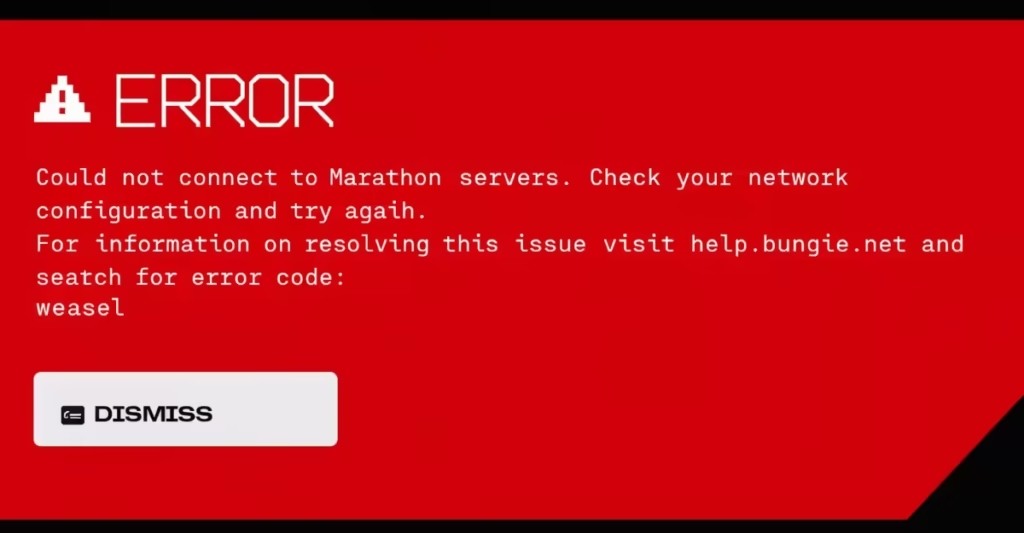
This problem often interrupts gameplay and kicks players back to the main menu. However, most cases come from temporary network issues or server communication problems that you can fix with a few quick steps.
Why the Marathon Weasel Error Appears
The Weasel error is Bungie’s general networking error code. It usually appears when the game cannot maintain a stable connection to its servers. This error can occur because of:
- Unstable internet connection
- ISP routing issues
- Logging into the game on multiple platforms
- Router or NAT configuration problems
- Temporary Bungie server outages
In some rare cases, the error can also appear if a player logs into the same account from two platforms at the same time.
Because the code covers many networking situations, you often need to check both your connection and Bungie’s server status.
How to Fix Marathon Weasel Error
Try the fixes below in order. Most players solve the problem within a few minutes.
1. Restart the Marathon Game
Start with the simplest fix.
- Close Marathon completely
- Wait about 20 seconds
- Launch the game again
Temporary network glitches often disappear after restarting the game client.
2. Check Marathon Server Status
If Bungie servers are down or under maintenance, the error will appear even if your internet works perfectly.
Check:
- Bungie Help Twitter
- Official Marathon server status page
- Community forums or Discord
If servers are offline, you must wait until Bungie restores service.
3. Restart Your Router
Router issues often cause packet loss that leads to the Weasel error.
Steps:
- Turn off your router
- Wait 30–60 seconds
- Turn it back on
- Launch Marathon again
This refreshes your network connection and clears temporary routing problems.
4. Switch to a Wired Ethernet Connection
Wi-Fi instability is one of the most common causes of this error.
A wired connection:
- Reduces packet loss
- Improves connection stability
- Prevents sudden disconnects
Bungie even recommends testing with Ethernet to rule out Wi-Fi problems.
5. Reset Your Network Settings (PC)
Windows network configurations can sometimes conflict with online games.
Steps:
- Open Command Prompt as Administrator
- Run these commands one by one:
ipconfig /flushdns
ipconfig /release
ipconfig /renew
netsh winsock reset- Restart your PC.
This refreshes your DNS and network stack.
6. Verify Marathon Game Files (Steam)
Corrupted game files can sometimes cause connection errors.
To verify files:
- Open Steam Library
- Right-click Marathon
- Click Properties
- Select Local Files
- Choose Verify Integrity of Game Files
Steam will automatically repair missing or corrupted files.
7. Update Windows and Network Drivers
Outdated drivers can cause networking conflicts with multiplayer games.
Check for updates:
- Windows Update
- Network adapter drivers
- GPU drivers
Updating ensures the game communicates correctly with Bungie servers.
8. Avoid Logging Into Multiple Platforms
If you play Marathon on multiple devices, make sure you log out from the other platform before starting the game.
Using the same account simultaneously can trigger the Weasel error.
What Happens If You Disconnect During a Match
If the game disconnects while you are inside a run:
- Your character remains in the match
- You temporarily lose control
- Enemies can still attack your character
- Your team must protect you
If you reconnect quickly, you can rejoin the match and continue playing.
The Marathon Weasel error usually points to a network connection problem between your device and Bungie servers. Most players fix it by restarting their router, switching to Ethernet, or checking server status.
If the error continues after trying every fix, the problem may come from Bungie’s servers or your ISP routing. In that case, monitoring server updates and waiting for a patch is the best option.
Once the connection stabilizes, you should be able to jump back into Marathon without interruptions.