When Microsoft OneDrive shows Proxy Authentication Error 2606, the app cannot connect to Microsoft servers because a proxy server blocks the request. This usually happens when Windows proxy settings are misconfigured, authentication fails, or a VPN or corporate network forces traffic through a proxy.
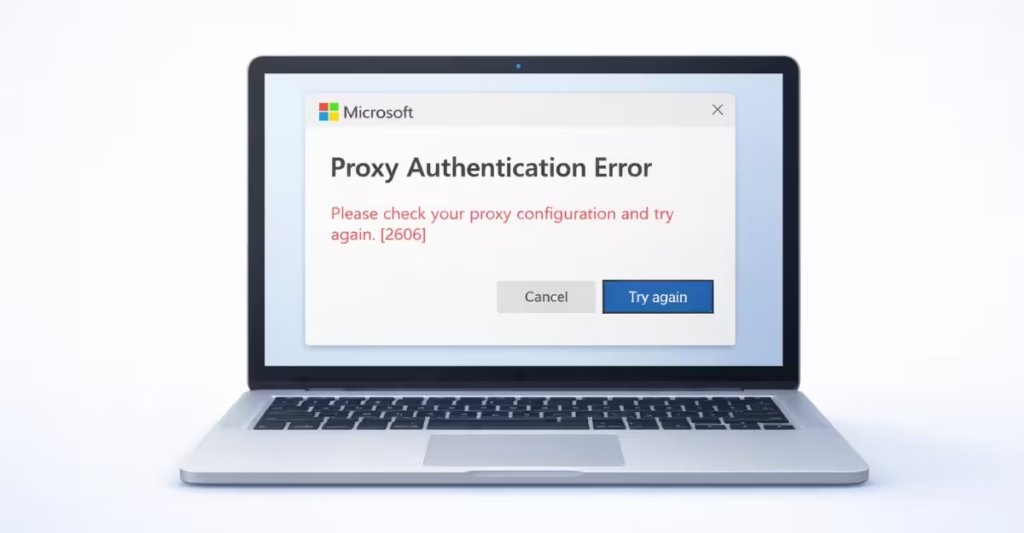
However, you can fix this problem quickly by adjusting Windows network settings, resetting the proxy configuration, or refreshing OneDrive itself. This guide explains the most effective ways to fix Proxy Authentication Error 2606 in OneDrive on Windows 11.
Why Proxy Authentication Error 2606 Appears in OneDrive
Proxy Authentication Error 2606 appears when OneDrive tries to access the internet through a proxy server but cannot verify credentials.
A proxy server acts as an intermediary between your device and the internet. If the proxy requires authentication and Windows does not provide valid credentials, OneDrive cannot connect.
Common causes include:
- Incorrect proxy configuration
- Proxy enabled accidentally in Windows
- VPN or security software conflicts
- Corporate network proxy restrictions
- Corrupted Windows network settings
Fix 1 – Disable Proxy Settings in Windows
Many users enable proxy settings without realizing it. If the proxy server information is incorrect, OneDrive fails to authenticate.
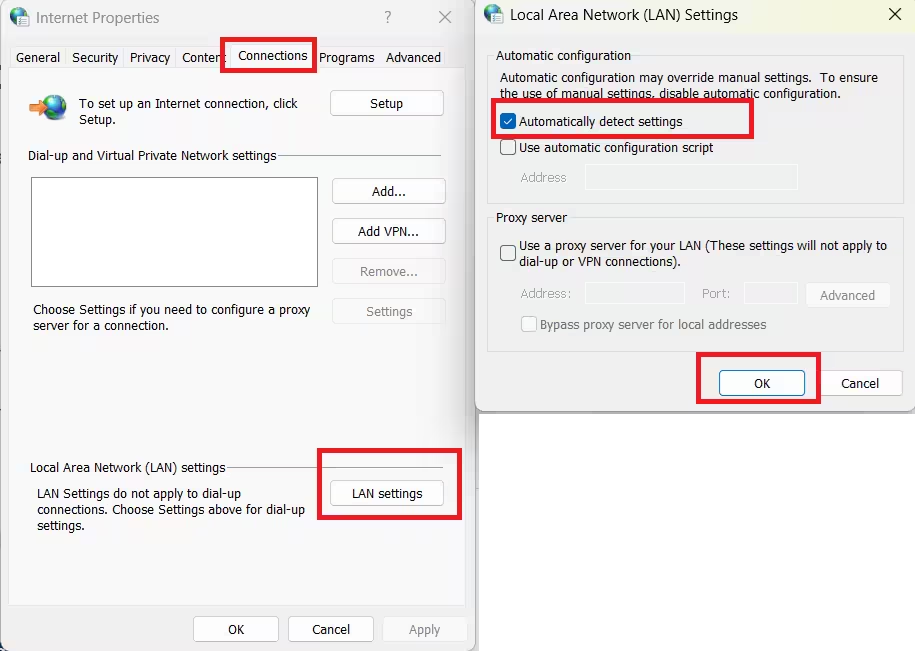
Follow these steps:
- Press Windows + R to open Run.
- Type:
inetcpl.cpl- Press Enter to open Internet Properties.
- Go to the Connections tab.
- Click LAN Settings.
- Enable Automatically detect settings.
- Disable Use a proxy server for your LAN.
- Click OK and close the window.
Restart OneDrive and check if the error disappears.
Fix 2 – Reset Network Settings
Corrupted network configurations often cause proxy authentication failures. Resetting network settings restores the default configuration.
Steps:
- Open Settings.
- Select Network & Internet.
- Scroll down and click Advanced Network Settings.
- Select Network Reset.
- Click Reset Now.
- Restart your computer.
Windows will reinstall network adapters and restore default settings.
Fix 3 – Reset the OneDrive Application
Sometimes the OneDrive client itself stores outdated authentication or network data. Resetting the application forces it to reconnect.
Steps:
- Press Windows + R.
- Enter the command:
%localappdata%\Microsoft\OneDrive\onedrive.exe /reset- Press Enter.
- Wait about one minute.
If OneDrive does not restart automatically, launch it from the Start Menu.
Fix 4 – Reset WinHTTP Proxy Settings
Windows maintains separate proxy configurations for system services. Incorrect settings here can trigger error 2606.
Steps:
- Open Command Prompt as Administrator.
- Run the command:
netsh winhttp reset proxy- Restart your computer.
This command removes any forced proxy configuration.
Fix 5 – Run the Windows Network Troubleshooter
Windows includes a built-in tool that automatically detects connectivity problems.
Steps:
- Open Settings.
- Select System.
- Click Troubleshoot.
- Choose Other Troubleshooters.
- Run Network & Internet Troubleshooter.
Follow the recommendations Windows provides.
Fix 6 – Disable VPN or Security Proxy Tools
Some VPN applications and network security tools route internet traffic through their own proxy servers.
If authentication fails, OneDrive cannot connect.
Try this:
- Disable your VPN temporarily.
- Disable any proxy browser extensions.
- Restart OneDrive.
If the error disappears, the VPN configuration likely caused the issue.
When Proxy Authentication Error 2606 Is a Corporate Network Issue
In some cases, the problem comes from corporate network policies.
Organizations often require employees to connect through authenticated proxy servers. If the credentials expire or network policies change, OneDrive authentication fails.
If you use a work or school network, contact the network administrator to verify proxy settings.
FAQs:
What causes Proxy Authentication Error 2606 in OneDrive?
Proxy Authentication Error 2606 in OneDrive occurs when Windows routes internet traffic through a proxy server that requires authentication. If the proxy credentials are incorrect or the proxy configuration is misconfigured, OneDrive cannot connect to Microsoft servers and the sync process fails.
How do I fix Proxy Authentication Error 2606 in OneDrive on Windows 11?
You can fix Proxy Authentication Error 2606 by disabling proxy settings, resetting the Windows network configuration, resetting OneDrive, and clearing WinHTTP proxy settings. In most cases, turning off the proxy server in Internet Properties resolves the issue.
Can a VPN cause Proxy Authentication Error 2606 in OneDrive?
Yes. Some VPN applications route traffic through proxy servers. If the VPN fails to authenticate with the proxy or uses incorrect settings, OneDrive may show Proxy Authentication Error 2606 and fail to sync files.
Why does OneDrive use proxy settings from Windows?
Microsoft OneDrive relies on the system network configuration in Windows. If a proxy server is enabled in Windows Internet settings, OneDrive automatically attempts to connect through that proxy, which can trigger authentication errors if the configuration is incorrect.
How do I check if a proxy server is enabled in Windows 11?
Open Settings → Network & Internet → Proxy and check whether Use a proxy server is enabled. If it is turned on without valid credentials, OneDrive and other apps may experience connectivity problems.
Does resetting OneDrive fix Proxy Authentication Error 2606?
Yes. Resetting the OneDrive application clears cached authentication data and network settings. Running the OneDrive reset command can resolve connection issues caused by corrupted configuration files.
Can corporate networks cause OneDrive Proxy Authentication Error 2606?
Yes. Many corporate or school networks require users to connect through authenticated proxy servers. If the credentials expire or the network proxy configuration changes, OneDrive may display Proxy Authentication Error 2606.
Is Proxy Authentication Error 2606 a Microsoft server issue?
Usually no. This error typically results from local proxy configuration issues on the computer or network. However, rare cases can occur if enterprise proxy infrastructure temporarily fails.