Microsoft has released the first Extended Security Update (ESU) for Windows 10 in 2026. The update arrives as KB5073724 and targets systems that still run Windows 10 under the ESU program or Windows 10 Enterprise LTSC.
This update focuses entirely on security hardening and system stability. Microsoft no longer ships feature upgrades for Windows 10, so every ESU release centers on protecting systems that remain in production.
What KB5073724 Is and Who Should Install It
KB5073724 is a January 2026 Patch Tuesday security update for supported Windows 10 editions enrolled in the Extended Security Updates program or running Windows 10 Enterprise LTSC.
You can install this update if:
- Your device runs Windows 10 Enterprise LTSC, or
- Your organization has purchased Extended Security Updates (ESU) for Windows 10.
Consumer editions that are not enrolled in ESU will not receive this update.
After installation:
- Windows 10 version 22H2 updates to Build 19045.6809
- Windows 10 Enterprise LTSC 2021 updates to Build 19044.6809
Microsoft confirmed that this release contains only security fixes and cumulative bug fixes introduced by earlier patches. It does not introduce new features.
See also: How to Download Windows 10 ISO Files (Official Microsoft Methods)
This release addresses three critical areas that directly affect system security and hardware compatibility:
- Active security vulnerabilities (including zero-days)
- Upcoming Secure Boot certificate expiration
- Removal of legacy modem drivers
Ignoring this update can expose systems to privilege escalation risks, Secure Boot failures later in 2026, and unexpected hardware incompatibilities.
Security Fixes Included in KB5073724
Microsoft fixed a large set of vulnerabilities in the January Patch Tuesday release, including three zero-day flaws. The most notable fixes include:
1. Elevation of Privilege in Agere Modem Drivers
Attackers could exploit outdated modem drivers to gain elevated system privileges. Microsoft removed the vulnerable drivers entirely to block this attack surface.
2. WinSqlite3.dll Security Detection Issue
Some security products incorrectly flagged WinSqlite3.dll as vulnerable. Microsoft updated the component to prevent false positives and improve compatibility with security software.
3. Secure Boot Certificate Protection
Several Secure Boot certificates issued in 2011 will expire during 2026. Systems that fail to update these certificates risk losing Secure Boot protection, which can allow boot-level attacks.
KB5073724 begins a controlled rollout of updated Secure Boot certificates to eligible systems.
Legacy Modem Drivers Removed (Important Compatibility Warning)
Microsoft permanently removed the following modem drivers in this update:
- agrsm64.sys (x64)
- agrsm.sys (x86)
- smserl64.sys (x64)
- smserial.sys (x86)
This change directly affects users who still rely on legacy modem hardware. Any device that depends on these drivers will stop working after the update installs. This mainly impacts older dial-up modems, serial modems, and embedded communication hardware. Microsoft does not provide replacement drivers for these components.
Secure Boot Certificate Updates
Secure Boot protects your system by validating boot loaders and firmware components. Several certificates used for this validation will expire in 2026.
Microsoft now includes high-confidence device targeting data in Windows quality updates. This mechanism allows Windows to automatically deliver new Secure Boot certificates only to systems that show consistent and stable update behavior.
How to Install KB5073724
You can install the update using either automatic or manual methods.
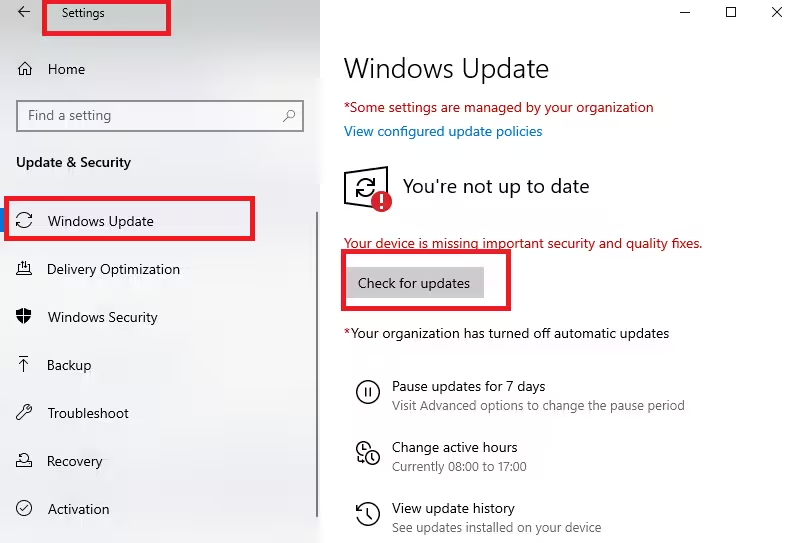
Option 1: Install through Windows Update
- Open Settings.
- Select Windows Update.
- Click Check for updates.
- Allow Windows to download and install KB5073724.
- Restart your device when prompted.
This method works for ESU-enrolled systems and Enterprise LTSC devices.
Option 2: Manual installation from Microsoft Update Catalog
- Open the Microsoft Update Catalog website.
- Search for KB5073724.
- Download the package that matches your system architecture.
- Run the installer.
- Restart the system after installation completes.
Manual installation helps in controlled enterprise environments or offline systems.
FAQs
What is Windows 10 KB5073724?
Windows 10 KB5073724 is the first Extended Security Update for 2026 that delivers security fixes, Secure Boot certificate updates, and driver removals for supported Windows 10 systems.
Who can install KB5073724?
Only devices enrolled in the Windows 10 Extended Security Updates program or running Windows 10 Enterprise LTSC can install KB5073724.
What build number does KB5073724 install?
After installing Windows 10 KB5073724, systems update to Build 19045.6809 or Build 19044.6809 depending on the Windows 10 edition.
Does KB5073724 include new features?
No. Windows 10 KB5073724 contains only security fixes and cumulative bug corrections. Microsoft no longer releases feature updates for Windows 10.
Why did Microsoft remove modem drivers in KB5073724?
Microsoft removed outdated modem drivers in KB5073724 to eliminate security risks tied to legacy hardware components.
Will legacy modem hardware still work after KB5073724?
No. Hardware that depends on the removed modem drivers will stop working after installing Windows 10 KB5073724.
What Secure Boot changes does KB5073724 introduce?
Windows 10 KB5073724 begins a phased rollout of updated Secure Boot certificates to protect systems from certificate expiration in 2026.
Is KB5073724 safe to install?
Yes. Microsoft reports no known issues with Windows 10 KB5073724 at this time.
How do I download Windows 10 KB5073724 manually?
You can download Windows 10 KB5073724 from the Microsoft Update Catalog and install it manually on supported systems.
Is KB5073724 mandatory for ESU devices?
Yes. Windows 10 KB5073724 installs automatically on ESU-enrolled devices unless updates are paused or managed by policy.
If your systems qualify for ESU, install this update promptly—but verify hardware compatibility before deployment. Staying current with security patches remains the safest way to protect legacy Windows environments in 2026.

