Microsoft has released Windows 11 Insider Preview Build 28020.1619 (KB5077230) to the Canary Channel. This build focuses on cross-device productivity, accessibility upgrades, enhanced security, and expanded language support.
If you test early Windows builds, this update brings meaningful improvements across Windows Hello, Voice Typing, Narrator, and even Paint.
Cross-Device Resume Gets Smarter
Microsoft expands Cross-Device Resume, originally introduced in May 2025. You can now continue tasks from your Android phone directly on your PC.
Here’s what you can do:
- Resume Spotify playback
- Continue working in Word, Excel, or PowerPoint
- Pick up browsing sessions
- Open files from the Microsoft Copilot app on supported Android phones
Supported Android brands include HONOR, OPPO, Samsung, Vivo, and Xiaomi. If you open a file in Copilot on your phone, Windows opens it in the Microsoft 365 app on your PC. If you don’t have the app installed, Windows opens it in your default browser.
This feature does not support offline-only files stored locally on your phone.
Narrator Customization Improves Accessibility
Microsoft gives users more control over Narrator announcements. You can now:
- Choose which control details Narrator speaks
- Adjust the order of announcements
- Reduce unnecessary speech output
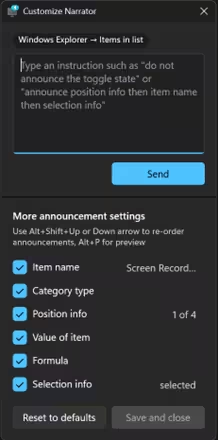
These changes help users navigate apps more comfortably and reduce information overload.
Windows Hello Expands Fingerprint Support
Windows Hello Enhanced Sign-in Security (ESS) now supports peripheral fingerprint sensors.
Previously, ESS worked only with built-in biometric hardware. Now you can plug in a supported fingerprint reader and enable enhanced security on desktops and Copilot+ PCs.
To set it up:
- Open Settings
- Go to Accounts > Sign-in options
- Enable Enhanced Sign-in Security
- Enroll your fingerprint
This update strengthens authentication security across more device types.
Voice Typing Adds Adjustable Wait Time
Microsoft introduces a new “Wait time before acting” setting in Voice Typing.
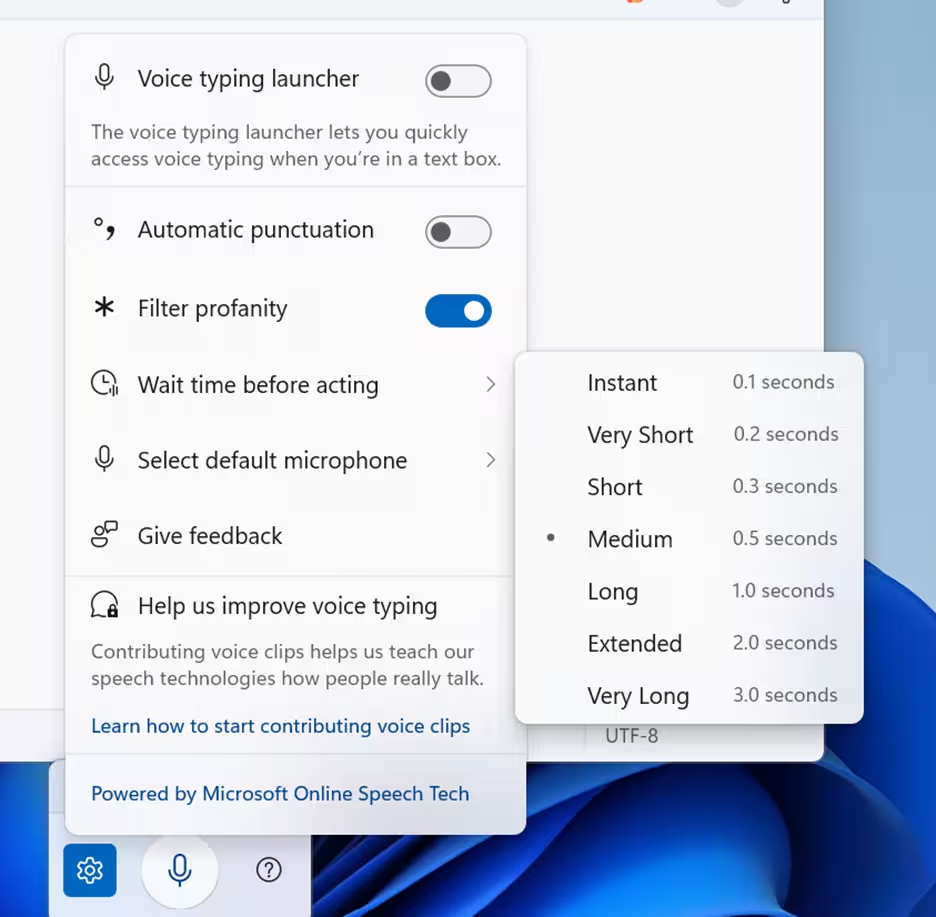
You can now control how long Windows waits before executing a voice command. Options range from instant (0.1 seconds) to longer delays (up to 3 seconds).
This helps users who speak slowly, pause often, or prefer deliberate command execution.
Voice Access Setup Gets Simpler
Voice Access now includes a streamlined setup flow. The redesigned experience:
- Downloads the correct speech model automatically
- Lets you choose your preferred microphone
- Explains what Voice Access can do
This change makes it easier for new users to get started.
Settings Agent Expands Language Support
Microsoft expands supported languages for the Settings Agent.
Newly supported languages include:
- German (de-de)
- Portuguese (pt-br, pt-pt)
- Spanish (es-es, es-mx)
- Korean (ko-kr)
- Japanese (ja-jp)
- Hindi (hi-in)
- Italian (it-it)
- Chinese (Simplified, zh-cn)
English (UK/US) and French (FR/CA) remain supported.
This expansion improves accessibility for global users.
Refreshed SCOOBE Experience
Some Insiders will see a redesigned Second Chance Out of Box Experience (SCOOBE) screen.
The new layout allows you to review and choose recommended settings more efficiently. Instead of navigating multiple setup pages, you can manage recommendations in one streamlined interface.
Paint App Adds Freeform Rotate
Paint version 11.2601.391.0 introduces freeform rotate.
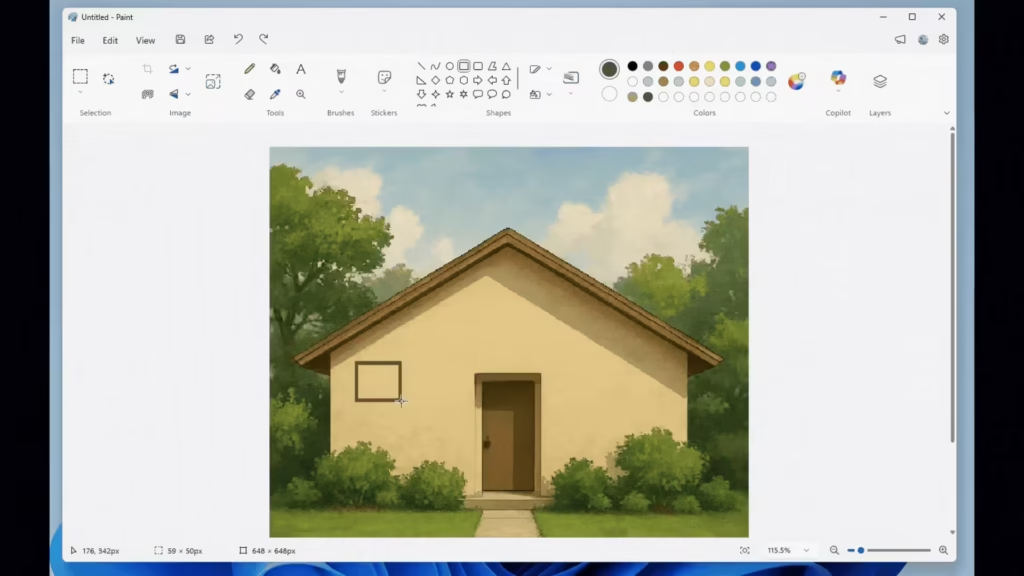
You can now rotate shapes, text, or selections at any angle using a rotation handle. For precise control, choose Custom Rotate and enter a specific angle manually.
This update gives creators more flexibility when adjusting artwork.
Important Notes for Canary Channel Users
The Canary Channel targets early experimentation, so these builds can show instability and unfinished behavior. Features often roll out gradually and may not appear for every Insider at the same time. Leaving the Canary Channel typically requires a clean installation of Windows 11 due to build number differences.
The desktop watermark is expected and confirms that the system runs a pre-release Insider build. Overall, Canary builds exist to collect early feedback, and features can change, improve, or disappear as development continues.

