Buying a Windows 11 product key looks simple — until you see dozens of cheap offers online that promise massive discounts. Many of those keys fail later, stop activating after hardware changes, or violate Microsoft licensing rules.
If you want a stable, fully licensed Windows system that continues receiving updates and security fixes, you need a legitimate license. This guide explains how Windows licensing works, where to buy safely, how to save money legally, how to upgrade from Windows 10 and how to verify your license.
A Windows 11 product key is a 25-character code that activates your copy of Windows. Activation links the license to your device hardware and confirms that the key is valid for that configuration.
Windows supports two activation models:
- Product Key – A traditional 25-character code entered during setup or later in Settings.
- Digital License – A license linked to your Microsoft account and device automatically after purchase or upgrade.
Once activated, Windows unlocks personalization features, security updates, and full system functionality.
How to Check If Your Windows 11 Is Already Activated
Before buying anything, confirm whether your PC already has a valid license.
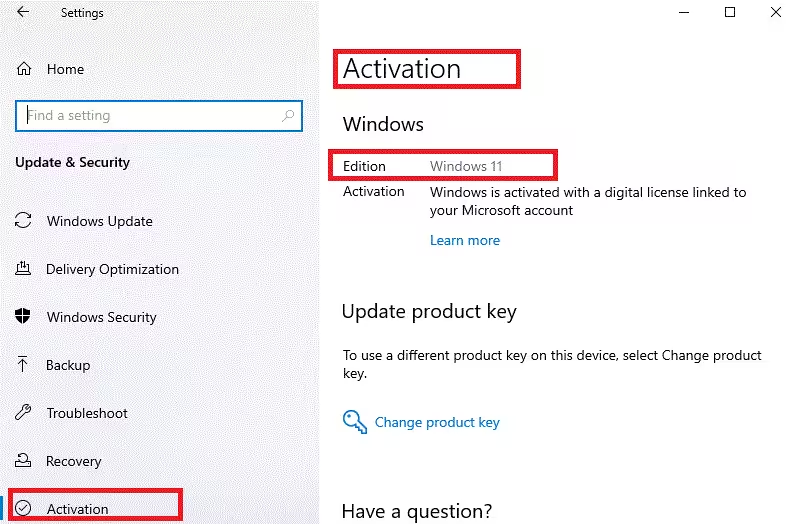
Steps
- Open Start.
- Go to Settings → Update & Security → Activation.
- Review the Activation status.
You may see:
- Windows is activated
- Windows is activated with a digital license
- Windows is activated with a digital license linked to your Microsoft account
- Windows is not activated
If Windows already shows activation, you do not need to purchase a new key.
Digital License vs Product Key: Which Should You Buy?
Digital License (Recommended for most users)
Best for personal PCs and laptops.
Advantages
- Automatically links to your Microsoft account.
- Reactivates easily after reinstalling Windows.
- No physical key to lose.
- Purchased directly from Microsoft Store.
Limitations
- Hardware changes may require reactivation through your account.
Product Key
Best for builders, technicians, or offline installs.
Advantages
- Works without signing into a Microsoft account.
- Ideal for clean installs or multiple system builds.
Limitations
- Keys can be misplaced or misused.
- Some low-cost keys become blocked later.
For most home users, a digital license offers better long-term convenience.
Official Windows 11 Pricing (Reference)
Check Microsoft’s standard pricing below to help you compare deals when making online purchases.
- Windows 11 Home: approximately $139
- Windows 11 Pro: approximately $199
Prices may vary slightly by region and promotions, but this gives you a baseline when evaluating discounts.
If a seller offers prices far below these levels, verify legitimacy carefully.
Where to Buy a Legitimate Windows 11 License
Safest Purchase Options
- Microsoft Store (Online or App)
- Authorized Retailers
- Amazon (verified sellers)
- Best Buy
- Newegg
- Local certified resellers
- OEM Preinstalled PCs
- New laptops and desktops with Windows preloaded
These sources provide invoices, refunds, and long-term license reliability.
Sellers You Should Avoid
Avoid any seller that:
- Sells Windows for extremely low prices.
- Sends keys through messaging apps without business verification.
- Offers volume or enterprise licenses to individuals.
- Does not provide invoices or refunds.
- Accepts only crypto payments.
- Promises lifetime activation without documentation.
Many of these keys eventually deactivate.
Minimum System Requirements for Windows 11
Before buying a license, confirm your PC meets Windows 11 requirements.
Basic Requirements
- Processor: 1 GHz or faster, 2 cores, 64-bit
- RAM: 4 GB or more
- Storage: 64 GB or more
- Firmware: UEFI with Secure Boot
- TPM: Version 2.0
- Graphics: DirectX 12 compatible
- Display: 720p or higher, 9 inches minimum
- Internet & Microsoft Account: Required for setup on Home edition
If your system does not meet these requirements, Windows 11 may not install or activate properly.
Can You Upgrade to Windows 11 Using a Windows 10 Key for Free?
Yes. If your PC already has a genuine Windows 10 license, you can upgrade to Windows 11 at no additional cost.
Important rules:
- Windows 10 Home upgrades to Windows 11 Home.
- Windows 10 Pro upgrades to Windows 11 Pro.
- The Windows 10 license must be activated first.
- Even unused Windows 10 keys can still activate and upgrade.
This is one of the best ways to save money legally.
How to Download and Install Windows 11
Option 1: Upgrade Existing Windows 10
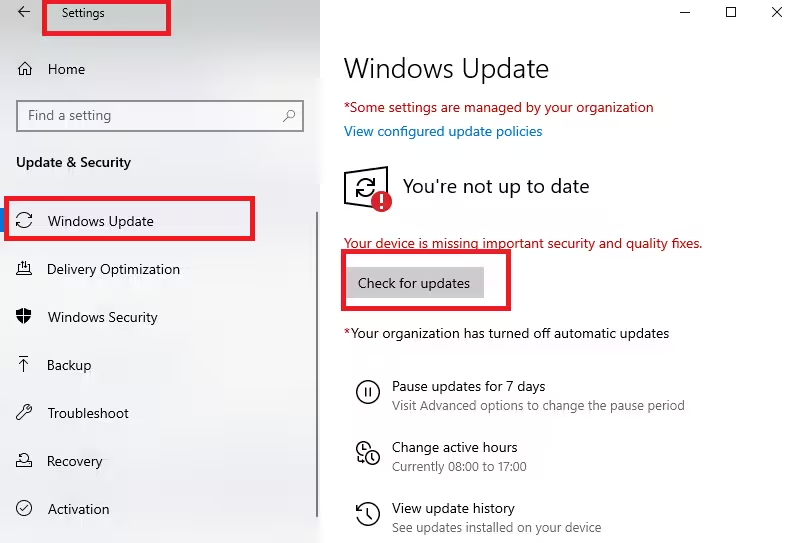
- Open Settings → Windows Update.
- Check for Windows 11 upgrade availability.
- Follow the on-screen upgrade instructions.
Option 2: Clean Installation
- Download the Windows 11 Installation Assistant or Media Creation Tool from Microsoft.
- Create a bootable USB drive if needed.
- Boot your PC from the installation media.
- Follow setup instructions.
- Enter a product key or skip and activate later.
How to Activate Windows 11
Activate Using a Product Key
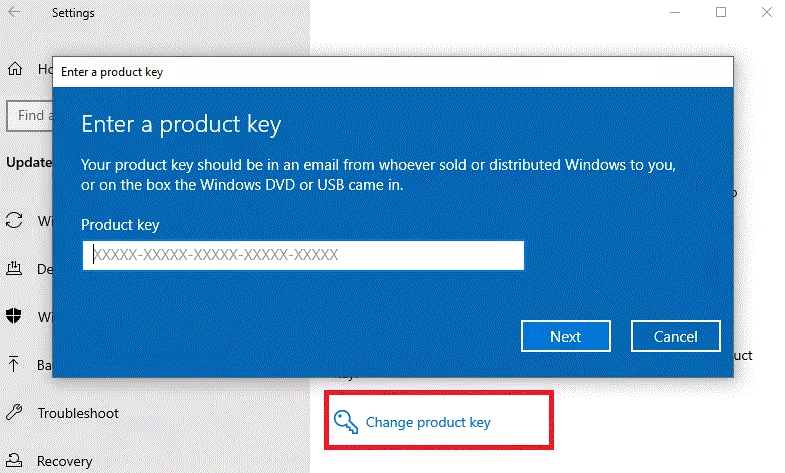
- Open Settings → System → Activation.
- Select Change product key.
- Enter the 25-character key.
- Complete activation.
Activate Using a Digital License
- Sign into the Microsoft account linked to your license.
- Windows activates automatically once online.
How to Verify Whether Your Product Key Is Legit
You can check license type using Command Prompt.
Steps
- Press Start and search for CMD.
- Open Command Prompt.
- Type:
slmgr /dli- Press Enter.
Common license types:
- Retail – Normal consumer license
- OEM – Preinstalled device license
- Volume / KMS / MAK – Often restricted and risky for home users
If your key shows volume licensing unexpectedly, it may stop working later.
How to Save Money When Buying Windows 11
- Upgrade from an activated Windows 10 system.
- Use student or education discounts if eligible.
- Buy during seasonal sales.
- Reuse an existing digital license on the same hardware.
- Purchase bundled OEM licenses with new hardware.
Avoid shortcuts that risk deactivation.
Windows 11 Home vs Pro: Which Should You Choose?
| Windows 11 Home | Windows 11 Pro |
|---|---|
| Personal use | Business features |
| Gaming | BitLocker encryption |
| Everyday productivity | Remote Desktop hosting |
| — | Advanced networking |
| — | Virtualization support |
Choose Pro only if you need those features.
FAQs
What is a Windows 11 product key?
A Windows 11 product key is a 25-character activation code that unlocks and verifies a licensed copy of Windows 11 on your PC. It enables full features, security updates, and personalization options.
Where can I buy a legit Windows 11 product key?
You can buy a legit Windows 11 product key from the Microsoft Store or authorized retailers like Amazon, Best Buy, and certified local resellers. Avoid extremely cheap sellers that cannot provide invoices or refunds.
Can I upgrade to Windows 11 for free using a Windows 10 key?
Yes. If your Windows 10 system is activated, you can upgrade to Windows 11 for free using the same license. The edition must match, such as Home to Home or Pro to Pro.
What happens if I don’t activate Windows 11?
If Windows 11 is not activated, you may see a watermark, lose personalization controls, receive repeated activation prompts, and miss certain feature updates, although security updates usually continue.
How do I check if my Windows 11 product key is valid?
Open Command Prompt and run slmgr /dli to view your license type and activation status. Retail and OEM licenses are normal for personal use, while volume licenses may deactivate later.
Is a digital license better than a Windows 11 product key?
A digital license is more convenient because it links automatically to your Microsoft account and reactivates easily after reinstalling Windows. A product key works well for offline installs or system builders.
Can I reuse my Windows 11 product key on another PC?
Retail licenses may be transferred to another PC after deactivating the old device. OEM licenses are typically locked to the original hardware and cannot be transferred.
How much does a Windows 11 product key cost?
Official pricing usually ranges around $139 for Windows 11 Home and $199 for Windows 11 Pro, though promotions and regional pricing may vary.
Why are some Windows 11 product keys so cheap online?
Extremely cheap keys often come from unauthorized volume licenses or regional abuse and may stop activating later. Always verify the seller before purchasing.
Do I need a Windows 11 product key if my PC already has a digital license?
No. If your PC already shows an activated digital license in Settings, you do not need to purchase another Windows 11 product key.

