Microsoft has released Windows 11 Insider Preview Build 26220.7752 (KB5074177) to the Beta Channel, continuing its push toward stronger security tooling and better system stability ahead of version 25H2 . The update introduces built-in Sysmon, expands Voice Access language support, and delivers several important fixes for File Explorer, cloud storage workflows, and Outlook.
As with recent Beta builds, Microsoft is rolling out most changes gradually. Users must enable the “Get the latest updates as soon as they’re available” toggle in Settings > Windows Update to receive all new features and fixes.
Built-In Sysmon Arrives Natively in Windows 11
The headline change in KB5074177 is the arrival of Sysmon as a native Windows feature. Previously, Sysmon required a separate Sysinternals download and manual setup. With this build, Microsoft integrates Sysmon directly into Windows, simplifying advanced system monitoring for power users and security teams.
See also: Windows 11 KB5074105 Update Fixes Explorer Freeze, Secure Launch Issues Persist
Sysmon records detailed system activity that helps detect suspicious behavior. It logs events directly to the Windows Event Log, allowing seamless integration with security tools and SIEM platforms. Microsoft has not changed how Sysmon works—only how it installs and runs.
By default, Sysmon remains disabled, and users must turn it on manually.
How to Enable Built-In Sysmon in Windows 11
Microsoft provides two supported ways to enable the new built-in Sysmon feature:
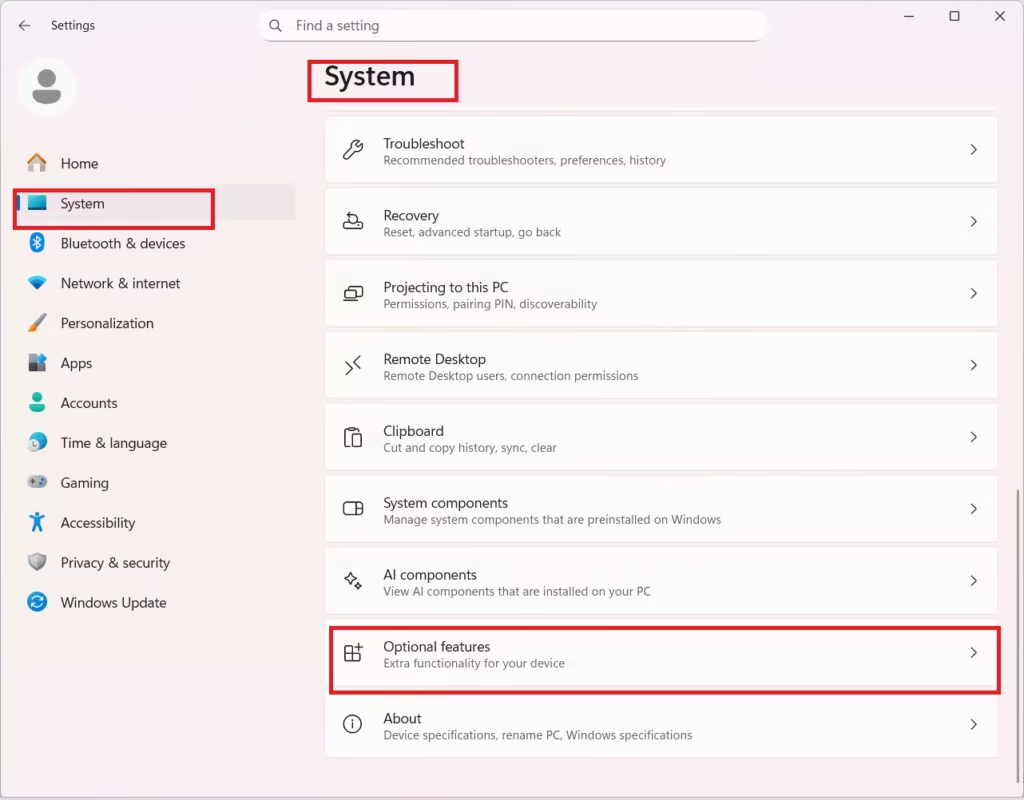
Enable via Settings
- Open Settings
- Go to System
- Select Optional features
- Click More Windows features
- Check Sysmon and apply changes
Enable via Command Line or PowerShell
Run the following command to enable the feature:
Dism /Online /Enable-Feature /FeatureName:SysmonAfter enabling it, complete the setup by running:
sysmon -iIf Sysmon was previously installed from the Sysinternals website, Microsoft requires users to uninstall it first before enabling the built-in version .
Voice Access Expands With Netherlands Language Support
KB5074177 also expands Voice Access, Microsoft’s hands-free control feature, by adding Netherlands locale support. This update continues Microsoft’s gradual effort to make accessibility features available across more regions and languages.
Voice Access improvements roll out progressively, so availability may vary even within the Beta Channel.
File Explorer and System Fixes in Build 26220.7752
Microsoft bundles several reliability fixes in this Beta update, all tied to the optional update toggle.
File Explorer Improvements
- Improved keyboard navigation and access keys for accessibility
- Fixed issues when renaming folders with custom names
- Restored missing icons and tooltips for “Add to favorites”
Cloud Storage and Outlook Fixes
- Fixed app freezes when working with files stored on OneDrive or Dropbox
- Resolved hangs and data reload issues in Outlook setups using PST files stored on OneDrive
These fixes target long-standing workflow disruptions, especially for users who rely heavily on cloud-synced files.
Windows 11 KB5074177 Beta Channel Update: Key Things to Know
Microsoft reminds testers that Beta Channel builds can still be unstable, even when focused on fixes. Features roll out using Controlled Feature Rollout, meaning not every Insider receives all changes immediately.
This update installs as part of Windows 11 version 25H2 via an enablement package. Some features may never ship to the public release, depending on feedback and testing outcomes.
See also: How to Reset PC When You Forgot PIN (Microsoft Account Sign-In Guide)
With KB5074177, Microsoft appears to prioritize security fundamentals, system reliability, and accessibility over headline AI additions. The move to make Sysmon a native Windows component signals a stronger emphasis on built-in threat visibility as Windows 11 evolves.
More clarity on Microsoft’s direction should emerge as Windows 11 25H2 continues moving through the Insider channels in the coming weeks.

