Microsoft has released Windows 11 Insider Preview Build 26300.7877 (KB5077232) to the Dev Channel. This update introduces usability improvements across Settings, File Explorer, Taskbar, Nearby Sharing, and the Paint app. The build is based on Windows 11 version 25H2 and rolls out through an enablement package.
Context Menu Now Matches Default App Icons
Microsoft refined how the context menu behaves for executable files. When you right-click on a .exe, .bat, or .cmd file, the “Open” option now displays the correct icon linked to the file’s default application.
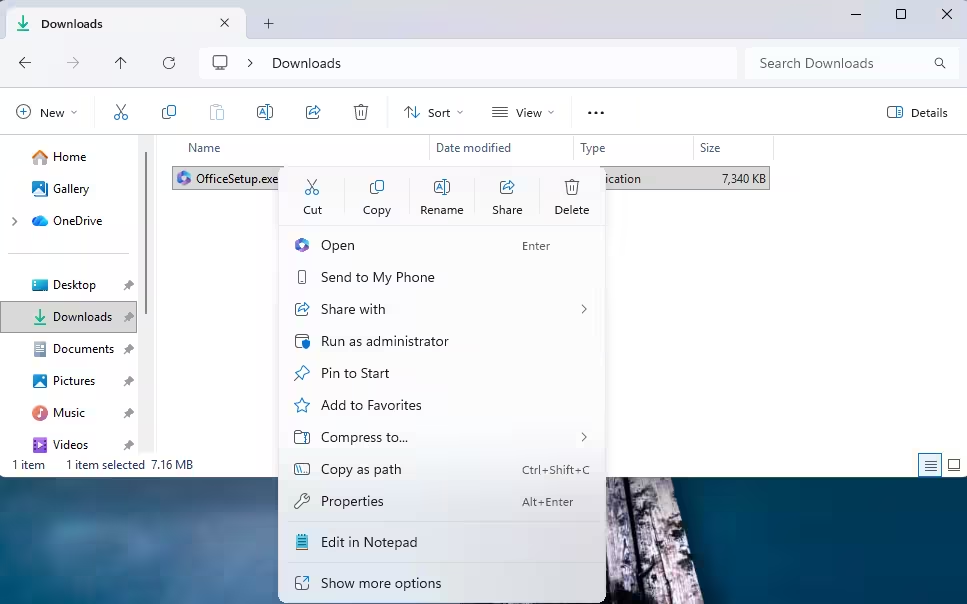
This change improves visual consistency and reduces confusion, especially for users who rely on visual identification when managing files.
Settings App Gets a Cleaner Device Info Experience
Microsoft updated the Device Info Card on the Settings Home page. The redesigned card simplifies key hardware specifications and improves the flow between:
- Settings Home
- System
- About
The updated layout makes device details easier to scan. Graphics and storage information now appear together in a unified section. You can also copy and paste system details quickly, which helps in support scenarios.
The consumer version of this experience is currently rolling out to Insiders in the United States. Enterprise-managed devices continue to use a separate version of the card.
Taskbar and System Tray Improvements
This build improves daily interaction with the taskbar:
- Smoother animations when hovering over grouped apps
- Better reliability of system tray icons when taskbar auto-hide is enabled
These refinements focus on responsiveness and visual polish.
File Explorer Stability Fix
Microsoft fixed an issue where open File Explorer windows or tabs would unexpectedly jump to the Desktop or Home view.
This bug caused workflow interruptions for many Dev Channel users. The fix improves session stability and tab reliability.
Nearby Sharing Now Handles Large Files Better
Nearby Sharing now works more reliably when sending large files. Users who frequently transfer media or project files between nearby devices should notice improved performance and fewer transfer interruptions.
Paint App Adds Freeform Rotate
Paint version 11.2601.391.0 introduces a highly requested feature: freeform rotate.
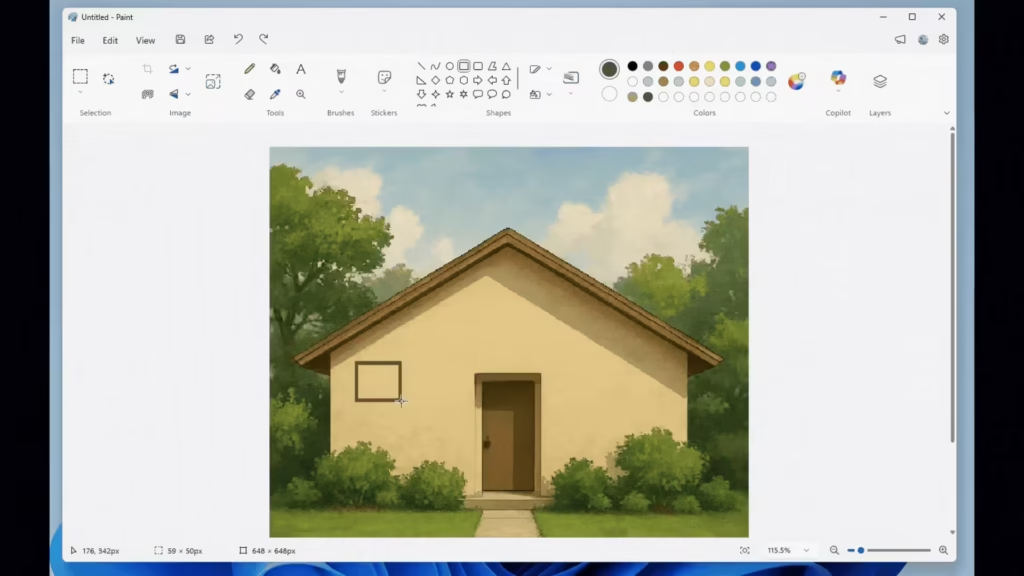
You can now rotate shapes, text, or active selections to any angle using a rotation handle. For precise control, you can choose Custom rotate from the Rotate menu and enter a specific angle manually.
This update gives creators more flexibility when editing artwork or adjusting design elements. It removes the limitation of fixed rotation increments and makes layout adjustments faster.
Controlled Feature Rollout Explained
Microsoft continues to use Controlled Feature Rollout (CFR) technology. Features first appear to a subset of Insiders who enable the toggle:
Settings > Windows Update > Get the latest updates as they are available
If you leave the toggle off, Microsoft will roll out new features gradually when they are ready.
Important Notes for Dev Channel Users
- This build is based on Windows 11 version 25H2
- The desktop watermark is normal for Insider builds
- Some features may change, get removed, or never ship publicly
- Localization may not be complete in early development features
If you want early access to experimental features, keep the update toggle enabled.
Windows 11 Insider Preview Build 26300.7877 focuses on polish rather than major feature additions. Microsoft improves visual consistency in the context menu, refines hardware visibility in Settings, enhances File Explorer stability, and adds meaningful creative flexibility to Paint.
Dev Channel builds often introduce experimental features. While not every change will reach stable release, this update clearly targets usability, clarity, and performance improvements across core Windows experiences.
If you’re testing the Dev Channel, this build is worth installing for the Settings refinements and the new Paint freeform rotate feature alone.

