Are you seeing the “Could not find zone ‘en_core_pre_gfx’” error when launching Call of Duty: Black Ops III (BO3)? Especially if you’re using a FitGirl repack, this is a common issue many users face.
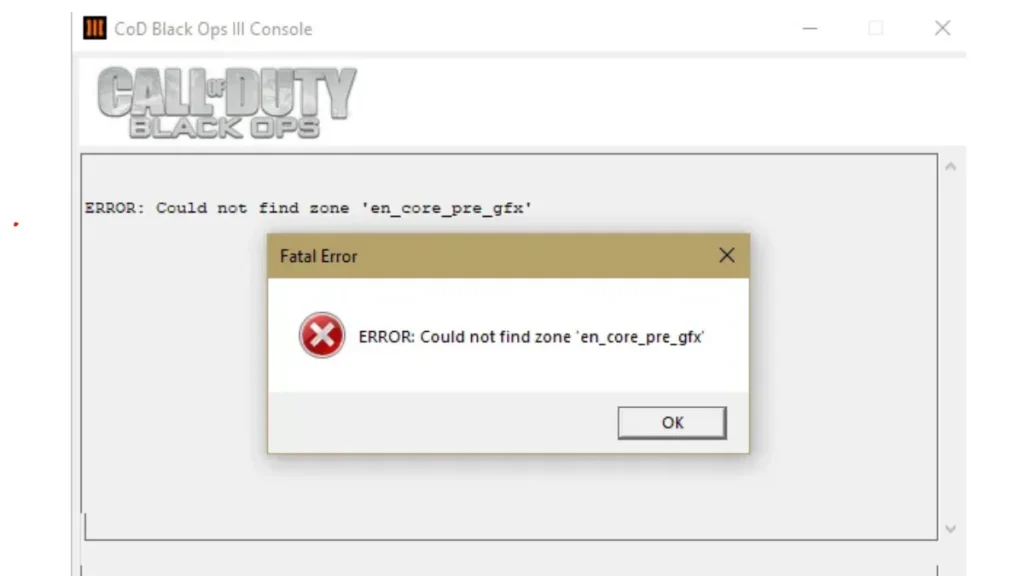
This error typically signals missing or corrupted language files, often English (en) localization data. Let’s explore multiple confirmed solutions that have helped users successfully fix this error without a full reinstall.
What Causes “en_core_pre_gfx” Error?
The most common reasons include:
- Missing language or sound zone files (e.g.,
zone/snd/enfolder is empty) - Corrupt or incomplete extraction of the repack
- Game installed on a different drive than Steam
- Antivirus deleting files during install
- Running the game from a shortcut instead of the install folder
How to Fix “en_core_pre_gfx” Error in Call of Duty
1. Check the ‘zone/snd/en’ Folder
A Reddit user confirmed their entire bo3/zone/snd/en folder was empty, which directly caused the en_core_pre_gfx error.
Fix:
- Navigate to your BO3 install folder:
Call of Duty Black Ops III\zone\snd\en - If it’s empty or missing
.fffiles, you need to replace or download the correct English language files.
2. Download and Add the Language Files
From Steam forums and YouTube fixes, several users resolved this error by downloading the appropriate language pack and pasting the entire zone folder into the game directory.
“Descarguen el pack de idiomas según corresponda… copian la carpeta
zoney la pegan dentro del juego y listo, funciona perfecto.”
Important: Don’t download from unknown sites. Use trusted sources or check community forums like r/PiratedGames for language pack links.
3. Reinstall the Game in the Same Drive as Steam
Users on Steam discussions reported success after deleting local files and reinstalling the game in the same drive where Steam is installed (even if the game isn’t run through Steam):
C:\Program Files (x86)\SteamIf your BO3 folder is in D:\Games, but Steam is on C:\, consider reinstalling BO3 on C:\.
4. Launch the Game from the Install Folder
Avoid running the game from a desktop shortcut. Instead:
- Go to the actual BO3 folder
- Right-click
bo3.exeor equivalent - Run as Administrator
This bypasses potential shortcut path issues and has resolved startup errors for many players.
5. Disable Antivirus and Add Exception
Some antivirus programs mistakenly quarantine parts of the BO3 language files during install.
Solution:
- Disable your antivirus temporarily while installing.
- After installation, add the BO3 folder to the exception list.
- Re-extract or redownload the language files if necessary.
6. Ensure DirectX and Drivers Are Up to Date
Just to rule out other issues:
- Press
Win + R, typedxdiag, and confirm DirectX 11 or higher is installed. - Update your graphics drivers (NVIDIA or AMD).
Additional Error: Missing “default_bindings.cfg”
Alongside en_core_pre_gfx, some users see:
“Missing config file ‘default_bindings.cfg’ during initialization. May need to add to code_pre_gfx.”
This often occurs alongside missing language files. Replacing the full zone folder usually resolves both issues.
Final Thoughts
If you’ve tried all of the above and still face issues:
- Re-extract the entire FitGirl installer with antivirus off.
- Join forums like r/PiratedGames or Reddit’s PCGaming for up-to-date fixes.
- Ensure no folders are empty in
/zone/, especiallyenglishandsnd/en.

