Pokémon HOME error code 2-ALZTA-0005 blocks access to trading, transferring, or saving changes on Nintendo Switch. It appears alongside related codes 8807, 999, 992, and 10015, and that extra code tells you which fix to use first.
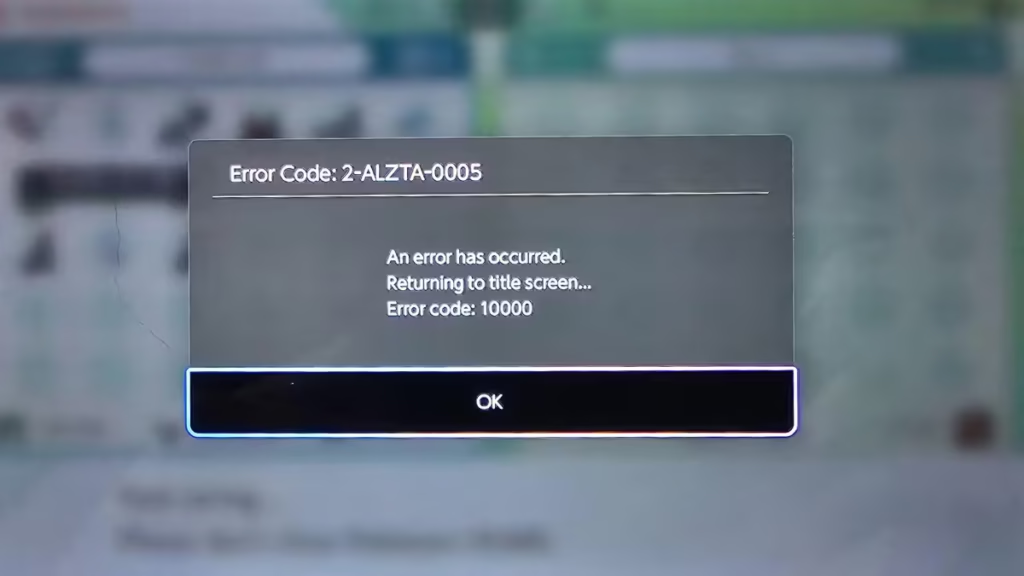
This error points to three main causes: a server problem, outdated app data, or a Switch save issue. Once you match the extra code to the right fix, the issue becomes much easier to resolve.
What Causes Pokémon HOME Error Code 2-ALZTA-0005
Error code 2-ALZTA-0005 appears when Pokémon HOME fails to open or function correctly on Nintendo Switch. It shows up alongside related codes 8807, 999, 992, and 10015, and each one points to a different cause.
- 8807 points to a console-side save data issue
- 992 or 999 point to a temporary connection or service problem
- 10015 links to a past app issue that was resolved through an update released on May 27, 2022
Once you identify the attached code, you can apply the correct fix immediately without trial and error.
How to Fix Pokémon HOME Error Code 2-ALZTA-0005
Follow these steps in the exact order to fix the error quickly.
1) Check Nintendo server status
Start with the network status page. If maintenance is active, Pokémon HOME may not open or sync correctly.
Wait until maintenance ends, then open Pokémon HOME again. This is the first check because server downtime blocks access even when your console and app are working normally.
2) Update Pokémon HOME
Outdated app versions trigger login, sync, and save problems.
To update Pokémon HOME on Switch:
- Highlight Pokémon HOME on the Home screen
- Press the + or – button
- Select Software Update
- Choose Via the Internet
If you also use the mobile version, update that as well.
3) Restart Pokémon HOME and restart your Switch
Close Pokémon HOME completely, restart the Switch, reconnect to a stable internet connection, and open the app again.
This clears temporary session, sync, and connection faults before you move to deeper fixes.
4) If you see error code 8807, delete Pokémon HOME save data on Switch
Error code 8807 has a direct fix: delete Pokémon HOME save data on the console and relaunch the app.
Follow these steps:
- Open System Settings
- Select Data Management
- Choose Delete Save Data
- Select Pokémon HOME
- Delete the save data for your user profile
- Launch Pokémon HOME again
This step does not remove Pokémon already deposited into Pokémon HOME.
5) If you see 992 or 999, retry after checking maintenance and connection
Error codes 992 and 999 point to a temporary service or communication issue.
Check for maintenance, confirm your internet connection is stable, restart the app, and try again. If the issue comes from service-side downtime, access returns once the service stabilizes.
6) If you see 10015, confirm Pokémon HOME is fully updated
Error code 10015 is tied to a known past issue that was resolved through an app update.
If 2-ALZTA-0005 appears with 10015, update Pokémon HOME first and then try again.
7) Use a stronger internet connection
An unstable network interrupts login, syncing, and save actions.
Do these quick checks:
- reconnect to Wi-Fi
- move closer to the router
- restart the router
- stop background downloads
- reopen Pokémon HOME after reconnecting
8) Contact support if the error stays
If the error still appears after all fixes, contact support directly.
Before you do, collect:
- full error code
- screenshot of the error screen
- Switch model
- Pokémon HOME version
- exact action that triggered the error
Will You Lose Your Pokémon?
No. Deleting Pokémon HOME save data on the console does not remove Pokémon already stored in Pokémon HOME.
That is the key difference: local console save data and cloud-stored Pokémon are not the same thing.
Pokémon HOME error code 2-ALZTA-0005 is fixable when you match the extra code to the correct solution. If you see 8807, delete Pokémon HOME save data on your Switch. If you see 10015, update the app. If you see 992 or 999, check server status and retry after maintenance or connection issues clear.

