If your PC says “Windows is activated,” you might assume everything is fine. In reality, activation and a genuine Windows license mean very different things, especially when it comes to updates, support, and long-term reliability.
What Windows 11 Activation Really Means for Your PC
Activation is a technical check. It only confirms that Windows 11 has accepted a product key or digital license on your device.
Once activated:
- The Activate Windows watermark disappears
- Personalization options unlock
- Core features work normally
- Windows Update continues
Activation only answers one question:
Is Windows unlocked right now?
It does not verify whether the license was obtained legally or is valid long-term.
What a Genuine Windows 11 License Means
A genuine license is about ownership and legality.
Your Windows 11 copy is genuine if:
- The license was purchased legally or came preinstalled
- The key matches your device and license type
- It complies with Microsoft licensing terms
- It passes backend validation checks permanently
Genuine status answers the important question:
Do you legally own this Windows license?
Activation vs Genuine: The Key Difference
| Feature | Activated | Genuine |
|---|---|---|
| Watermark removed | Yes | Yes |
| Windows usable | Yes | Yes |
| Personalization unlocked | Yes | Yes |
| Legal ownership | Not guaranteed | Yes |
| Long-term validity | Uncertain | Stable |
| Safe for work/business | No | Yes |
Important:
All genuine licenses are activated, but not all activated systems are genuine.
How Windows Can Be Activated but Not Genuine
This commonly happens when users activate Windows using:
- Volume (KMS) keys meant for organizations
- Cheap third-party keys sold online
- OEM keys reused on unsupported hardware
- Expired or leaked activation keys
Windows may activate successfully, but later:
- Activation can expire
- License status may change after updates
- Validation warnings may appear
How to Check If Your Windows 11 License Is Genuine
Go to:
Settings → System → Activation
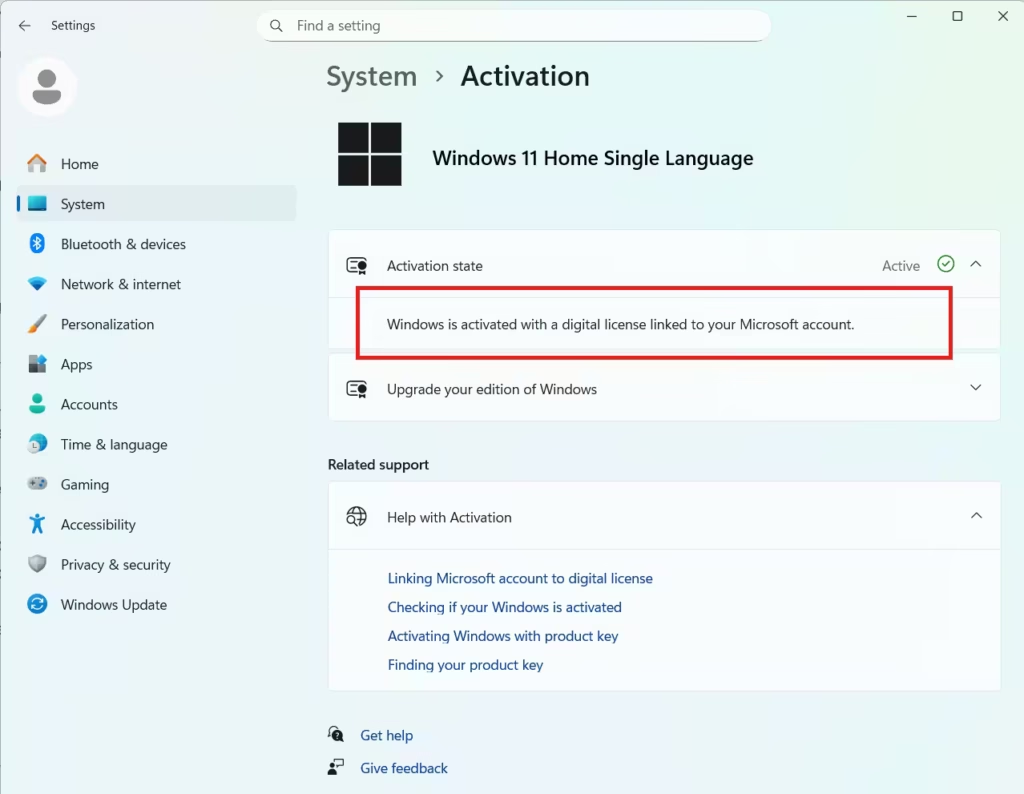
Look for the message like:
- “Activated with a digital license” → usually genuine
- “Activated using your organization’s activation service” → risky for home users
Advanced users can run:
slmgr /dlvThis shows whether your license is Retail, OEM, or Volume-based.
Will Non-Genuine Windows Stop Working?
No. Windows will not suddenly shut down.
However, you may face:
- Activation warnings returning
- Limited support from Microsoft
- Feature update failures
- License deactivation after checks
For professional or business use, non-genuine Windows can cause compliance problems.
Do You Really Need a Genuine Windows 11 License?
- Short-term personal use: Activation may seem enough
- Long-term stability: Genuine matters
- Work, resale, or business PCs: Genuine is essential
If you want reliable updates, support, and peace of mind, a genuine license is the safer choice.

