If Windows shows “Product key not working”, “Windows isn’t activated”, or a random activation error code, you can fix it permanently in most cases. You do not need hacks, cracks, or unsafe tools. You only need to follow the correct activation path based on your situation.
This guide walks you through every reliable fix, step by step, using methods recommended by Microsoft.
Step 1: Check Your Windows Edition First (Critical)
Most activation failures happen because the product key does not match the installed edition.
How to check your Windows edition
- Open Settings
- Go to System → About
- Look at Windows edition (Home, Pro, Enterprise)
Why this matters
- A Windows Home key will not activate Windows Pro
- A Pro key will not activate Home
- Activation fails immediately if editions do not match
Fix
- Install the correct edition for your key
or - Use a product key that matches your installed edition
Do this before trying anything else.
Step 2: Run the Windows Activation Troubleshooter
Windows includes a built-in tool that fixes most genuine activation issues.
How to run it
- Open Settings
- Go to System → Activation
- Click Troubleshoot
- Sign in with your Microsoft account if prompted
When this works best
- After reinstalling Windows
- After upgrading from Windows 10 to 11
- If Windows was activated on this PC before
If Windows finds a linked digital license, activation completes automatically.
Step 3: Fix Activation After a Hardware Change
Replacing hardware—especially the motherboard—often breaks activation.
How to reactivate after hardware change
- Open Settings → System → Activation
- Click Troubleshoot
- Select I changed hardware on this device recently
- Sign in with the Microsoft account used earlier
- Select your device and activate
Important notes
- This works only if the license was linked to your Microsoft account
- Retail and digital licenses usually transfer
- OEM licenses often do not transfer after motherboard replacement
Step 4: Re-enter the Product Key Correctly
Typing mistakes and wrong keys are more common than people expect.
How to change the product key
- Open Settings → System → Activation
- Click Change product key
- Enter the 25-character key carefully
- Click Next and activate
Tips
- Type the key manually
- Avoid keys from unofficial websites
- Do not reuse keys from another PC
Step 5: Check Whether Your License Is OEM or Retail
License type decides whether activation can be recovered.
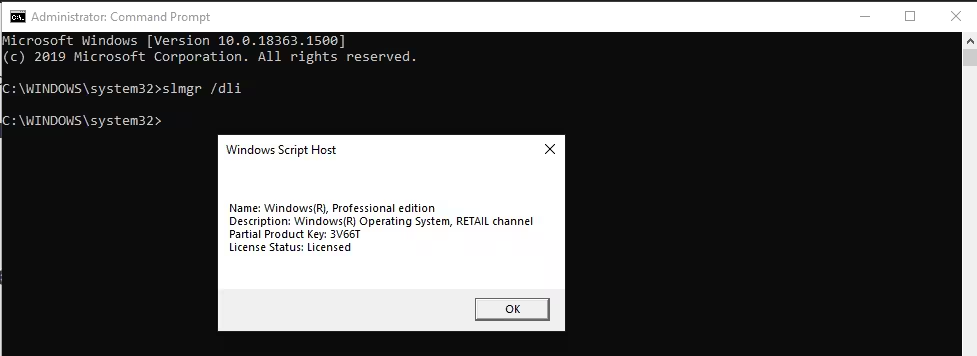
How to check license type
- Open Command Prompt as Administrator
- Run:
slmgr /dli
What the result means
- OEM license
- Comes preinstalled on laptops or branded PCs
- Locked to original hardware
- Usually fails after motherboard replacement
- Retail license
- Purchased separately
- Can transfer to new hardware
- Best long-term option
If you changed the motherboard and used an OEM key, Windows may require a new license.
Step 6: Activate Windows by Phone (Last Resort)
Use this only if online activation fails.
How to start phone activation
- Press Win + R
- Type:
slui 04 - Follow on-screen instructions
This method still works for many retail licenses.
All Common Windows Activation Error Codes (Reference Table)
If Windows still fails to activate after following all steps above, the error code below explains what is blocking activation and what to do next.
| Error Code | What It Means | What You Should Do |
|---|---|---|
| 0xC004F211 | Hardware on the device has changed | Run Activation Troubleshooter and re-activate using your Microsoft account |
| 0xC004F213 | No product key or license found | Enter a valid product key or use Troubleshooter after hardware change |
| 0xC004F212 | Product key not compatible with this Windows edition | Install the correct Windows edition or use a matching key |
| 0xC004F210 | Product key is for a different Windows edition | Reinstall the correct edition or enter the correct key |
| 0xC004E016 | Product key does not match Windows version | Use a key that matches the installed Windows version |
| 0x803F7001 | No valid license found on the device | Enter a valid product key or purchase a license |
| 0x800704CF | Windows cannot find a valid license | Re-enter a valid key or run Activation Troubleshooter |
| 0xC004C003 | Product key is blocked or already used | Use a new retail key or contact Microsoft support |
| 0xC004C008 | Product key already used on another device | Buy a new license or activate by phone |
| 0x803FA067 | Invalid or incorrect product key | Verify Windows edition and re-enter correct key |
| 0xC004F050 | Invalid product key entered | Enter a genuine, valid key |
| 0xC004C020 | Volume license exceeded allowed activations | Contact organization IT or use a personal retail key |
| 0x8007232B | KMS server not available | Connect to organization network or use retail key |
| 0xC004F074 | KMS activation failed | Ensure correct network or contact IT admin |
| 0x8007007B | Invalid KMS server name | Check network or use correct activation method |
| 0x8007267C | Activation server unavailable | Check internet and try again later |
| 0xD0000272 | Activation server temporarily down | Wait and retry activation |
| 0xC0000272 | Activation service unavailable | Retry activation later |
| 0x80072F8F | Incorrect date/time or secure connection issue | Fix system date & time, check internet |
| 0xC004E003 | System files modified or corrupted | Restore system files or use System Restore |
| 0x80070652 | Update components missing or corrupted | Run Windows Update Troubleshooter |
| 0x80004005 | Activation failed due to unknown error | Run Activation Troubleshooter or reset Windows |
| 0x87E10BC6 | Licensing service error | Run Activation Troubleshooter and retry |
| 0xC004F00F | Enterprise key used on Home/Pro edition | Use correct edition key |
| 0xC004C060 | Invalid license detected | Use a genuine product key |
| 0xC004C4A2 | Activation attempt blocked | Retry later or use a different key |
| 0xC004C4A4 | License validation failed | Re-enter product key |
| 0xC004C4A5 | License limit reached | Buy a new license |
| 0xC004B001 | License store error | Restart device and retry activation |
| 0xC004F010 | License not found | Enter valid product key |
| 0xC004C00E | License data corrupted | Run Troubleshooter or reset Windows |
| 0xC004C00F | Invalid license data | Re-enter product key |
What You Should NOT Do
Avoid these completely:
- Registry activation hacks
- Third-party activators
- Cracked or leaked keys
- Random commands from YouTube videos
These methods can break Windows updates, trigger license bans, reduce system security, and damage site credibility if recommended.
How to Prevent Activation Problems in the Future
- Always link your Windows license to a Microsoft account
- Keep a record of your product key
- Use retail licenses for custom PCs
- Confirm Windows edition before reinstalling
FAQs: Windows Product Key Not Working
Why is my Windows product key not working?
Your Windows product key may not work if it does not match the installed Windows edition, was already used on another device, became invalid after a hardware change, or was entered incorrectly. Activation also fails if the license type is OEM and the motherboard was replaced.
Can I fix Windows activation errors without buying a new key?
Yes, in many cases you can fix Windows activation errors by running the Activation Troubleshooter, signing in with the Microsoft account linked to your license, reinstalling the correct Windows edition, or reactivating after a hardware change if you use a retail or digital license.
Why does Windows say it’s not activated after reinstalling?
Windows may show “not activated” after reinstall if the wrong edition was installed, the license was not linked to a Microsoft account, or the activation servers could not verify your device. Running the Activation Troubleshooter usually restores activation.
Does changing the motherboard affect Windows activation?
Yes, changing the motherboard often breaks Windows activation because Windows treats it as a new device. Retail licenses can usually be reactivated, but OEM licenses are often locked to the original motherboard.
What is the difference between OEM and Retail Windows licenses?
An OEM license comes preinstalled and is tied to the original hardware, while a retail license is purchased separately and can be transferred to new hardware. Retail licenses are more flexible for upgrades and repairs.
Can I activate Windows using a Microsoft account?
Yes, if your Windows license is linked to a Microsoft account, you can reactivate Windows easily after reinstalling or changing hardware by signing in and using the Activation Troubleshooter.
Is phone activation still available for Windows?
Phone activation is still available for many retail licenses and can be accessed using the SLUI 04 command when online activation fails, though some editions require internet activation only.
Are Windows activation hacks or cracks safe?
No, activation hacks and cracked keys are unsafe because they can break Windows updates, trigger license bans, reduce system security, and harm website credibility if recommended.
In most cases, permanent Windows activation works if the installed Windows edition matches the product key, the license is genuine, and the correct recovery method is used after hardware changes. If the license is OEM and the motherboard was replaced, buying a new license may be unavoidable—but at least the reason is clear and avoids unnecessary trial and error.

