If you’ve seen players using colorful text or icons in Overwatch 2 chat and wondered how they’re doing it—you’re in the right place. Thanks to a newly surfaced “feature” or bug, Overwatch 2 players can now paste texture codes directly into chat to display icons, hero emojis, ability effects, and even role symbols in real-time. This guide walks you through how to use these codes to enhance your in-game communication.
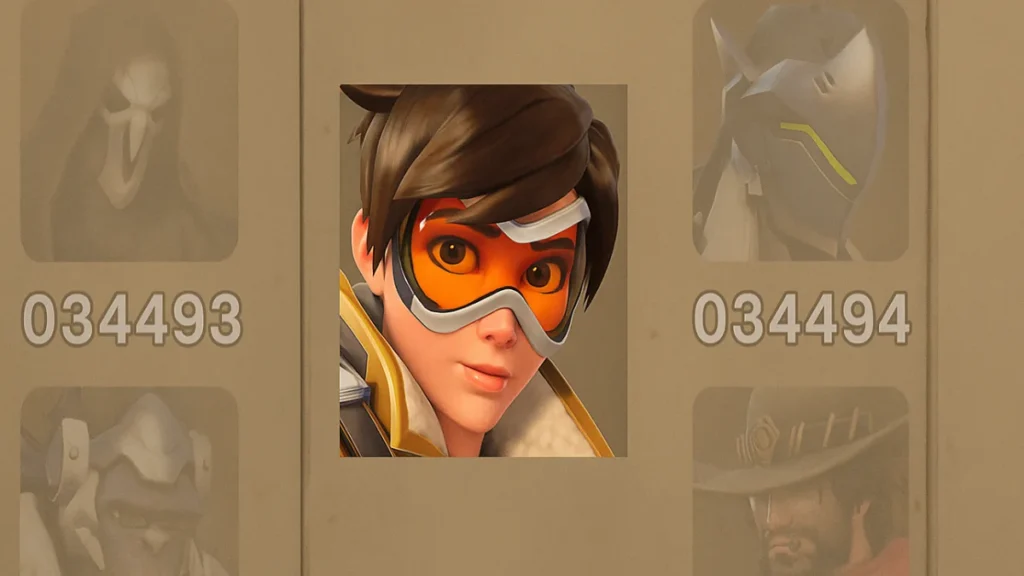
All Overwatch Emoji Codes
Overwatch emoji codes are internal texture references that can be pasted in the in-game chat. These codes pull graphical assets directly from the game files and display them as emoji-like icons during matches. Players use them to communicate, show flair, or even coordinate visually in match chat or the Workshop.
Each code is formatted like <TXCxxxxxxxxxxxxxxx> or <txCxxxxxxxxxxxxxxx> and must be typed or pasted with the angle brackets for it to work.
How to Add Color to Text
Overwatch supports text coloring through embedded hex color codes. To apply a color, wrap a hexadecimal RGBA string inside <FG......FF> and then type your message. Example
<FGFF0000FF>This is red text!Basic Color Codes:
| Code | Color Name |
|---|---|
<FGFF0000FF> | Red |
<FG00FF00FF> | Green |
<FG0000FFFF> | Blue |
<FGFFFF00FF> | Yellow |
<FGFF00FFFF> | Magenta |
<FGFFA500FF> | Orange |
<FGFFFFFFFF> | White |
<FG000000FF> | Black |
You can also insert any hex color using the format <FGHEXCODEFF>. For instance, pink would be:
<FGFF69B4FF>Pink Power!See also: Overwatch 2 Mid-Season 19 Twitch Drops: All Rewards, Dates, and How to Claim
Hero Icons
You can show Overwatch hero faces using texture codes. Here are a few examples:
| Hero | Emoji Code |
|---|---|
| Doomfist | <TXC00000000038495> |
| Winston | <TXC0000000003849A> |
| Reaper | <TXC000000000384A0> |
| Mercy | <TXC000000000385C3> |
| Kiriko | <TXC000000000385C4> |
| Sombra | <TXC000000000384A1> |
| Junkrat | <TXC000000000386FE> |
| Lucio | <TXC000000000385C9> |
These are great for visually calling out heroes during a match or spicing up Workshop messages.
2D Hero Portrait Icons
Character portrait illustrations from the hero gallery.
| Hero | Icon Code |
|---|---|
| D.Va | <tx0C00000000038C19> |
| Junker Queen | <tx0C00000000038C1B> |
| Orisa | <tx0C00000000038C1C> |
| Sigma | <tx0C00000000038C27> |
| Sojourn | <tx0C00000000038C33> |
| Lucio | <tx0C00000000038C41> |
3D Hero Portrait Icons
Full render-style hero textures.
| Hero (3D View) | Icon Code |
|---|---|
| Sigma (Mythic Skin) | <tx0C00000000040CE1> |
| Illari | <tx0C00000000043E3D> |
| Winston | <tx0C00000000043EC9> |
| Sojourn | <tx0C00000000043ED0> |
| Genji | <tx0C00000000043ECB> |
| Pharah (Hood Skin) | <tx0C000000000455B7> |
Hero Ability Icons
Want to show off specific hero abilities? You can use texture codes for those too:
Mercy
- Guardian Angel:
<txC000000000012F3> - Resurrect:
<txC000000000012F4> - Valkyrie:
<txC00000000011E07>
Hanzo
- Sonic Arrow:
<txC000000000012F9> - Dragonstrike:
<txC000000000012F7> - Storm Arrow:
<txC00000000016F30>
Doomfist
- Seismic Slam:
<txC0000000000F445> - Meteor Strike:
<txC0000000000F448>
Example Ability Icons:
| Hero | Ability | Code |
|---|---|---|
| Mercy | Guardian Angel | <txC000000000012F3> |
| Hanzo | Dragonstrike | <txC000000000012F7> |
| Zenyatta | Transcendence | <txC000000000012FC> |
| Pharah | Barrage | <txC000000000013EB> |
| Sombra | EMP | <txC00000000009F75> |
| Lucio | Sound Barrier | <txC00000000003C5F> |
See also: Overwatch 2 Season 19 Battle Pass Skins, Haunted Masquerade Mode, and New Hero Tease
Weapon Icons
Visual representation of each hero’s primary or secondary weapon.
| Hero | Weapon Name | Code |
|---|---|---|
| Mercy | Caduceus Staff | <txC00000000001332> |
| Reaper | Hellfire Shotgun | <txC00000000001338> |
| Zenyatta | Orbs of Destruction | <txC00000000001334> |
| D.Va | Pistol (out of mech) | <txC00000000004EA9> |
| Genji | Shuriken | <txC00000000004E83> |
UI, Role, and Match Status Icons
You can also display icons related to roles and game types:
| Description | Code |
|---|---|
| Tank Role | <txC00000000004120> |
| Ultimate Ready | <txC000000000039DB> |
| Healing | <txC000000000039DD> |
| Escort Gamemode | <txC00000000020AF3> |
| Push Robot Standing | <txC000000000221AC> |
Spray & Graffiti Icons
Spray designs from the hero spray collections.
| Description | Emoji Code |
|---|---|
| Tracer – Slipstream Poster | <txC0000000000501E> |
| Lucio – Amp it Up Graffiti | <txC00000000008036> |
| Ana – Sleep Dart Art | <txC000000000099FC> |
| Zenyatta Spray | <txC0000000000849B> |
Control and Keybinding Icons
| Input Device | Label | Code |
|---|---|---|
| Mouse | Middle Mouse Button | <txC00000000005DAD> |
| Mouse | Left Click | <txC0000000000447f> |
| Controller | Xbox A Button | <txC000000000044AF> |
| Controller | Left Stick Press | <txC000000000044A8> |
| Controller Combo | LB + RB | <txC000000000044AE> |
Quick Tips
- Codes must be wrapped in
< >, including both brackets. - These only work in match chat, not in menus or lobbies.
- If a texture doesn’t appear, it may have been deprecated in the current game version.
Overwatch emoji codes are a fun way to personalize your in-game communication. Whether you’re calling out an ultimate with style or throwing a heart emoji after a clutch play, these hidden features add a layer of flair and strategy to your chat experience. Bookmark a few of your favorites and try them in your next match! Play Now!

