The Megatech DLC adds some of the largest structures Astroneer has ever offered, along with new missions, resource demands, and multi-stage construction systems. But before you start deploying massive platforms and launching construction anchors across the solar system, you must unlock access to the Megatech mission chain. This guide walks you through every requirement and the exact steps needed to begin the DLC smoothly—whether you’re continuing an old save or starting fresh.

Step 1: Meet the Requirements to Unlock Megatech Missions
The Megatech missions do not appear automatically for new saves. You must first complete two base-game missions: Unearthed and Forward Progress.
Complete “Unearthed”
This mission revolves around printing your first Extractor and producing a Resource Nugget.
Required materials for an Extractor:
- Plastic
- 2 Iron
Plastic is crafted in a Chemistry Lab, while Iron comes from smelting Hematite found on planets such as Glacio or Novus.
Once you unlock the Extractor blueprint in the Large Printer, start printing it, power it, and use it to produce any Resource Nugget. The mission completes automatically once the nugget is created.
Complete “Forward Progress”
This mission asks you to place a Shelter and Landing Pad on any planet other than your starting world, Sylva.
Blueprint requirements:
- Landing Pad: 1 Aluminum + 2 Ceramic
- Shelter: 2 Silicone + 2 Plastic
Aluminum comes from smelting Laterite, while Ceramic is smelted from Clay. Silicone requires Resin, Methane, and Quartz through the Chemistry Lab.
Once both items are crafted and placed on an off-world location, the Forward Progress mission completes—unlocking the entry point into the Megatech mission chain.
Step 2: Claim the First Megatech Mission
Once prerequisites are done, the Megatech DLC officially begins with the mission titled:
“Large Scale Learning: Claim Distribution Launcher System Anchor Deploy Mega Printer Platform”
This is your introduction to the first mega structure: the Distribution Launcher System (DLS).
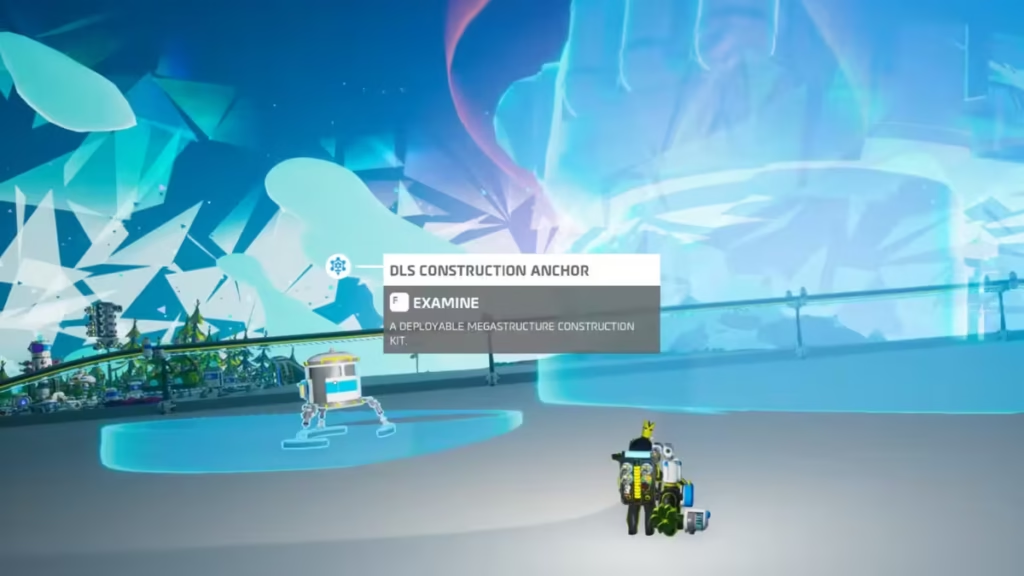
After claiming the mission, you’ll receive a Deployable Mega Structure Kit. Place it down on level terrain—keep in mind the platform is extremely large and will override its own flat area even if the ground isn’t perfect.
Step 3: Deploy and Activate the Distribution Launcher System (DLS)
The DLS is the foundation for every other megastructure in the DLC. Before it can build anything, you must activate its construction controls.
How to activate the DLS
- Locate the construction anchor deployment station on the platform.
- Toggle the safety off to enable building.
With the DLS active, you can now begin delivering resources to complete its assembly.
Step 4: Supply All Required Resources
The DLS requires a large number of refined materials. Load them directly onto the platform.
| Resource | Required |
|---|---|
| Compound | 49 |
| Zinc | 29 |
| Copper | 23 |
| Steel | 7 |
Once the final resource is slotted, the platform begins construction. The DLS draws heavy power, so ensure your base has sufficient generation or storage. When assembly completes, you’ll hear a unique activation sound confirming the system is online.
Step 5: Prepare for Mega Structure Deployment
With the DLS fully built, the next stage of the DLC involves launching Construction Anchors—specialized modules used to build large megastructures across the system.
Print a Construction Anchor Landing Pad
Before loading an anchor into the launcher, you must craft a landing pad.
Materials required:
- 2 Aluminum Alloy
- Ceramic
- Exochip
Print this at a standard printer.
Load an Anchor into the DLS
After the pad is ready, the DLS lets you select a construction anchor from its intermodal terminal list. Options include megastructures like the Biodome or Museum.
Choose the anchor, load it into the launching tube, and it becomes “ready to launch.”
Deploy the Landing Pad
Place your newly printed landing pad at the location where you want the structure to be built. Once deployed, call in the anchor through the DLS interface, and it will arrive at your selected pad to begin printing the megastructure.
Step 6: Optional Branches – Museum and Intermodal Terminal
After starting the main Megatech chain, two additional mission branches unlock. Completing these opens broader megastructure options.
Museum Missions
- Take a Byte: Earn 2000 additional Bytes
- Here We Go Sampling: Collect and use 10 Research Samples
Intermodal Terminal Missions
- Rubberstamp: Use the Data Log at Logistics Depot: Glacio
- Materials Matters: Print a Chemistry Lab and craft Rubber or Plastic
Once these branches are complete, you gain access to more anchor types and unlock new megastructure deployment missions.
Read More:
- Where Winds Meet Codes (November 2025)
- Solve the Puzzle Disney Dreamlight Valley Walkthrough Guide
- The Expanding World of Creativity and Connection Through Custom Board Game Design
- How to Unlock Tigger in Disney Dreamlight Valley: Complete Fun! Fun! Fun! Quest Guide
- Varsapura Release Date and Gameplay Overview
- ARC Raiders Light Bulbs: Best Locations and Fastest Farming Guide
- Red Dead Redemption 2 Time Period Explained: When the Story Takes Place in the Timeline
Starting the Astroneer Megatech DLC is all about building up the foundation needed for massive construction. The early steps focus on clearing prerequisite missions, establishing the Distribution Launcher System, and learning how to launch construction anchors. Once you have the DLS active and your first landing pad deployed, the rest of the DLC unfolds through mission-driven megastructure building across the entire solar system. Play Now!

