If ARC Raiders refuses to start on your PC and instead shows an Unreal Engine crash reporter with the error UE-PioneerGame or EXCEPTION_ACCESS_VIOLATION, you are not dealing with a broken purchase. This issue comes from Unreal Engine failing during early initialization on Windows systems.
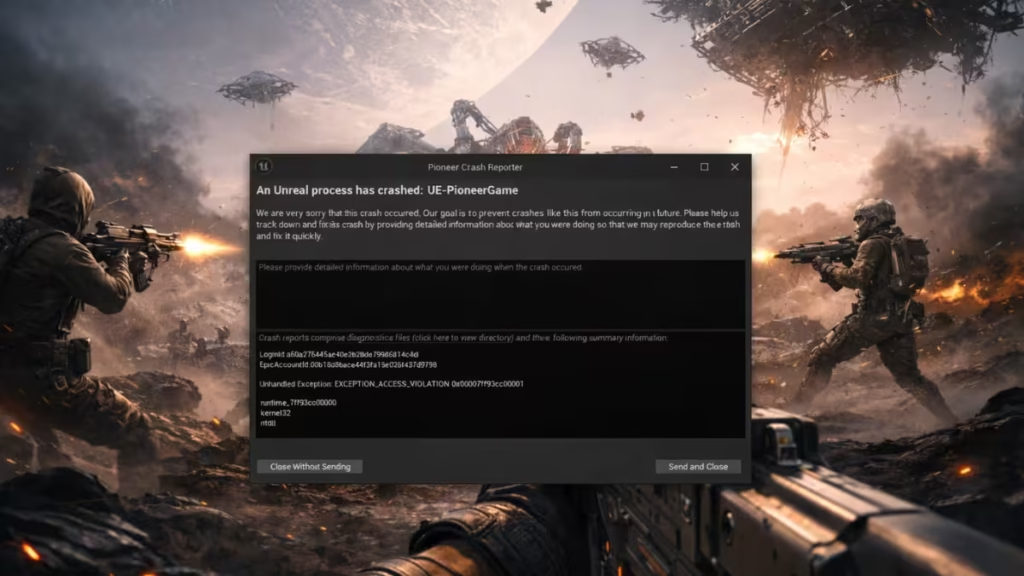
What Causes the UE-PioneerGame Crash in ARC Raiders?
ARC Raiders runs on Unreal Engine, which performs strict memory and system checks during launch. When the engine detects invalid memory access, corrupted cache files, or third-party hooks, it immediately shuts down.
The most common causes include:
- Corrupted Unreal Engine cache or config files
- Overlay and monitoring software hooking into the game
- Missing or broken Visual C++ runtimes
- Windows security memory isolation conflicts
- CPU or BIOS feature conflicts
- Driver-level injections from GPU utilities
That is why DX11 forcing and basic driver reinstalls usually do not work.
Step 1: Fully Reset Unreal Engine Cache (Most Important Fix)
Unreal Engine stores launch data locally. If this data becomes corrupted, ARC Raiders crashes instantly every time.
- Close Steam or the Epic Games Launcher
- Press Win + R, type:
%LOCALAPPDATA%- Delete the following folders if they exist:
UnrealEngineUE-PioneerGameEpicGamesLauncher\Saved
- Open Documents
- Delete:
Unreal Projects(if present)
- Restart your PC
- Launch ARC Raiders again
Many first-launch crashes resolve at this stage alone.
See also: Failed to Install Easy Anti-Cheat in ARC Raiders? How to Fix the Error on PC
Step 2: Disable All Overlays and Monitoring Tools
Unreal Engine does not tolerate injected overlays during startup. Even one active overlay can cause an access violation.
Disable or fully close:
- Steam Overlay
- Discord Overlay
- NVIDIA GeForce Experience In-Game Overlay
- MSI Afterburner
- RivaTuner Statistics Server
- Xbox Game Bar
- OBS Studio
- RGB utilities (Armoury Crate, iCUE, Mystic Light)
After disabling these tools, restart your PC before testing the game again.
Step 3: Force ARC Raiders to Use the Correct GPU
On systems with multiple GPUs, Unreal Engine may launch on the wrong adapter and crash instantly.
- Open Settings → System → Display → Graphics
- Add
ArcRaiders.exe - Set Graphics preference to High performance
- Save changes
- Restart Windows
This step is especially important on gaming laptops and hybrid GPU desktops.
Step 4: Install All Required Visual C++ Redistributables
ARC Raiders requires updated Microsoft runtimes to load Unreal Engine modules correctly.
Install both x64 and x86 versions of:
- Microsoft Visual C++ 2015–2022 Redistributable
After installation, restart your PC before launching the game.
Step 5: Temporarily Disable Windows Memory Integrity
Windows security features sometimes block Unreal Engine memory allocation during launch.
- Open Windows Security
- Go to Device Security
- Open Core isolation
- Turn Memory integrity OFF
- Restart your PC
- Test ARC Raiders
You can re-enable this feature later after confirming stability.
Step 6: Adjust BIOS CPU Features That Conflict with Unreal Engine
You already disabled XMP and SVM, which is good. Also test the following if the crash persists:
Intel CPUs
- Disable Intel VT-x
- Temporarily disable E-cores
AMD CPUs
- Disable PBO (Precision Boost Overdrive)
- Disable CPB (Core Performance Boost)
These settings frequently cause Unreal Engine access violations during startup.
Step 7: Verify Game Files and Run as Administrator
After clearing cache and adjusting system settings:
- Verify ARC Raiders game files in Steam or Epic
- Right-click
ArcRaiders.exe - Select Run as administrator
This ensures Unreal can write required files during first launch.
Step 8: Perform a Clean GPU Driver Install (If Needed)
If standard driver reinstall did not help, perform a clean install.
- Use Display Driver Uninstaller (DDU)
- Boot into Safe Mode
- Remove GPU drivers completely
- Install the latest stable GPU driver (avoid beta releases)
- Restart and test the game
Why DX11 and Driver Reinstalls Often Don’t Fix This
Forcing DX11 or reinstalling drivers does not fix corrupted Unreal cache, overlay injections, or Windows security conflicts. That is why many players report no improvement after trying those steps alone.
This crash happens before rendering fully initializes, so deeper system-level fixes matter more.
FAQs
Why won’t ARC Raiders launch on my PC?
ARC Raiders won’t launch on PC mainly due to Unreal Engine startup failures. Corrupted cache files, overlay software, missing Visual C++ runtimes, or Windows security features often block the game during early initialization, causing the UE-PioneerGame crash.
What is the UE-PioneerGame error in ARC Raiders?
UE-PioneerGame is an Unreal Engine crash module used by ARC Raiders. The error appears when the engine hits an access violation during launch, usually triggered by corrupted engine data, system-level conflicts, or third-party software injections.
How do I fix ARC Raiders EXCEPTION_ACCESS_VIOLATION error?
You can fix the EXCEPTION_ACCESS_VIOLATION error by clearing Unreal Engine cache, disabling overlays, installing Visual C++ redistributables, forcing the correct GPU, and turning off Windows memory integrity. These steps resolve the crash for most PC players.
Does disabling overlays fix ARC Raiders launch crashes?
Yes. Overlays frequently cause ARC Raiders to crash at launch. Steam Overlay, Discord Overlay, NVIDIA In-Game Overlay, MSI Afterburner, and RivaTuner can inject code that Unreal Engine blocks, resulting in an instant crash.
Is ARC Raiders not starting because of Windows 11?
Windows 11 itself does not break ARC Raiders, but certain Windows 11 security features like Memory Integrity can interfere with Unreal Engine memory access. Disabling these features temporarily often allows the game to launch normally.
Will forcing DirectX 11 fix ARC Raiders not launching?
Forcing DirectX 11 alone usually does not fix ARC Raiders launch issues. The UE-PioneerGame crash happens before full rendering begins, which means cache corruption and system conflicts matter more than the DirectX version.
Do I need to reinstall ARC Raiders to fix the crash?
Reinstalling ARC Raiders rarely fixes this issue by itself. Clearing Unreal Engine cache and config folders is more effective than reinstalling the entire game, since corrupted launch data often persists across reinstalls.
Is ARC Raiders crashing at launch a hardware problem?
No. ARC Raiders crashing at launch is not caused by faulty hardware. The issue comes from software conflicts, Unreal Engine cache corruption, or Windows-level restrictions rather than GPU or CPU failure.
Can antivirus software block ARC Raiders from launching?
Yes. Some antivirus and security tools block Unreal Engine memory allocation, which causes ARC Raiders to crash instantly. Temporarily disabling third-party antivirus software can help confirm if this is the cause.
Will ARC Raiders get an official fix for this issue?
Yes. Launch crashes related to Unreal Engine often receive fixes through game patches. If none of the troubleshooting steps work, the issue likely sits in the current PC build and may resolve after an update.
ARC Raiders failing to launch with UE-PioneerGame / EXCEPTION_ACCESS_VIOLATION is frustrating, but it is also fixable. Clearing Unreal cache, disabling overlays, and resolving Windows-level conflicts solve the problem for most PC players.

