Microsoft has released Windows 11 Insider Preview Build 26220.7872 (KB5077231) to the Beta Channel, focusing on practical interface refinements rather than headline features. This update continues the gradual rollout approach tied to Windows 11 version 25H2, with several changes gated behind the “get the latest updates” toggle.
The build targets everyday usability across File Explorer, Settings, and the taskbar, making common actions clearer and system information easier to access for both home users and IT teams.
Windows 11 Context Menu Now Shows Default App Icon
Microsoft has updated the right-click context menu behavior for executable files. When users right-click .exe, .bat, or .cmd files, the Open option now displays the icon of the file’s default app.
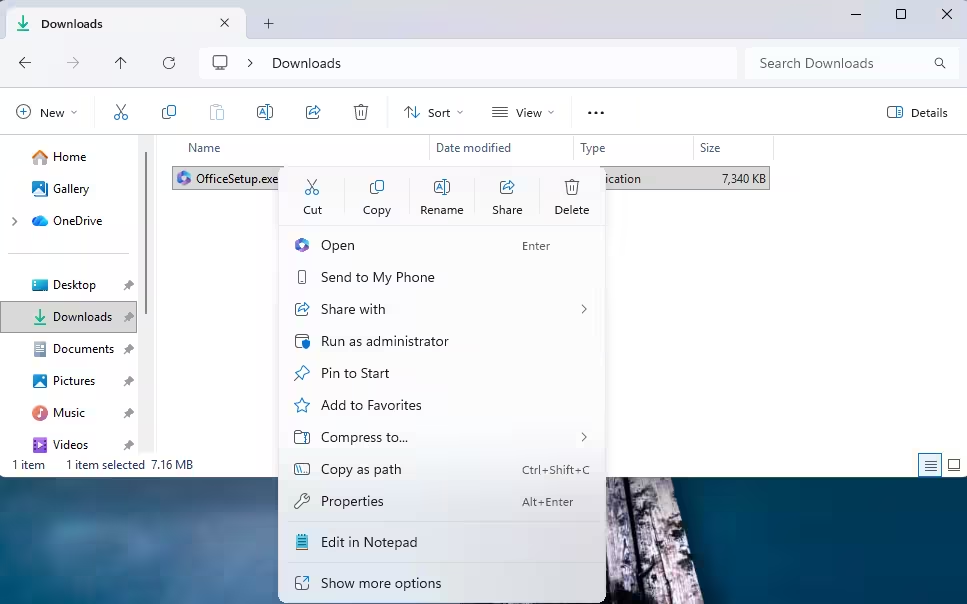
This change removes visual ambiguity, especially on systems where multiple tools handle scripts or executables. The update improves clarity without altering how files actually launch, keeping workflows consistent while reducing confusion.
Windows 11 Improves Device Info Card in Settings
The Device info card on the Settings Home page has received a visual and structural cleanup. Microsoft simplified how key specifications appear, making them easier to scan at a glance. This experience is currently rolling out to U.S.-based Insiders.
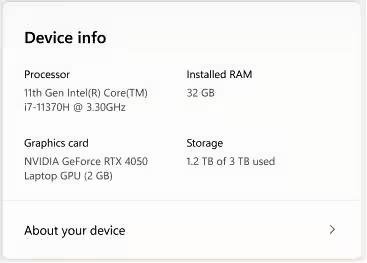
The update also restores prominent hardware details at the top of Settings > System > About, responding directly to early user feedback. Graphics and storage information now live in a single consolidated section, with built-in copy and paste support to help during troubleshooting or support calls.
Enterprise-managed devices continue to use a separate device card experience designed for IT environments.
Windows 11 Improves Taskbar Hover Animations
Taskbar interactions feel more polished in this build. Microsoft improved the animations that appear when users hover over grouped app icons. The result is smoother motion and clearer visual feedback, especially on systems with multiple apps pinned or running simultaneously.
While subtle, these animation updates contribute to a more responsive and modern taskbar experience.
Gradual Rollout and Toggle-Based Access
Like recent Beta Channel builds, features in Build 26220.7872 roll out in stages using Controlled Feature Rollout technology. Insiders who enable Settings > Windows Update > Get the latest updates as they’re available will see changes earlier.
Microsoft notes that some features may never reach the stable release, as Insider builds remain a testing ground for concepts that can evolve, change, or be removed entirely.
For Insiders, it’s a reminder that Windows 11 development is currently centered on polish and usability as version 25H2 approaches broader availability.

