Automation no longer requires complex logic or hours of manual setup. With Claude Code and n8n, you can describe a task in plain English and turn it into a working automation workflow within minutes.

This guide explains how to install Claude Code, connect it with n8n, and build a real automation that checks daily news or sports updates and sends a summary automatically.
What You Will Build in This Guide
You will create an automation that:
- Runs once every day
- Checks the latest news or sports updates
- Summarizes the key points using Claude
- Sends the summary to email or Slack
This example mirrors real editorial or news-tracking workflows used by content sites like fdaytalk.
Step 1: Install Claude Code on Your System
Claude Code runs locally and converts plain language instructions into structured workflows.
Install on macOS, Linux, or WSL
curl -fsSL https://claude.ai/install.sh | bashInstall on Windows (PowerShell)
irm https://claude.ai/install.ps1 | iexConfirm installation:
claude --versionClaude Code now works as a local CLI tool that understands files, instructions, and automation logic.
Step 2: Install n8n for Automation Execution
n8n handles workflow execution, scheduling, and integrations.
Quick local setup using Docker
docker run -it --rm \
  -p 5678:5678 \
  -v n8n_data:/home/node/.n8n \
  n8nio/n8n
Open:
http://localhost:5678This setup supports daily and hourly automations reliably.
Step 3: Describe Your Automation in Plain Language
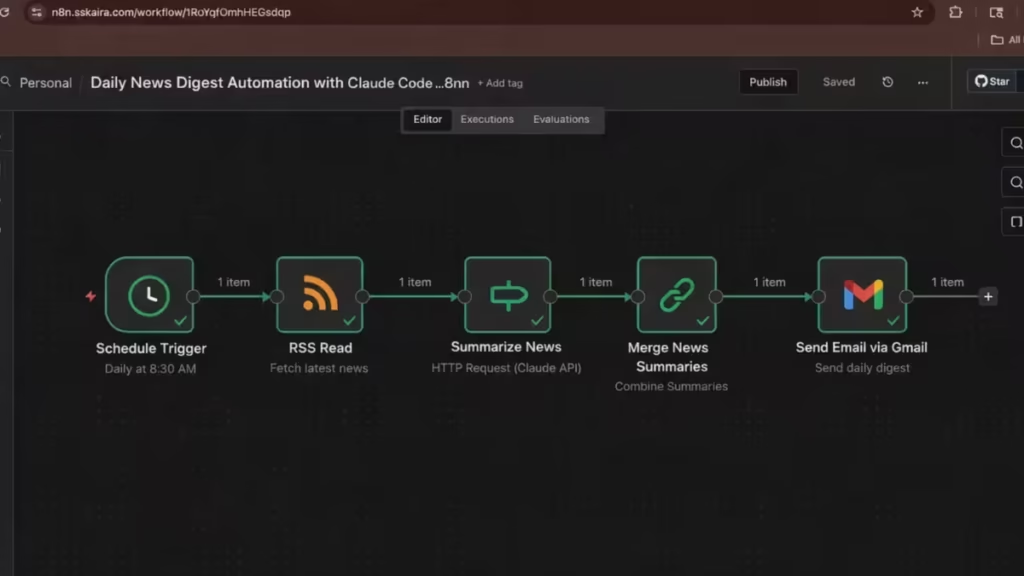
Claude works best when you describe the task clearly. Create a file named:
workflow-spec.mdExample: Daily Sports or News Check
Goal:
- Every day at 8:30 AM
- Fetch the latest sports or news updates from an RSS feed
- Pick the top 5 stories
- Summarize each story in 2 short bullet points
- Combine everything into one clean report
- Send the report to my email

Inputs:
- RSS feed URL (sports or news)
- Claude API key (stored in n8n)
- Email credentials

Workflow logic:
- Schedule Trigger
- RSS Read node
- Claude summary using HTTP Request
- Merge all summaries
- Email node

Output format:
- Title with date
- Headline + link
- Two bullet points per story
This is still plain English, but it gives Claude enough structure to generate a valid workflow.
Step 4: Generate the n8n Workflow Using Claude Code
Run Claude Code from the same folder:
claudePaste this instruction:
Read
workflow-spec.md.
Generate a valid n8n workflow JSON that I can import directly.
Use only core nodes such as Schedule Trigger, RSS Read, HTTP Request, Merge, and Email.
Output only the workflow JSON.
Claude will return a ready-to-import n8n workflow.
Step 5: Import the Workflow Into n8n
- Open the n8n dashboard
- Go to Workflows
- Click Import
- Paste the JSON from Claude Code
- Open the workflow on the canvas
All nodes should already connect correctly.
Step 6: Configure Claude and Email Credentials
Claude API Setup
In the HTTP Request node:
- Set method to
POST - Add required headers
- Use an environment variable or n8n credential for the API key
Do not hardcode API keys inside workflows.
Email Node
- Configure SMTP or Gmail once
- Send a test email to confirm delivery
Step 7: Test and Activate the Automation
Before activating:
- Run the workflow manually
- Confirm RSS items load correctly
- Confirm Claude returns summaries
- Confirm email delivery
After verification, turn the workflow Active. n8n will now run it daily without intervention.
FAQs
What is a Claude Code n8n workflow?
A Claude Code n8n workflow is an automation built by describing tasks in plain English and letting Claude Code generate a ready-to-import n8n workflow JSON. n8n then executes the workflow on a schedule or trigger.
Can Claude Code generate n8n workflows from plain language?
Yes. Claude Code converts plain language instructions into structured n8n workflows. You describe the goal, inputs, and logic, and Claude Code outputs a valid n8n workflow file that you can import and run.
Is Claude Code free to use with n8n?
Claude Code allows limited free use for testing, but real automation requires an active Claude plan or API credits. n8n itself is free if you self-host it, but Claude API usage may incur costs based on usage.
Do I need coding knowledge to create a Claude Code n8n workflow?
No. You do not need programming skills. You only need to describe what the automation should do in clear plain English. Claude Code handles the workflow logic and structure.
How does Claude Code connect to n8n?
Claude Code generates an n8n workflow JSON file. You import this file into the n8n dashboard, configure credentials, and activate the workflow. Claude Code does not run workflows directly.
Can I use Claude Code n8n workflows for daily news or sports updates?
Yes. Claude Code works well for daily news checks, sports updates, and content monitoring. You can automate RSS feeds, summarize updates, and send alerts to email, Slack, or Telegram.
Is Claude Code suitable for production automation?
Yes, if you use stable n8n core nodes and configure credentials properly. Many users rely on Claude Code n8n workflows for daily reports, content tracking, and monitoring tasks.
Does n8n run Claude Code workflows automatically?
Yes. Once you activate a workflow in n8n, it runs automatically based on the schedule or trigger you defined. Claude Code is only used to generate the workflow, not to execute it.
Can I edit the workflow after Claude Code generates it?
Yes. n8n workflows remain fully editable. You can modify nodes, adjust schedules, or add integrations after importing the Claude Code–generated workflow.
Is Claude Code better than manually building n8n workflows?
Claude Code saves time and reduces setup errors, especially for beginners. Manual n8n building offers more control, but Claude Code accelerates workflow creation significantly.
Can I reuse the same Claude Code setup for multiple workflows?
Yes. You can reuse the same Claude Code installation to generate unlimited n8n workflows by changing the plain-language description for each automation.
Does Claude Code support advanced n8n logic?
Claude Code supports conditional logic, merging, filtering, and scheduling when you describe them clearly. For very complex workflows, manual refinement in n8n may still help.
If you can describe a task in plain English, Claude Code can build the workflow, and n8n can run it automatically. This approach saves time, reduces errors, and scales easily for daily news, sports coverage, or content monitoring on sites like fdaytalk.

