Building and maintaining friendships has quietly become one of the most powerful progression systems in Pokémon Go. What started as a simple way to connect with other Trainers now plays a major role in levelling up, unlocking exclusive rewards, trading rare Pokémon, and even Remote Trading once you reach the newest Friendship tier.
Whether you are returning to the game or are pushing toward late-game levels, understanding how to add friends and grow those friendships efficiently can make a dramatic difference to your XP gains and overall gameplay. This guide breaks down the entire process—from adding your first friend to stacking huge XP boosts from Best Friends and Forever Friends.
What the Friends System Actually Does in Pokémon Go
Friendship in Pokémon Go is more than a social feature. By raising your Friendship Level with another Trainer, you unlock a range of advantages that make cooperative play more rewarding.
These include:
- Trading Pokémon, with reduced Stardust costs at higher Friendship Levels.
- Sending and receiving Gifts, which is the only consistent way to obtain 7 km Eggs.
- Increased damage in Raids and Gym battles when fighting alongside friends.
- Extra Premier Balls after completing Raids together.
- Lucky Friends and Lucky Trades, which guarantee a Lucky Pokémon.
- Remote Trading, unlocked when you reach the Forever Friends tier.
- Huge XP rewards when you reach major Friendship milestones.
If you want to level fast or collect region exclusives more easily, the Friends system becomes essential.
How to Add Friends in Pokémon Go
Adding a friend is a simple process, and you do not need to meet any level requirement just to add them. Here’s how it works.
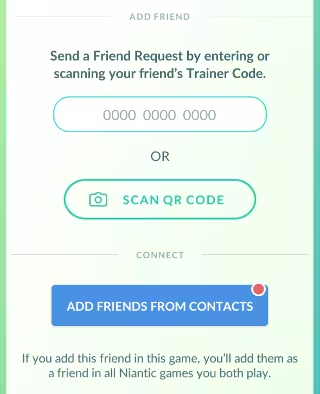
1. Find Your Trainer Code
Every Trainer has a unique 12-digit Trainer Code and a scannable QR Code. To access it:
- Open Pokémon Go.
- Tap your Trainer icon (bottom left).
- Open the Friends tab.
- Tap Add Friend.
Your Trainer Code will appear here, ready to share.
2. Add Someone Using Their Trainer Code
Once you have their code:
- Enter the 12-digit Trainer Code exactly.
- Send a Friend Request.
- Your request expires after 7 days if not accepted.
3. Add Friends Quickly Using QR Code
If you are in the same place as another Trainer:
- Tap QR Code at the top-right of the Add Friend screen.
- Scan their code or let them scan yours.
This method is the fastest during events, Community Days, or local meetups.
4. Add Friends from Other Niantic Games
If you share a Niantic Profile across games, friends from titles like Pikmin Bloom or Ingress may appear automatically in your Pokémon Go friend list.
5. Add Friends Using Your Phone Contacts
Pokémon Go can sync with your device contacts (up to 2,000).
Once synced, you can:
- Invite contacts to download the game.
- Add contacts who already have a Pokémon Go account.
This requires verifying your phone number.
6. The Friends List Limit
You can keep up to 500 friends in Pokémon Go (including other Niantic apps). Once you hit the cap, you must remove someone before adding a new friend.
How to Raise Friendship Levels Quickly and Efficiently
Friendship increases when you interact with another Trainer. Each interaction earns Friendship Points (FP), and earning enough FP upgrades your Friendship Level.
Actions That Increase Friendship
Any of these interactions count once per day:
- Opening a Gift from your friend
- Sending a Gift to your friend
- Participating in the same Raid or Gym battle
- Trading Pokémon
- Battling in Trainer Battles or Team GO Rocket balloon battles together
You can only earn progress once per friend per day, even if you battle or trade multiple times.
Friendship Levels and Why They Matter
The core Friendship Levels (Good, Great, Ultra, Best, Forever) unlock major bonuses:
- Better damage boosts in raids
- Larger Stardust reductions when trading
- More Premier Balls in raids
- Chance to become Lucky Friends
- Access to Remote Trading at Forever Friends
Best Friends also give the game’s largest XP payout—100,000 XP per level-up, which becomes 200,000 XP if you activate a Lucky Egg before the increase.
The Best Strategies to Level Up Friendships Faster
Power-levelling your friendships takes planning, but the rewards are worth it. Here are the most effective techniques.
1. Use Gifts Daily
Gifts are the most reliable way to progress with dozens of friends at once.
Tips:
- Open Gifts first, then send yours.
- Keep plenty of open inventory space for items from Gifts.
- Mark your high-priority friends with nicknames or tags.
2. Coordinate Lucky Egg Friendships
When you are about to reach Great, Ultra, or Best Friend, activate a Lucky Egg before triggering the final interaction.
You will gain:
- Great Friend: 10,000 XP (20,000 with Lucky Egg)
- Ultra Friend: 50,000 XP (100,000 with Lucky Egg)
- Best Friend: 100,000 XP (200,000 with Lucky Egg)
Stacking multiple Best Friend upgrades during an event or Community Day can result in millions of XP within minutes.
3. Battle and Raid Together
Raids are one of the fastest ways to trigger a Friendship interaction, especially with local raid groups.
4. Use QR Codes During Events
Community Days and local meetups are ideal for adding many players quickly via QR Code.
5. Monitor Your Friendship Progress
Tap your friend’s profile → tap the Hearts icon.
You’ll see exactly how many interactions remain before the next level.
The New Forever Friends Level and Remote Trading
A major update introduced Forever Friends, a tier above Best Friends.
Reaching it unlocks:
- Remote Trading with that friend—no physical proximity required.
- Ability to earn additional Remote Trades by gaining more Friendship Points after reaching the tier.
Remote Trades do not stack, so use your current one before earning another.
This dramatically changes how players collect region-exclusive Pokémon, especially for collectors and Pokédex completions.
Tips to Manage a Large Friend List
Once you grow your friend network, managing hundreds of players becomes easier with filters and tags.
You can:
- Sort by nickname, gift status, or Friendship Level
- Filter with search terms like “giftable”, “interactable”, “lucky”, or “friendlevel4”
- Assign custom tags for raid groups, international traders, or XP partners
These tools help you stay organized when pushing toward multiple high-level Friendships. Play Now!
Read More:
- Is Shieldon Shiny in Pokémon Go? Shiny Odds and How to Find It
- Pokémon GO Precious Paths Special Research Steps & Rewards
- Pokemon GO Masterwork Research A Precious Catch Quest Steps
- Pokémon Go: Best Giovanni Counters & Rewards December 2025
- Pokémon Go Dynamax Lugia Counters and Best Tactics
- How to Change Keldeo Form Pokémon GO – Resolute Form
- Is Scraggy Shiny in Pokémon Go? Shiny Scraggy Guide
- Is Morelull Shiny in Pokémon Go? How to Get Shiny Morelull and Shiinotic
- How to Get Shiny Sinistea in Pokémon Go
- Pokémon GO Lucky Trinket Returns in GO Pass November 2025 – Rewards, Dates & How It Works
- Pokemon Go Halloween Cup 2025 – Little & Great League Dates, Rules, and Best Teams

