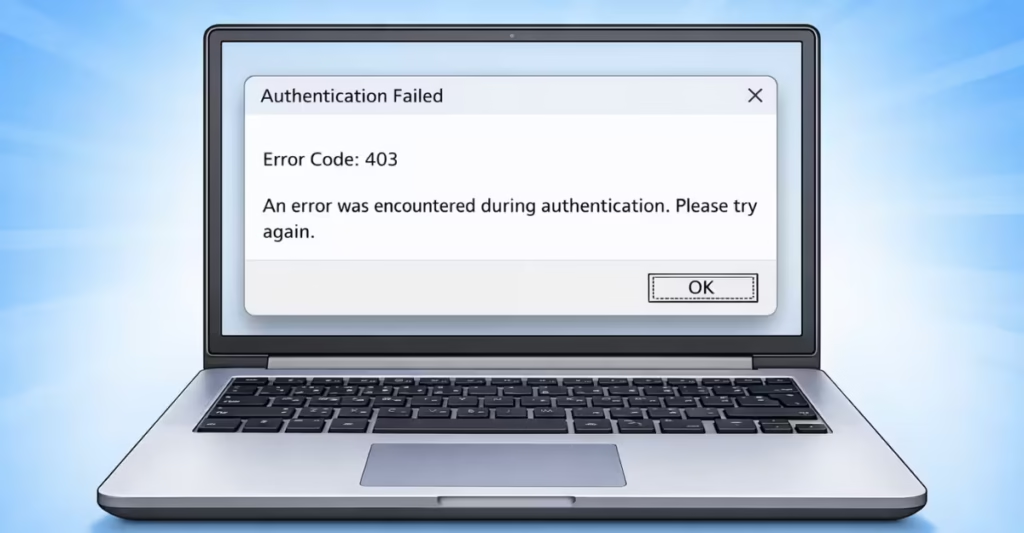
Roblox Error Code 403 appears when the platform blocks your request and refuses to grant access. Players usually see messages like “Authentication Failed – Error Code 403” or “Access to Roblox has been denied.” The error prevents you from logging in, launching a game, or loading Roblox through the browser.
In most cases, the issue happens because Roblox cannot properly authenticate your session. Corrupted client files, VPN connections, firewall blocks, or network conflicts can trigger the error. However, you can fix Roblox Error Code 403 with a few simple troubleshooting steps.
See also: How to Fix Roblox Error Code 2 (Connection Failed)
Fix 1: Reinstall Roblox Completely
Corrupted Roblox files often trigger Error Code 403. A clean reinstall replaces broken files and resets the client.
Follow these steps:
- Press Start and open Settings
- Go to Apps → Installed Apps
- Locate Roblox in the list
- Click Uninstall
- Restart your computer
- Download Roblox again from the official website
- Install the newest version
A fresh installation removes damaged cache files and restores proper authentication.
Fix 2: Delete Roblox AppData Cache
Roblox stores temporary authentication data in your system folders. If the cache becomes corrupted, Roblox may reject your login session.
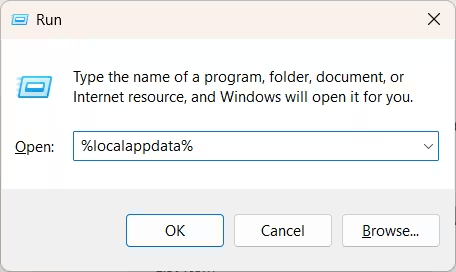
Clear the cache using this method:
- Press Windows + R
- Type %localappdata% and press Enter
- Find the Roblox folder
- Delete the entire folder
- Restart your PC
- Reinstall Roblox
This process forces Roblox to rebuild its local files.
Fix 3: Disable VPN or Proxy Connections
Roblox frequently blocks traffic from VPN services. Security systems treat VPN connections as suspicious and deny authentication requests.
To test this issue:
- Turn off your VPN software
- Disable proxy settings in Windows
- Restart your internet connection
- Launch Roblox again
If Roblox loads normally after disabling the VPN, the network routing caused the error.
See also: How to Fix Roblox Error Code 279 When Using a VPN (Connection Failed)
Fix 4: Clear Browser Cache and Cookies
If you launch Roblox through the website, outdated cookies or cached data may break authentication.
Clear your browser data:
- Press Ctrl + Shift + Delete in your browser
- Select Cookies and Cached Files
- Confirm the removal
- Restart the browser
- Visit Roblox again
Fresh cookies allow Roblox to create a new login session.
Fix 5: Change Your DNS Server
Incorrect DNS settings sometimes block Roblox services. Switching to a public DNS server resolves hidden network conflicts.
Use one of these DNS options:
| Provider | Primary DNS | Secondary DNS |
|---|---|---|
| Google DNS | 8.8.8.8 | 8.8.4.4 |
| Cloudflare DNS | 1.1.1.1 | 1.0.0.1 |
After changing DNS, restart your network connection and try launching Roblox again.
Fix 6: Check Firewall and Antivirus Settings
Firewalls or antivirus software sometimes block Roblox communication with its servers.
Test this quickly:
- Temporarily disable your firewall
- Launch Roblox
- If the game works, add Roblox.exe to the firewall exceptions list
Always re-enable the firewall after testing.
Fix 7: Try a Different Internet Connection
If Roblox flagged your IP address, the server may reject your connection with a 403 error.
You can test this easily:
- Connect to a mobile hotspot
- Restart your router to obtain a new IP address
- Use a different network
If Roblox works on another network, the original IP triggered the block.
See also: Roblox Error 429: How to Bypass Rate Limits (2025 Ultimate Guide)
Fix 8: Check for Account Restrictions
Sometimes Roblox returns Error Code 403 because the account itself faces restrictions.
Possible reasons include:
- Violating Roblox community guidelines
- Suspicious login activity
- Temporary account suspension
Check your email inbox for any messages from Roblox support.
When Roblox Error Code 403 Fixes Itself
Occasionally, Roblox security systems temporarily flag accounts or IP addresses. If the error continues after trying all fixes, wait 24–72 hours and try again.
Many players report that the issue resolves automatically once Roblox resets the security flag.
FAQs
Why does Roblox show Error Code 403?
Roblox shows Error Code 403 when the server refuses access due to authentication problems, corrupted files, VPN usage, or firewall restrictions.
Can VPN cause Roblox Error 403?
Yes. Roblox often blocks VPN traffic because it triggers security filters.
Does reinstalling Roblox fix Error Code 403?
Yes. A clean reinstall replaces corrupted files and resolves many authentication issues.
Can DNS cause Roblox Error 403?
Incorrect DNS settings can prevent Roblox from connecting to its authentication servers, which may trigger the error.