Ubisoft Connect (formerly Uplay) users have recently been encountering a frustrating error message: Dolphin-028. This error has left many players locked out of their games, unable to connect to Ubisoft servers, and wondering what went wrong.
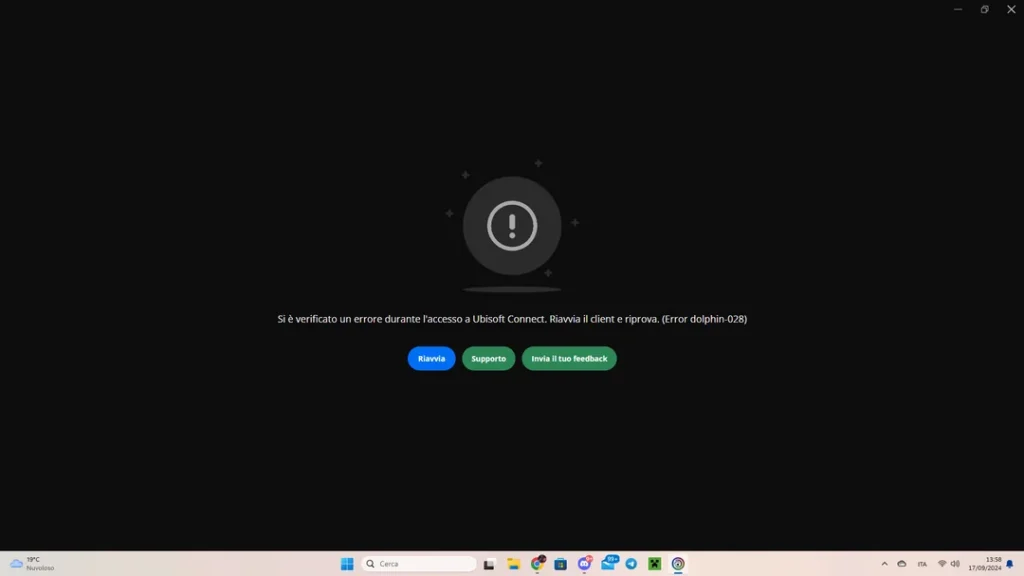
If you are seeing Uplay - Error Dolphin-028, don’t worry. In this article, we will break down what causes the error, what it means, and most importantly, how to fix it.
What is Uplay - Error Dolphin-028?
Dolphin-028 is a connection error that occurs when Ubisoft Connect is unable to properly establish a link with Ubisoft’s servers. Even if your internet is working perfectly, this error can appear, leaving you unable to log into your Ubisoft account or launch Ubisoft games.
Uplay Error Dolphin-028 - How It Affects Your Games
- Ubisoft Connect fails to log in.
- All Ubisoft games, like The Division 2, Rainbow Six Siege, and Ghost Recon, are affected.
- Other online services work fine, so the issue is isolated to Ubisoft.
What Causes Dolphin-028?
The root cause is usually on Ubisoft’s end — either due to:
- Server outages caused by maintenance or overload.
- Login session failures, where the server cannot verify your credentials.
- Temporary IP blocking if Ubisoft’s servers flag suspicious traffic.
- Corrupted Ubisoft Connect cache files on your PC.
- DNS or network configuration problems, though rare.
How to Fix Uplay - Error Dolphin-028 (Complete Troubleshooting)
Here is a step-by-step guide to try resolving the error.
1. Check Ubisoft’s Server Status
Before spending time troubleshooting, first check if Ubisoft’s servers are down.
- Ubisoft Status on Downdetector: https://downdetector.com/status/uplay
- Ubisoft Support on Twitter: https://twitter.com/UbisoftSupport
If there is a large-scale outage, your best option is to wait until Ubisoft resolves it.
2. Restart Ubisoft Connect and Your PC
- Close Ubisoft Connect completely.
- Reboot your PC.
- Relaunch Ubisoft Connect.
This simple refresh fixes minor temporary glitches.
3. Change Your Ubisoft Password
This worked for many players who experienced Dolphin-028 during recent outages.
- Visit: https://account.ubisoft.com
- Change your password.
- Log back into Ubisoft Connect with the new password.
This forces Ubisoft Connect to re-authenticate your session, which can bypass the error.
4. Run Ubisoft Connect as Administrator
- Right-click the Ubisoft Connect shortcut.
- Choose Run as Administrator.
- Try logging in again.
5. Clear Ubisoft Connect Cache
Corrupted cache files sometimes prevent proper login. To clear your cache:
- Navigate to:
C:\Program Files (x86)\Ubisoft\Ubisoft Game Launcher\cache- Delete the cache folder.
- Restart Ubisoft Connect.
6. Flush DNS and Renew IP Address
If the error relates to outdated DNS records or IP issues, refreshing your network settings may help.
- Open Command Prompt (Admin) and run:
ipconfig /flushdns
ipconfig /release
ipconfig /renew
7. Reinstall Ubisoft Connect
- Uninstall Ubisoft Connect from Control Panel > Programs.
- Download the latest version from: https://ubisoftconnect.com
- Install and try logging in again.
8. Try Switching Networks
- If you are on wired internet, try switching to WiFi.
- Or, use your mobile hotspot to see if the error is tied to your regular ISP.
9. Contact Ubisoft Support (If All Else Fails)
If you have tried everything and the servers are back online, you can submit a ticket at:
What Worked for Other Players?
From community discussions, these were the most effective fixes:
| Fix | Success Rate |
|---|---|
| Changing Ubisoft Password | High |
| Running as Admin | Moderate |
| Flushing DNS & Renewing IP | Moderate |
| Clearing Cache | Moderate |
| Reinstalling Ubisoft Connect | Low |
Note: Changing your Ubisoft Connect password was the most successful fix during recent outages.
In most cases, Dolphin-028 is caused by Ubisoft server-side issues, not your PC or internet. If servers are down, no fix will work until Ubisoft restores services.
Useful Links
| Resource | Link |
|---|---|
| Ubisoft Server Status | https://downdetector.com/status/uplay |
| Ubisoft Support Twitter | https://twitter.com/UbisoftSupport |
| Ubisoft Connect Download | https://ubisoftconnect.com |
| Ubisoft Support Help Center | https://www.ubisoft.com/help |
The Uplay Error Dolphin-028 has been affecting Ubisoft players worldwide, especially PC users. While it is mostly linked to Ubisoft server problems, some local fixes can help after the servers are back online.
Have you encountered Dolphin-028? Let us know in the comments how you fixed it — your experience could help fellow players.