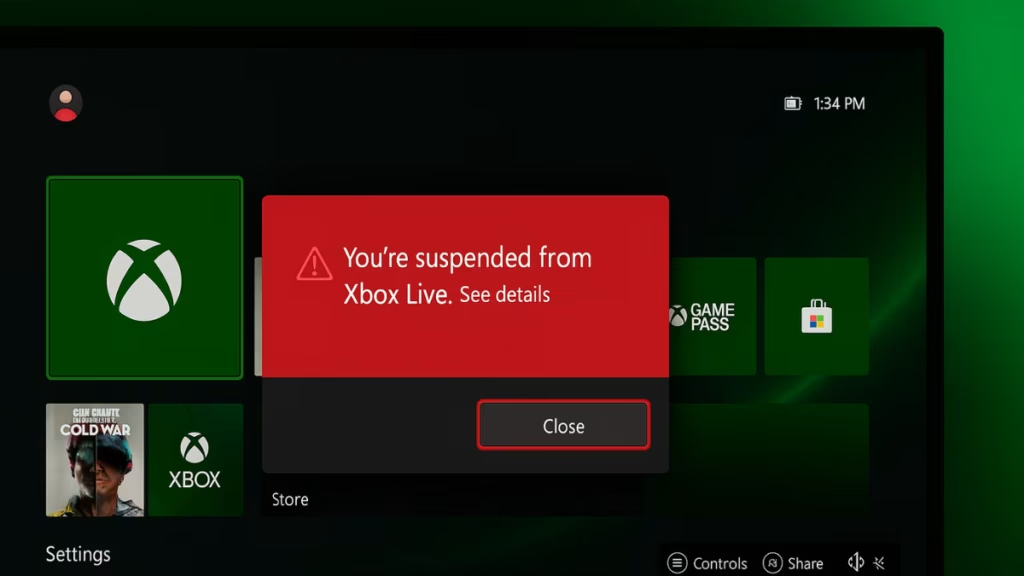
Many players have recently reported being suspended from Xbox Live after creating multiple Microsoft accounts, especially for Minecraft. If your profile suddenly shows “You’re suspended from Xbox Live,” or you can’t access multiplayer, here’s how to check your suspension details and fix it step by step.
Why Xbox Live Suspends Accounts
Before applying fixes, it’s important to understand why suspensions happen. Microsoft may suspend your Xbox or Microsoft account for several reasons:
- Creating or using multiple accounts to bypass limits or features
- Violating the Xbox Community Standards (chat, name, or content violations)
- Sharing or selling accounts to others
- Fraudulent or suspicious login behavior
- Repeated Terms of Service violations
If you created several Microsoft accounts for Minecraft access, the system may detect this as policy abuse, even if it was unintentional.
1. Check the Suspension Details (Xbox Enforcement Portal)
The first step is confirming the reason and duration of your suspension.
Steps:
- Go to the official Xbox Enforcement Portal.
- Sign in with the affected Microsoft account.
- Open the Enforcement History section.
- Select your latest action to view:
- Suspension reason
- Start and end date
- Number of strikes (if applicable)
- If you see a Case Review option, your account is eligible for appeal.
Also check your email inbox and spam folder for a message from Microsoft titled “Action required: Your Xbox account has been suspended.” It often contains details not shown on the console.
2. Appeal the Suspension (Case Review)
If you believe the suspension was an error—for example, you created multiple accounts for family use or device testing—you can appeal directly.
Steps:
- Return to enforcement.xbox.com.
- Select the enforcement action you want to appeal.
- Click Submit a Case Review.
- Explain your situation clearly. Mention that the multiple accounts were created unintentionally, without abuse or malicious intent.
- Submit and wait for Microsoft’s response, which usually takes two to five business days.
Keep your appeal professional and factual. Avoid emotional or aggressive language; polite explanations receive better outcomes.
3. Understand the Xbox Strike System
Microsoft now uses a strike-based enforcement system to determine suspension length.
| Strikes | Suspension Duration |
|---|---|
| 1 | 1 day |
| 2 | 1 day |
| 3 | 3 days |
| 4 | 7 days |
| 5 | 14 days |
| 6 | 21 days |
| 7 | 60 days |
| 8 | 365 days (1 year) |
If your account triggered multiple alerts for repeated sign-ins or extra profiles, multiple strikes could have been added at once, resulting in a longer suspension.
4. Avoid Mistakes During Suspension
To prevent further enforcement actions:
- Do not create or sign into new Microsoft accounts.
- Do not attempt to play online from another profile on the same console.
- Do not use VPNs or region-spoofing tools.
- Wait for the suspension period to expire.
- Keep your console connected to the internet so it can automatically lift the suspension once the timer ends.
Repeated attempts to bypass enforcement can escalate a temporary suspension to a permanent ban.
5. Contact Xbox Support for Clarification
If the Enforcement Portal does not show your ban reason or duration, contact Xbox Support for confirmation.
Steps:
- Visit support.xbox.com.
- Navigate to Contact Us → Account & Profile → Ban or Suspension.
- Choose Chat or Request a Call.
- Provide the following details:
- Gamertag
- Microsoft account email
- Date when the suspension started
A support representative can check whether the suspension is temporary or permanent.
6. If It’s a Permanent Ban
If your record shows “Permanent Suspension” or “Device Ban,” here’s what it means:
- Permanent bans cannot be appealed if no Case Review option is shown.
- You can still play offline and use single-player games.
- You may create a new Microsoft account only if your console itself is not banned.
- If your console is banned, confirm this with support before attempting to buy or replace hardware.
A permanent account ban does not always mean a console ban, so verify the scope before taking further action.
How to Prevent Future Suspensions
After your suspension ends, follow these practices to stay safe:
- Use only one verified Microsoft account per player.
- Avoid frequent sign-ins from multiple accounts on the same device.
- Review the Xbox Community Standards regularly.
- Keep your Microsoft account’s contact information updated for enforcement notifications.
Most Xbox Live suspensions are temporary and automatically lift once the enforcement period ends. If it’s your first strike, you can usually return to multiplayer and Minecraft access after a few days.
Read More:
- Fix Microsoft Game Input Plugin FPS Drop and Controller Lag on Windows
- Minecraft Drowned Error Code Fix After Update 1.21.120
- How to Fix Battlefield 6 Connection Lost Error on Steam
- How to Fix Borderlands 4 ntdll.dll Crash on Windows 10/11
- How to Fix Minecraft Bedrock Stuttering and Lag on PC
For repeated or multi-account issues, submit a Case Review through the Enforcement Portal and avoid creating new profiles until the matter is resolved.
With careful steps and patience, your account can return to full functionality without risking a permanent ban.