If you just received a rapid PayCard, you need to activate it before you can access your pay. This reloadable prepaid card works wherever Debit Mastercard or Visa debit cards are accepted, making it a practical choice for employees who want direct access to their wages without a traditional bank account.
This guide covers every activation method, how to set up direct deposit, what to do if you lose your card, and how to get the most from your account.
What Is a rapid! PayCard?
The rapid PayCard is a reloadable prepaid payroll card that lets employees receive and manage pay without paper checks or a bank account. You can use it to make purchases, withdraw cash at ATMs, pay bills online, and receive direct deposits for wages, tax refunds, and government benefits.
The card requires no credit check. Approval depends only on a successful identity verification and U.S. residency.
Key features:
- Accepted at millions of ATM and merchant locations worldwide
- Surcharge-free access to 55,000+ Allpoint ATMs
- Optional interest-bearing savings account (opt-in required)
- Cash back rewards program
- rapid PAY mobile app for iOS and Android
- Fraud protection built on intelligent behavioral analysis
How to Activate Your rapid PayCard
You have two ways to activate: online or by phone. Both require your 16-digit card number and personal details for identity verification.
Method 1: Activate Online at rapidfs.com
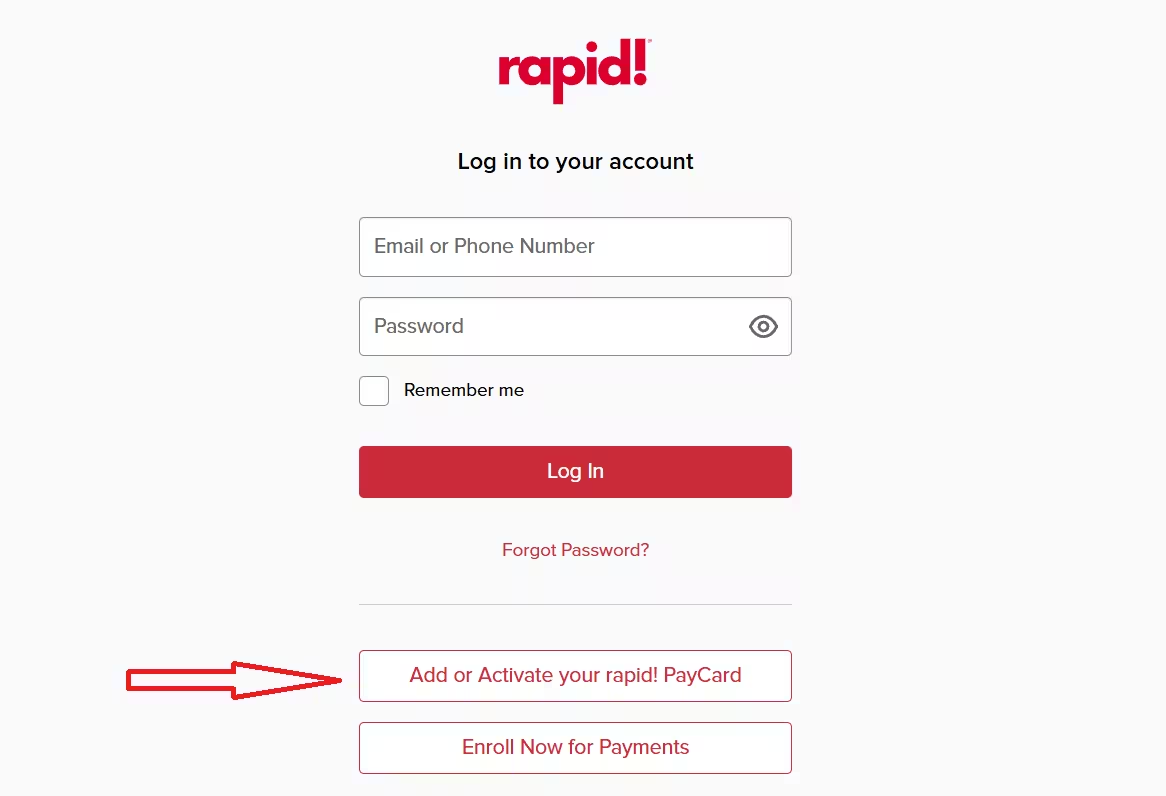
- Go to rapidfs.com/login
- Scroll down and click “Add or Activate your rapid! PayCard”
- Enter your 16-digit card number
- Complete or confirm your account profile information
- Finish the process within 5 minutes or the session will time out and you will need to restart
Method 2: Activate by Phone
- Call 1-877-380-0980
- Follow the voice prompts
- Have your card number and personal details ready to verify your identity
- Create a 4-digit PIN for ATM access and secure transactions
- Request a free personalized card upgrade during this call if you want your name embossed on the card
Both methods take just a few minutes to complete.
Instant Issue Card vs. Personalized Card
The first card you receive is the instant issue card. It carries a Mastercard or Visa brand mark but does not have your name on it.
During your activation call, you can request a free upgrade to a personalized card with your name embossed on it. The personalized card arrives within 7 to 10 business days. Your instant issue card stays fully active until you activate the new one, so you will not lose access to your funds during the wait.
How to Set Up Direct Deposit
After you activate your card, give your employer your card account number and routing number to set up direct deposit. You can find both by:
- Logging in at www.rapidfs.com
- Calling customer service at 1-877-380-0980
- Asking your payroll department for a rapid PayCard direct deposit form
Once your employer processes the setup, your pay will typically be available by 10:00 AM EST on payday.
The rapid PayCard also accepts direct deposits from multiple sources. You can use it across more than one employer and add deposits for income tax refunds, Social Security benefits, military pensions, and other eligible payments.
How to Check Your Balance
You can check your balance anytime through any of these methods:
- Online: Log in at www.rapidfs.com
- Phone: Call 1-877-380-0980
- Mobile app: Use the rapid!PAY app on iOS or Android
- Text alerts: Sign up for text notifications to get instant updates whenever your account activity changes
How to Add More Funds
The rapid PayCard supports multiple funding sources:
- Second or part-time employer: The card is portable, so any employer can set up direct deposit to it
- Tax refunds: Direct deposit your federal or state income tax refund directly to the card
- Government and benefit payments: Social Security, military pensions, and similar deposits all qualify
- Mobile check deposit: Load approved checks using the Ingo Money app on your phone
What to Do If You Lose Your Card
Your money stays protected under the Networks’ Zero Fraud Liability policy, so losing the card does not mean losing your funds.
Take these steps immediately:
- Call 1-877-380-0980 and press 0 to reach a live representative
- Report the card lost or stolen
- Request a replacement card
- Alternatively, ask your employer for a replacement if you need one faster
The rapid PayCard fraud line is available 24/7 at (844) 346-9847.
How to Find a Surcharge-Free ATM
The card connects to the Allpoint ATM network, which gives you surcharge-free access at more than 55,000 ATM locations worldwide. Use the ATM locator at rapidfs.com to find the nearest one.
Security Tips for Your rapid! PayCard
Protect your account by following these practices:
- Never share your card number, PIN, or account password with anyone (rapid PayCard will never ask for this over the phone)
- Memorize your PIN instead of writing it down
- Log out after every online session, especially on public or shared computers
- Never share a verification code you did not request
- Go directly to rapidfs.com instead of clicking links in unexpected emails or texts
- Sign up for text alerts to monitor all account activity in real time
Frequently Asked Questions
How do I activate my rapid PayCard online?
Visit rapidfs.com/paycard/activate, enter your 16-digit card number, and complete your account profile. You must finish the process within 5 minutes or the session will time out and you will need to restart.
What number do I call to activate my rapid PayCard?
Call 1-877-380-0980 and follow the voice prompts. Have your card number and personal details ready. You will also set your 4-digit PIN during this call.
When will my money be available on my rapid PayCard after direct deposit?
Your payroll funds will typically be available by 10:00 AM EST on your payday. You can check your balance anytime by calling 1-877-380-0980, logging in at rapidfs.com, or using the rapid PAY mobile app.
What is the difference between the instant issue and personalized rapid PayCard?
The instant issue card is the first card you receive. It carries a Visa or Mastercard brand mark but does not have your name on it. You can request a free upgrade to a personalized card with your name embossed during your activation call. The personalized card arrives within 7 to 10 business days, and your instant issue card stays active until you activate the new one.
What should I do if my rapid PayCard is lost or stolen?
Call 1-877-380-0980 immediately and press 0 to reach a representative. Report the card lost or stolen and request a replacement. Your funds stay protected under the Networks’ Zero Fraud Liability policy. The fraud line is also available 24/7 at (844) 346-9847.

