Vanilla Gift Cards are prepaid debit cards issued by Sutton Bank that work anywhere Visa or Mastercard is accepted across the United States. Before you can use a physical card for purchases, you need to activate it. The process takes under two minutes whether you do it online or by phone.
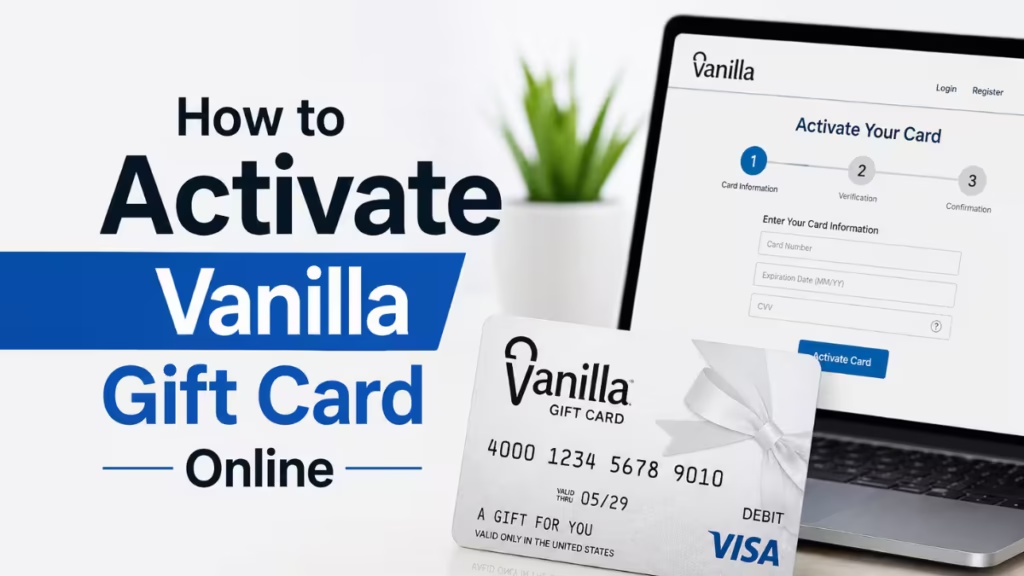
This guide covers every step to activate your Vanilla Gift Card, set a PIN, use the card for online purchases, check your balance, and troubleshoot activation errors.
What Is Vanilla Gift Card?
A Vanilla Gift Card is a prepaid debit card that comes preloaded with a fixed dollar amount. You can use it at most U.S. retailers that accept Visa or Mastercard debit cards, both in-store and online.
A few things to know upfront:
- Vanilla Gift Cards are not reloadable. Once you spend the balance, the card is done.
- Physical Vanilla Gift Cards require activation before first use.
- Vanilla eGift Cards (the digital version sent to your email) activate automatically when delivered. You do not need to activate them manually.
- The cards are not tied to a bank account, so they do not build credit history. If you want to work on your credit profile, check out this guide on how to build your credit from scratch.
How to Activate Vanilla Gift Card Online
Online activation is the fastest method. Have your card in hand before you start.
What you need:
- Your 16-digit card number (front of the card)
- Expiration date (front of the card)
- 3-digit CVV code (back of the card)
Steps:
- Open a browser and go to balance.vanillagift.com.
- Enter your 16-digit card number, expiration date, and CVV code when prompted.
- Click Continue to submit your card details.
- Follow the on-screen prompts to confirm activation.
- Once the site confirms the card is active, your balance will display on screen.
That is all it takes. The card is ready to use as soon as you see the confirmation message.
How to Activate Vanilla Gift Card by Phone
If you prefer the phone method, look at the back of your card for the toll-free number. The standard Vanilla customer service line is 1-833-322-6760.
Steps:
- Call 1-833-322-6760 from any phone.
- Follow the automated prompts.
- Enter your 16-digit card number, expiration date, and CVV when the system asks.
- Listen for the confirmation message that your card has been activated.
Both methods activate the same card on the same account. Use whichever one is more convenient. Like activating any payment card, such as when you activate a Wells Fargo debit card or credit card or activate a Citi credit card, you need your card details ready before you call or go online.
How to Set a PIN on Your Vanilla Gift Card
Vanilla Gift Cards let you set a PIN when you make your first debit purchase at a point-of-sale terminal. The card does not come with a preset PIN.
- When a terminal prompts you for a PIN, enter any four-digit number you choose.
- That number becomes your PIN for all future debit transactions on that card.
- Pick something easy for you to remember but not obvious to someone else.
- If you need to change your PIN later, call 1-833-322-6760 and provide your card number, expiration date, and security code.
For online purchases, you do not need a PIN. The card number, expiration date, and CVV are sufficient.
How to Use Your Vanilla Gift Card Online After Activation
Once your card is active, using it online works just like a standard debit or credit card. Follow these steps at checkout:
- Select Credit or Debit as your payment type. Do not select "Gift Card" as a payment option, even if the merchant offers it, since Vanilla cards process as Visa or Mastercard debit cards.
- Enter your 16-digit card number, expiration date, and CVV code.
- Fill in your name and billing address. Use the address you provided during card registration on the Vanilla website. If you did not register an address, some merchants may decline the transaction.
- Click the buy or confirm button to complete the purchase.
- The transaction amount is deducted from your card balance immediately.
Important: Some merchants require your card balance to be at least 20% higher than the purchase total to authorize the transaction. If a legitimate merchant declines your card and you believe the balance is sufficient, this authorization hold requirement may be the cause.
Subscriptions and recurring payments: Vanilla Gift Cards do not work reliably for subscription services like Netflix or Spotify. Since the card is not reloadable, recurring charges will fail once the balance runs out or when the merchant attempts to verify a permanent payment source.
How to Check Your Vanilla Gift Card Balance
Checking your balance before any purchase prevents declined transactions.
Online:
- Go to balance.vanillagift.com.
- Enter your card number, expiration date, and CVV.
- Your current balance appears on screen.
By phone:
- Call 1-833-322-6760.
- Follow the prompts and enter your card details.
- The automated system reads your available balance.
Make it a habit to check your balance before checkout, especially for larger purchases. If your balance will not cover the full amount, you may need to split the payment if the merchant allows it.
How to Add Your Vanilla Gift Card to a Digital Wallet
You can add your Vanilla Gift Card to Apple Wallet, Google Wallet, or Samsung Wallet for tap-to-pay purchases at in-store terminals that support contactless payments.
Apple Wallet
- Open the Wallet app on your iPhone.
- Tap the + icon in the upper right corner.
- Select Debit or Credit Card.
- Scan the card with your camera or enter the card details manually.
- Add your billing address and save.
Your Vanilla Gift Card now appears in Apple Wallet and works with Apple Pay at compatible terminals.
Google Wallet
- Open the Google Wallet app.
- Tap Add to Wallet + at the bottom of the screen.
- Select Payment Card, then New credit or debit card.
- Scan the card or enter the details manually.
- Enter your billing address and tap Save.
Samsung Wallet
- Open the Samsung Wallet app.
- Tap the + icon in the upper right corner.
- Scan the card or enter the details manually.
- Enter your billing address and tap Save.
Where You Can and Cannot Use a Vanilla Gift Card
Works at:
- Most U.S. online retailers that accept Visa or Mastercard debit cards, including Amazon, Walmart, Target, eBay, and Best Buy
- Physical stores where you swipe or tap a debit card
- Streaming services and food delivery apps that accept one-time debit payments
- Gas stations (pay inside to avoid a large pre-authorization hold)
Does not work reliably at:
- Subscription services with recurring billing (Netflix, Spotify, gym memberships)
- Gas pumps that place a pre-authorization hold of up to $175 on the card balance
- International merchants and websites outside the U.S.
- Merchants that do not accept prepaid or debit gift cards
If you receive an unauthorized charge on any payment card, you have the right to dispute it. Learn how to dispute a credit card charge step by step.
Splitting a Payment With Your Vanilla Gift Card
If your purchase total exceeds your card balance, some merchants let you split the payment between two methods.
- In-store: Tell the cashier the exact amount you want charged to the Vanilla card, then pay the remainder with cash or another card.
- Online: Check the merchant's checkout page for a split payment option. Amazon supports split payments, so you can apply your Vanilla card balance and cover the rest with another payment method.
Most online merchants do not offer split payments. If the merchant does not support it and your balance is too low, the transaction will be declined.
Troubleshooting: Vanilla Gift Card Not Activating
If the activation process fails, work through these checks before contacting support.
- Card details entered incorrectly: Double-check the 16-digit card number, expiration date, and CVV against the physical card. One wrong digit causes an error.
- Card not yet eligible for activation: Some cards have a short delay between purchase and activation eligibility. Wait a few minutes and try again.
- Website issue: Clear your browser cache, switch to a different browser, or try the phone activation method at 1-833-322-6760 instead.
- Card already activated: If you received a used card, someone may have activated it already. Check the balance at balance.vanillagift.com. If it shows a balance and activated status, the card is ready to use.
- Damaged card: If the card number or CVV on the back is unreadable, call customer service. Provide proof of purchase so they can replace the card.
- Card declined after activation: Confirm you are selecting Credit or Debit at checkout, not Gift Card. Also confirm the billing address you enter matches what is registered on your Vanilla account. A mismatch causes most online declines.
This process is similar to troubleshooting other card activations. For reference, see how to activate a Mastercard gift card online or how to activate and use a Tremendous Visa card for comparison.
What Happens If You Overspend the Balance?
If you try to spend more than your remaining balance, one of two things happens:
- The transaction is declined at checkout.
- The merchant allows a partial charge up to your balance and asks you to cover the rest with another payment method. This depends entirely on whether the merchant supports split payments.
If the card is nearly empty and you want to use the remaining balance, check it first at balance.vanillagift.com, then either find a merchant that accepts split payments or use the exact remaining amount on a small purchase.
Vanilla Gift Card Expiration and Inactivity Fees
Vanilla Gift Cards expire after 9 years from the issue date. The funds on the card do not expire when the card itself does. If your card expires with a remaining balance, contact Vanilla customer service at 1-833-322-6760 to request a replacement card with the balance transferred.
Some cards charge an inactivity fee of approximately $1 per month after 12 consecutive months of no activity. Check your cardholder agreement for the exact terms on your specific card.
FAQs
Do you need to activate Vanilla Visa Gift Card?
Yes, physical Vanilla Gift Cards require activation before use. Vanilla eGift Cards sent by email do not need activation since they activate automatically on delivery.
Can I use my Vanilla Gift Card online right after activation?
Yes. As soon as you complete the activation steps at balance.vanillagift.com or by phone, the card is ready for online purchases.
Why does my Vanilla Gift Card keep getting declined online?
The most common causes are an incorrect billing address, insufficient balance, the merchant not accepting prepaid cards, or selecting "Gift Card" instead of "Credit" or "Debit" at checkout.
Can I reload my Vanilla Gift Card?
No. Vanilla Gift Cards are not reloadable. Once the balance reaches zero, the card is no longer usable.
Can I use my Vanilla Gift Card at an ATM?
Standard Vanilla Gift Cards do not support ATM cash withdrawals. The cards are designed for purchases only.
What do I do if my Vanilla Gift Card is lost or stolen?
Contact Vanilla customer service immediately at 1-833-322-6760. If you registered the card and can verify ownership, you may qualify for a replacement card with the remaining balance.
Can I use my Vanilla Gift Card outside the United States?
No. Vanilla Gift Cards are issued for U.S. use only. Most international merchants and non-U.S. websites will decline them.