Roblox Error Code 267 appears when a game removes you from an experience due to connection problems, account restrictions, or rules enforced by the game developer. The message often reads:
“You were kicked from this experience: Anomalous lag spike, rejoin. (Error Code: 267)”
While this error can look serious, it is usually temporary and not a platform-wide ban. In most cases, you can rejoin after fixing the underlying issue.
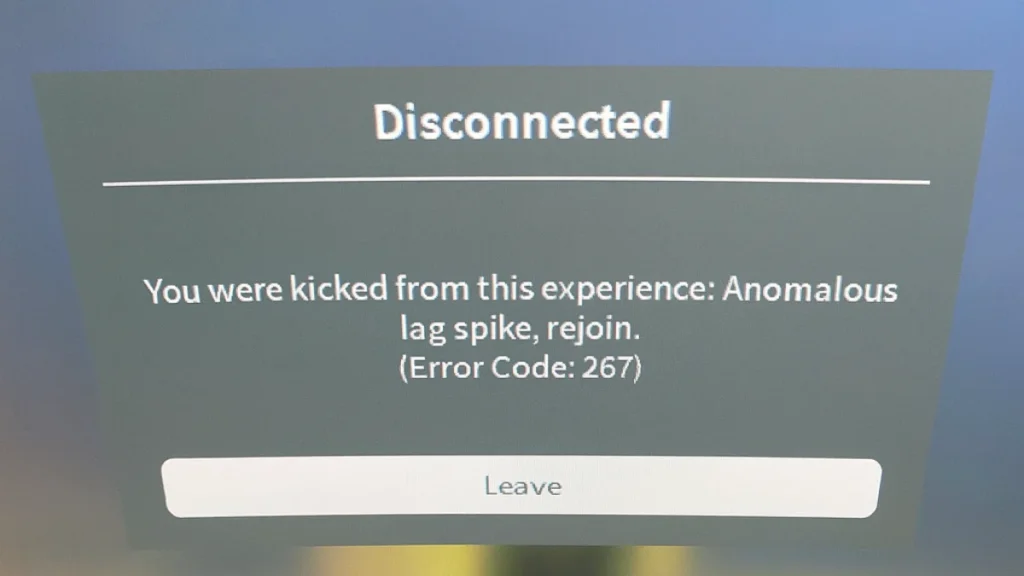
Roblox Error Code 267 usually means the game’s internal script removed you due to lag spikes, suspicious activity, or account restrictions. It is commonly game-specific, not a Roblox account ban, and most players can rejoin after stabilizing their connection or waiting for the restriction to expire.
What Causes Roblox Error Code 267?
Before applying fixes, it helps to understand why the error appears. The most common causes include:
- Sudden internet lag or packet loss
- Game scripts using
:Kick()to remove players - Temporary bans set by the game developer
- VPN or proxy connections flagged as suspicious
- Firewall or antivirus blocking Roblox traffic
- Corrupted or outdated Roblox files
- Newly created or flagged alternate accounts
Is Roblox Error Code 267 a Permanent Ban?
No. Roblox Error Code 267 is not a permanent Roblox ban in most cases.
This error is usually triggered by game-level moderation scripts, not Roblox itself. These scripts are controlled by individual developers and are commonly used to prevent lag abuse, cheating, or unstable connections.
Here’s how to tell what kind of restriction you’re facing:
| Situation | What It Means | Can You Rejoin? |
|---|---|---|
| Anomalous lag spike | Network instability | Yes |
| Kicked by game script | Rule or condition triggered | Usually |
| Banned from one game | Developer restriction | Sometimes |
| Roblox account ban | Platform violation | No |
If you can still join other Roblox games, your account is not banned.
Step-by-Step Fixes for Roblox Error Code 267
Follow these solutions in order. Stop once the issue is resolved.
1. Check and Stabilize Your Internet Connection
Roblox actively monitors connection quality. Sudden ping spikes often trigger Error Code 267.
What to do:
- Open a browser and visit a speed test site.
- Run the test and check:
- Ping: should stay under 150 ms
- Download speed: at least 5 Mbps
- If results are unstable:
- Restart your router
- Switch from Wi-Fi to Ethernet
- Try a different network if possible
Stable connections reduce automatic script kicks.
2. Restart Roblox and Your PC
Temporary memory or session issues can disconnect you mid-game.
Steps:
- Close Roblox completely
- Press Ctrl + Shift + Esc
- End all Roblox processes
- Restart your PC
- Relaunch Roblox and rejoin the game
This refreshes both client and network sessions.
3. Disable Antivirus or Firewall Temporarily
Security software sometimes blocks Roblox traffic, causing false kick triggers.
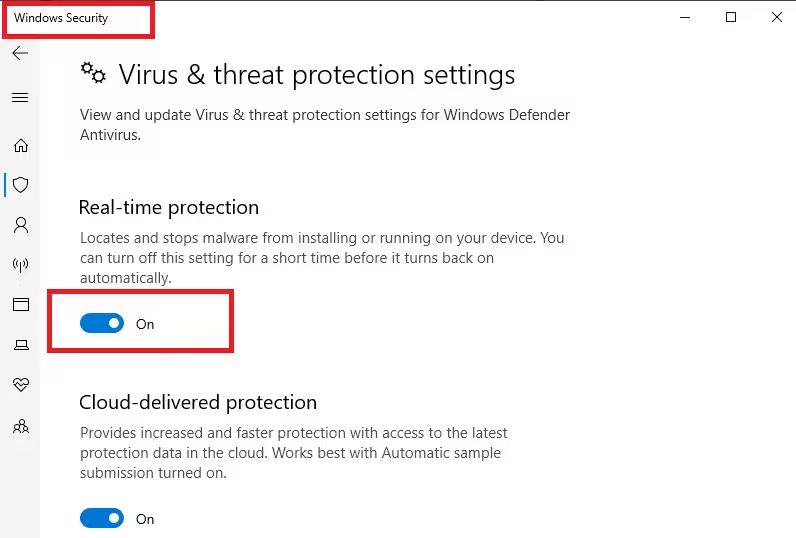
Windows Defender steps:
- Open Settings
- Go to Privacy & Security → Windows Security
- Open Virus & threat protection
- Turn off Real-time protection
- Open Firewall & network protection
- Temporarily disable the active firewall
Important: Re-enable protection afterward and add Roblox as an exception if it fixes the issue.
4. Update Roblox to the Latest Version
Outdated or partially updated files can cause instability.
Microsoft Store version:
- Open Microsoft Store
- Go to Library
- Click Get updates
- Update Roblox
If Roblox is stuck updating, continue to the next step.
5. Clear Roblox Cache and Reinstall
Corrupted cache files frequently cause Error Code 267.
Clear cache on Windows:
- Press Windows + R
- Type:
%localappdata%\Roblox - Press Enter
- Delete the Versions folder
Reinstall Roblox:
- Open Settings → Apps
- Uninstall Roblox
- Download it again from the official Roblox website
- Launch and rejoin the game
6. Stop Using VPNs or Proxies
Roblox often flags VPN traffic as suspicious.
Fix:
- Disconnect any VPN or proxy
- Restart Roblox
- Rejoin the game using your normal connection
If the error disappears, the VPN was the trigger.
7. Test with a Different Roblox Account
Some games restrict newly created or flagged accounts.
How to test:
- Log out of your current account
- Create a new Roblox account
- Join the same game
If the new account works, the restriction is account-specific, not a device issue.
8. Contact the Game Developer
If Error Code 267 appears only in one game, the restriction is controlled by the developer.
What to do:
- Open the game’s Roblox page
- Scroll to Developer Info
- Check:
- Group wall
- Social media links
- Developer profile contact options
- Politely ask why your account was removed
Developers can manually review restrictions.
Common Error Code 267 Messages You May See
Different messages still point to the same issue:
- “Anomalous lag spike, rejoin”
- “You have been banned from this server”
- “Unbanned in X hours”
- “Cheating suspicion detected”
All indicate a kick or temporary restriction, not account deletion.
What NOT to Do When You See Error Code 267
Avoid these actions, as they can worsen the restriction:
- Rejoining repeatedly without fixing lag
- Using VPNs to bypass kicks
- Switching accounts too frequently
- Modifying game files or scripts
These behaviors can escalate temporary restrictions into longer bans.
Related Guides You Might Like:
- How to Fix Roblox Error Code 264 (Quick Fixes)
- Roblox Error Code 524: Causes & How to Fix It
- Roblox Error 429: How to Bypass Rate Limits
- Roblox Error Code 277: Fix Disconnection Issues with These Easy Solutions
- How to Fix Roblox Error Code 279: 7 Quick Solutions
FAQs
What is Roblox Error Code 267?
Roblox Error Code 267 appears when a game removes a player due to lag spikes, suspicious activity, or restrictions set by the game developer.
Why does Roblox say “Anomalous lag spike”?
The “anomalous lag spike” message means the game detected unstable network behavior, such as sudden ping spikes or packet loss, and removed the player to protect gameplay stability.
Is Roblox Error Code 267 a permanent ban?
No. Roblox Error Code 267 is usually a temporary, game-specific kick, not a permanent Roblox account ban.
How long does Roblox Error last?
In most cases, the restriction lasts from a few minutes to several hours, depending on the game’s moderation rules.
Can I rejoin the game after Error Code 267?
Yes. Most players can rejoin after fixing network issues, restarting Roblox, or waiting for the temporary restriction to expire.
Does Error Code 267 mean my Roblox account is banned?
No. If you can join other Roblox games, your account is not banned. The restriction applies only to that specific game.
Can VPN usage cause Roblox Error?
Yes. Using a VPN or proxy can trigger Error Code 267 because Roblox may flag the connection as suspicious.
Will reinstalling Roblox fix Error Code 267?
Reinstalling Roblox can fix the issue if corrupted cache files or outdated client versions are causing instability.
Can a new Roblox account bypass Error Code 267?
A new account may work if the restriction is account-specific, but repeating the same behavior can trigger the error again.
Who controls Roblox Error bans?
Most Error Code 267 kicks are controlled by game developers, not Roblox itself, through in-game moderation scripts.
If the error appears in only one game, the developer controls the restriction—and contacting them is the best solution.

