If you just installed Crunchyroll on your TV, console, or streaming device, you need to activate it before you can start watching anime. The process is simple and takes only a few minutes when you follow the correct steps.
This guide shows you exactly how to activate Crunchyroll using the official activation code method, along with fixes for common problems.
What You Need Before Activation
Before you start, make sure you have everything ready. This prevents errors during the process.
- A Crunchyroll account (free or premium)
- A supported device (TV, console, or streaming stick)
- A stable internet connection
- A phone or computer to enter the activation code
Step 1: Open Crunchyroll App on Your Device
Launch the Crunchyroll app on your TV, PlayStation, Xbox, or streaming device.
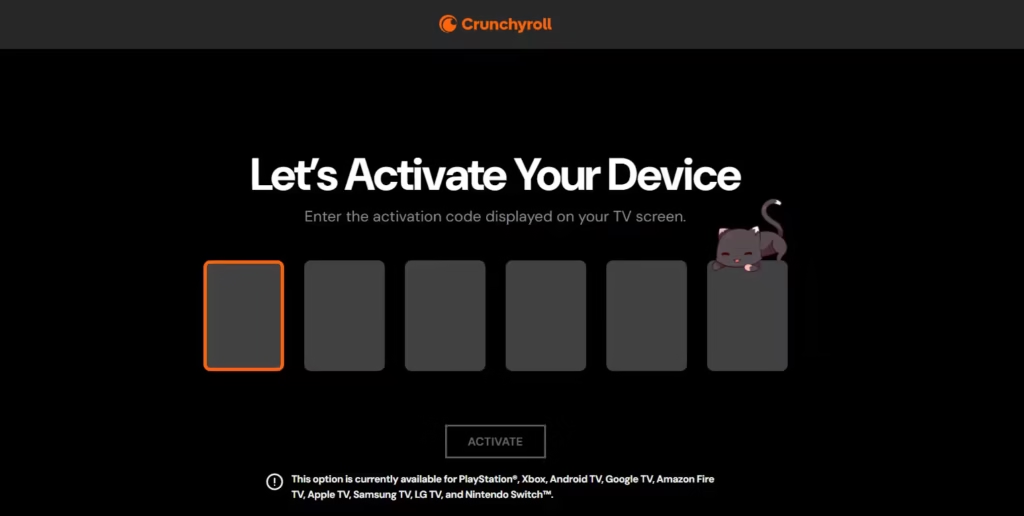
- Go to the Login page
- Select “Activate with Code”
- A 6-character activation code will appear on your screen
This code is unique and expires quickly, so don’t delay.
Step 2: Visit the Activation Page
Now switch to your phone or computer.
- Open your browser
- Go to: www.crunchyroll.com/activate
Make sure you are logged into your Crunchyroll account.
Step 3: Enter the Activation Code
- Type the 6-character code shown on your TV/device
- Click Submit
Once you enter the code, your device will automatically log in and sync with your account
Step 4: Start Watching
After successful activation:
- Your device will refresh automatically
- You will be logged in
- You can start streaming anime instantly
No need to enter email or password on your TV.
Supported Devices for Crunchyroll
Crunchyroll works on most modern devices. You can activate it on:
- Smart TVs (Samsung, LG, Sony)
- Streaming devices (Fire TV, Roku, Apple TV, Chromecast)
- Gaming consoles (PlayStation 4/5, Xbox One/Series X/S, Nintendo Switch)
- Mobile devices (Android, iOS)
How to Fix Crunchyroll Activation Issues
If activation fails, use these quick fixes.
1. Activation Code Not Working
- Refresh the app and generate a new code
- Enter it immediately (codes expire fast)
2. No Code Showing on Screen
- Check your internet connection
- Restart the app
3. App Not Responding
- Restart your device
- Reinstall the Crunchyroll app
4. Activation Page Not Loading
- Try a different browser
- Disable VPN or switch server
5. Region Not Supported
- Use a VPN if Crunchyroll is unavailable in your country
How to Activate Crunchyroll Without Typing Password
Crunchyroll uses the activation code system to make login easier on TVs.
Instead of typing your email and password:
- You log in once on your phone
- Enter the code
- Your device connects instantly
This method saves time and avoids typing errors with remotes.
How to Manage or Remove Devices
If you want to remove a device:
- Go to Settings → Device Management
- Select the device
- Click Deactivate
You can also remove all devices at once if needed.
FAQs
How long does the Crunchyroll activation code last?
Activation codes usually expire within a few minutes. Generate a new one if it stops working.
Can I activate Crunchyroll on multiple devices?
Yes, you can activate multiple devices, but streaming limits depend on your subscription.
Why is my Crunchyroll activation code not working?
The code may have expired or been entered incorrectly. Refresh the app and try again.
Do I need a premium account to activate Crunchyroll?
No, you can activate with a free account, but premium is required for full access.
What should I do if the app is stuck on activation screen?
Restart the app or clear cache. Reinstall if the problem continues.
Can I activate Crunchyroll without internet?
No, your device must be connected to the internet to generate and verify the activation code.

