Microsoft launched MAI-Image-2.5 and the model immediately secured third place on Arena’s text-to-image leaderboard. The release marks the strongest performance yet for Microsoft’s in-house image generation lineup and puts the company within striking distance of OpenAI and Google at the very top of the rankings.
What Is Microsoft MAI-Image-2.5?
MAI-Image-2.5 is the third generation of Microsoft’s in-house text-to-image AI model. It takes the MAI-Image series from a mid-table position to a spot among the top three models on Arena’s global leaderboard, behind only OpenAI’s gpt-image-2 at rank one and one other model at rank two.
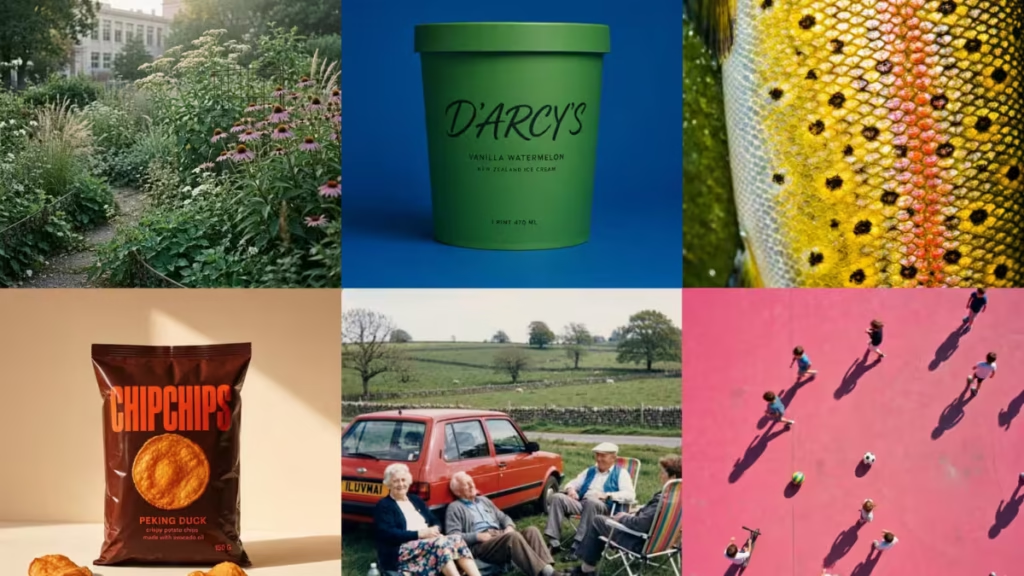
The MAI Superintelligence Team describes MAI-Image-2.5 as a step-change in quality over MAI-Image-2. The model follows prompts more closely, renders text more reliably, and produces more detailed and coherent images than any previous version.
From #9 to #3: How the MAI-Image Series Evolved
Microsoft’s image generation journey started slowly. MAI-Image-1 debuted at the ninth position on Arena’s leaderboard, well behind the leading AI tools from other labs. The model launched to Bing users through Bing.com/create and the Bing mobile app.
In March 2026, Microsoft introduced MAI-Image-2, which made significant gains with better natural light handling, more accurate skin tones, and improved visual coherence. MAI-Image-2 debuted at third place on Arena, trailing only Google’s gemini-3.1-flash-image-preview and OpenAI’s gpt-image-1.5-high-fidelity. Microsoft made MAI-Image-2 available inside Microsoft Copilot and Bing Image Creator, and also released it for developers through the API on Microsoft Foundry.
MAI-Image-2.5 now holds that same third-place position, but with substantially higher scores across every style category Arena tracks.
Arena Leaderboard Scores: MAI-Image-2.5 vs Previous Models
Arena publishes category-by-category scores for every model. The table below shows how the three generations of the MAI-Image series compare across all eight tracked dimensions.
| Category | MAI-Image-1 | MAI-Image-2 | MAI-Image-2.5 |
|---|---|---|---|
| Overall | 1093 | 1182 | 1254 |
| 3D Imaging and Modeling | 1096 | 1178 | 1254 |
| Cartoon, Anime and Fantasy | 1100 | 1178 | 1268 |
| Photorealistic and Cinematic | 1103 | 1202 | 1247 |
| Art | 1104 | 1176 | 1256 |
| Portraits | 1094 | 1208 | 1261 |
| Text Rendering | 1070 | 1174 | 1278 |
| Product, Branding and Commercial | 1086 | 1175 | 1263 |
MAI-Image-2.5 improves across every single category. The biggest gains appear in Text Rendering, jumping from 1070 under MAI-Image-1 to 1278 under MAI-Image-2.5, and in Cartoon, Anime and Fantasy, which climbs from 1100 to 1268.
OpenAI’s gpt-image-2 currently leads the overall leaderboard with a score of 1388.
Key Improvements in Microsoft MAI-Image-2.5
Sharper Text Rendering
Text rendering is the area where MAI-Image-2.5 delivers its largest improvement over previous versions. Words in generated images are sharper and more legible. Layouts hold together better across different styles and sizes. This directly addresses one of the most common weaknesses in AI-generated images, where text on posters, labels, and packaging tends to distort or break down.
Stronger Commercial and Branding Imagery
MAI-Image-2.5 makes a focused push into professional creative work. The model generates better posters, packaging mockups, branding concepts, and product shots than any previous version. Brand-forward visuals come through with more polish, and the structural integrity of product imagery improves noticeably.
Improved Visual Reasoning
The model demonstrates stronger visual reasoning across objects, lighting, scale, scene structure, and spatial relationships. A simple set of directions now produces a more deliberate, coherent result. Microsoft says MAI-Image-2.5 is better at understanding how elements relate within a scene and how light interacts with surfaces.
Broader Style Range
MAI-Image-2.5 performs well across a wide range of image styles, from photorealistic and cinematic outputs to stylized illustrations, 3D modeling, anime, and fine art. The Arena scores above confirm that no single category is a weak point for the model.
Where to Try MAI-Image-2.5 Right Now
Arena hosts MAI-Image-2.5 for anyone to try without a paid subscription. Microsoft is also bringing the model to the MAI Playground and Microsoft Foundry, where developers can access it through the API.
Like previous models in the MAI-Image series, MAI-Image-2.5 will integrate into Microsoft’s consumer and developer products over time. Microsoft Copilot and Bing Image Creator previously received MAI-Image-2, and Microsoft has not announced a timeline for when MAI-Image-2.5 will replace it in those products.

