Spotify has rolled out a new feature called podcast clips, and it changes how listeners interact with episodes. Instead of sending a full two-hour episode link and hoping your friend finds the right moment, you can now cut out the exact segment you want and share it right away.
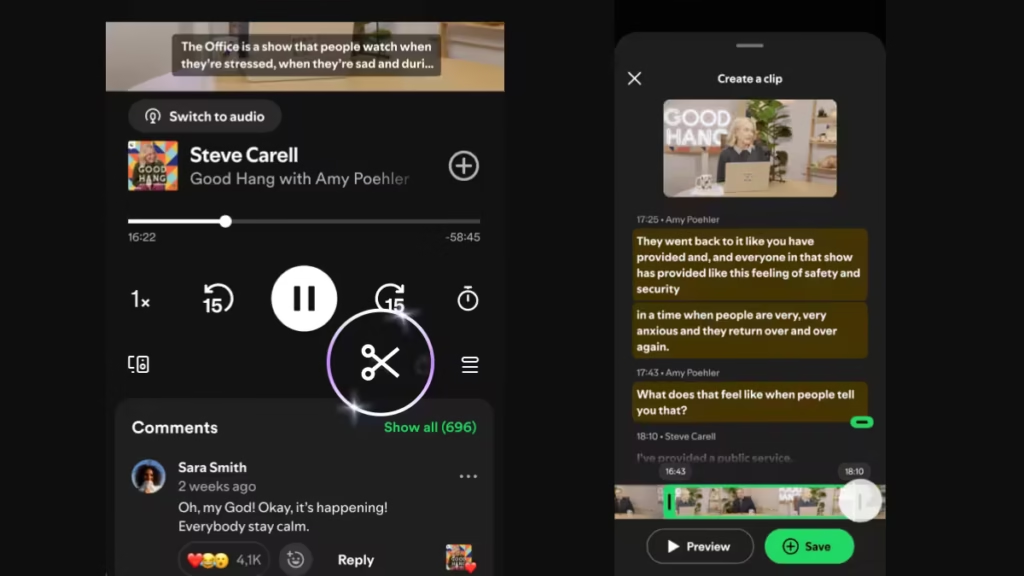
The feature is live globally for both Free and Premium users on mobile, with availability expanding across more podcast shows over time.
What Are Spotify Podcast Clips
Spotify podcast clips let you capture specific moments from any podcast episode while you listen. You save or share only the part that matters, whether that is a piece of advice, a funny exchange, an interview highlight, or a take you want a friend to hear.
The feature also comes with an updated sharing menu. From the share icon, you can choose to share a full episode, a chapter, a timestamp, or a clip, then send it through Spotify Messages or any supported platform.
How to Create a Podcast Clip on Spotify
Creating a clip takes only a few seconds while you are already listening:
- Open any podcast episode in the Spotify app.
- Tap the scissors icon in the Now Playing view.
- Trim the section you want to keep.
- Tap Save to store it in your library or Share to send it immediately.
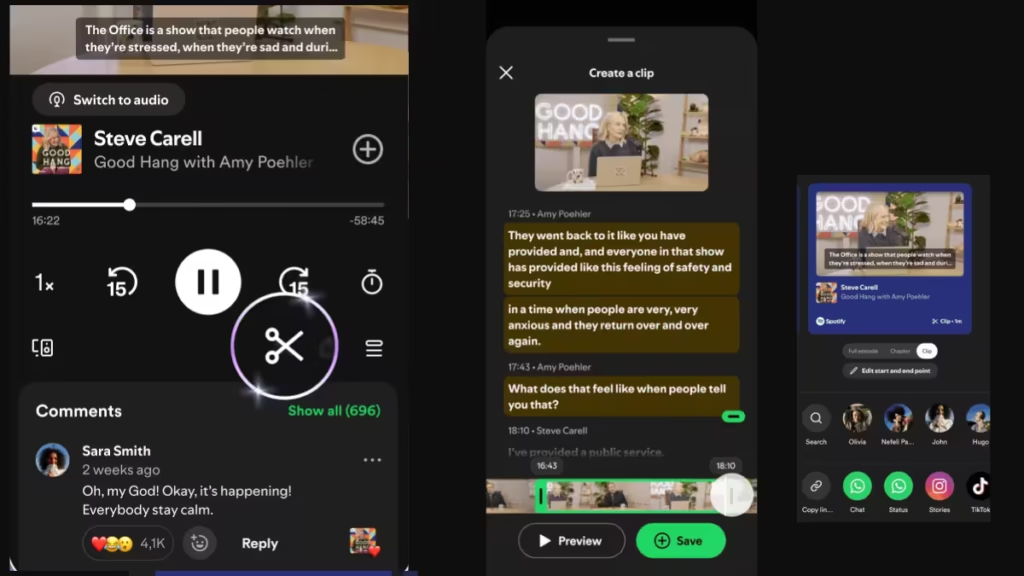
For more sharing options, tap the share button first, choose your format (full episode, chapter, timestamp, or clip), then send it through the platform you prefer.
Where Spotify Saves Your Clips
Saved clips get their own dedicated section inside Your Library. You can revisit them any time and add them directly to podcast playlists. This keeps your favorite moments organized without scrubbing through full episodes again.
Spotify says podcast chapters, which launched earlier this year, are already being saved and added to playlists more than 2 million times every month. Early testing shows that enabling clips increases overall podcast saving rates, which points to stronger long-term engagement for both listeners and creators.
Why Spotify Added This Feature
Podcast discovery increasingly happens through short, shareable moments rather than full episode promotion. A single funny clip or a standout interview exchange can spread faster than the entire show. For creators, a shared clip can act as a new entry point that turns one moment into a longer listener relationship.
Spotify has been building several engagement-focused features lately. The platform has been expanding video content options inside the app and introduced verification badges for real artists. Podcast clips fit that same pattern of keeping users active inside Spotify longer and turning casual listeners into regular ones.
According to Spotify’s newsroom, the clips feature was designed specifically around the insight that saved content drives stronger long-term engagement.
Availability
Spotify podcast clips are rolling out globally for Free and Premium users on mobile devices. Support will expand across more podcast shows gradually. Look for the scissors icon the next time you open an episode in the Now Playing view.
Frequently Asked Questions
How do I create a podcast clip on Spotify?
While listening to any podcast episode, tap the scissors icon in the Now Playing view, trim the section you want, then tap Save or Share. The process takes only a few seconds without leaving the player.
Where are saved Spotify podcast clips stored?
Saved clips get a dedicated section inside Your Library. You can also add clips directly to podcast playlists from the same location.
Is the Spotify podcast clips feature free?
Yes. Spotify podcast clips are available to both Free and Premium users on mobile devices. Availability is rolling out gradually across supported podcast shows.
Can I share Spotify podcast clips on social media?
Yes. After creating a clip, tap the share button and choose your format. You can send clips through Spotify Messages or any supported external platform.
What is the scissors icon in the Spotify podcast player?
The scissors icon is the entry point for the new clips feature. Tapping it while listening opens a trimming tool that lets you select and capture the specific moment you want to save or share.
Do Spotify podcast clips work on desktop?
At launch, clips are available only on mobile devices. Spotify has not confirmed a desktop release date, but the company says support will expand over time.

