Google is rolling out a new sharing feature for the Gemini app that lets Workspace users share chats, canvases, and generated media directly through Google Drive.

The update builds on the same infrastructure that powers file sharing across Docs, Sheets, and Drive. For teams already using Workspace, there is no new interface to learn.
What the New Sharing Feature Does
The feature lets you share a snapshot of your Gemini conversation, canvas, or generated media with teammates using the standard Google Drive sharing menu. Because it runs on the same underlying technology as Google Drive, the experience is identical to sharing any other Workspace file.
You can share via two methods: through Google Drive sharing or through a public link. Admins control which methods are available to users inside the organization.
How Conversation Snapshots Work
When you share a Gemini chat, you share a snapshot of that conversation up to that moment. If a recipient continues the chat from that snapshot, their messages do not alter your original thread. Both users work independently from that point forward.
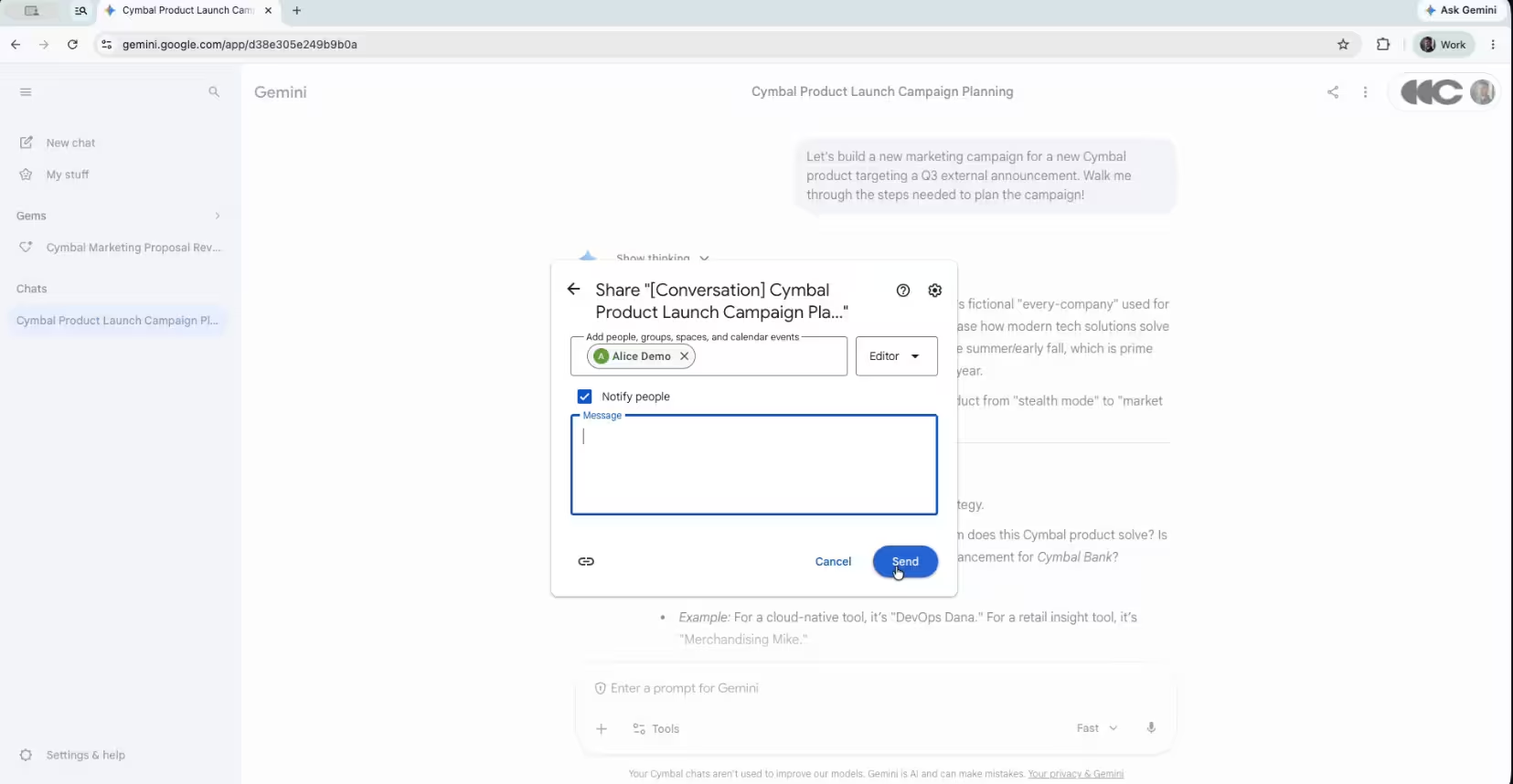
This design lets teams build on top of what others have created without overwriting the source conversation, scaling AI competency and collaboration across the organization. Educators can share a structured Gemini session with students, who can then continue from the same starting point without affecting the original.
Who Gets Access to This Feature
The sharing feature is available to all Google Workspace customers on the web. It turns on by default for Workspace users and inherits your organization’s existing Google Drive sharing policies automatically.
If your organization already allows Drive content to be shared outside the domain, Gemini assets follow those same rules. No extra configuration is required for end users once the feature reaches their account.
How Admins Can Control Gemini Sharing
Workspace admins manage the feature through the Google Admin Console. Navigate to Generative AI settings under the Gemini app section. From there, admins can:
- Toggle public link sharing on or off
- Toggle Google Drive sharing on or off independently
- Apply either setting to specific organizational units or configuration groups
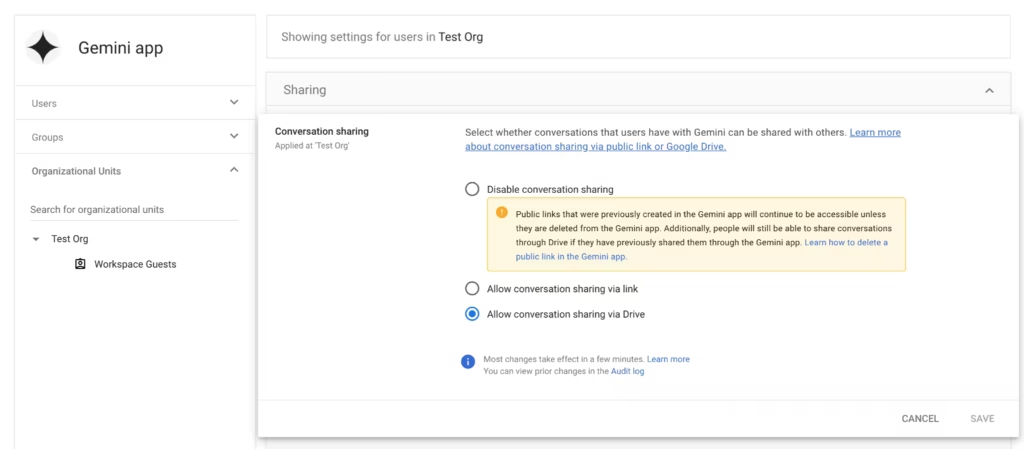
These independent toggles give teams with strict cybersecurity policies granular control over how Gemini output leaves the organization. An admin can allow internal Drive sharing while blocking public link sharing, or disable both entirely for sensitive units.
Rollout Timeline
Google is releasing the feature in two stages:
Admin Console controls Rapid Release and Scheduled Release domains: Full rollout starting May 28, 2026 (1 to 3 days for visibility)
End-user visibility Rapid Release and Scheduled Release domains: Full rollout starting June 3, 2026, with the complete rollout expected by June 8, 2026
Other Gemini Updates from Google I/O 2026
Google introduced several additional Gemini updates at its I/O 2026 developer conference, positioning Gemini as a proactive work tool rather than a basic prompt-response chatbot.
- Gemini 3.5 Flash and Pro: Flash becomes the new default for the Gemini web app due to its speed and low operational cost. Google says it outperforms older flagship models on reasoning and coding tasks.
- Gemini Omni: A new multimodal model that lets users generate and edit video from any input type in one step.
- Neural Expressive: A new design language that gives the Gemini app a major visual redesign across the interface.
Frequently Asked Questions
Does sharing a Gemini chat give the recipient access to my future messages?
No. Shared conversations are snapshots. If the recipient continues the chat from that snapshot, their new messages do not appear in your original thread and do not change your conversation.
Can admins block users from sharing Gemini chats outside the organization?
Yes. Admins can toggle external sharing off independently from internal Drive sharing inside the Google Admin Console under Generative AI settings.
Is the Gemini Drive sharing feature available on free Google accounts?
No. The feature is available to Google Workspace customers only. Free Google account holders do not get access to this sharing functionality.
When will end users see the new sharing option?
End users on both Rapid Release and Scheduled Release domains will start seeing the feature from June 3, 2026, with full rollout expected by June 8, 2026.
Does sharing a conversation affect my Gemini usage limit?
Sharing a conversation snapshot does not consume your Gemini usage limit. If the recipient continues the shared chat, that activity counts against their own quota.
What types of content can I share through this feature?
You can share Gemini chats, canvases, and generated media using the standard Google Drive sharing menu from the Gemini web interface.
Related Tech Guides
- How to Set Up Gemini Daily Brief on Android
- How to Install Gemini CLI on Windows, macOS, and Linux (Step-by-Step Guide)
- GreyVibe Hackers Use ChatGPT and Gemini to Launch AI-Powered Cyberattacks
Gemini Error Fixes

