Microsoft pushed out an emergency patch for Windows 11 on July 18, 2026, after the July Patch Tuesday update caused serious problems on select Dell PCs. The new update, KB5121767, targets performance drops, overheating, battery drain, and unexpected shutdowns tied to an Intel driver conflict.
What Caused the Windows 11 KB5101650 Dell Shutdown Issue
Microsoft released KB5101650 on July 14, 2026, as that month’s Patch Tuesday update, carrying more than 570 security fixes. On a limited number of Dell PCs, the update broke the Intel Innovation Platform Framework (Intel IPF) driver, which handles thermal management, fan control, and power features.
Affected machines experienced a range of symptoms including a Black Screen of Death, boot failures, sudden shutdowns, higher power draw, and overheating. The root cause traces back to a new Windows USB-C Connection Manager interface that conflicts with the Intel driver Dell PCs rely on for power management. Microsoft blocked KB5101650 from reaching affected devices once the issue surfaced.
What Windows 11 KB5121767 Fixes
KB5121767 is an out-of-band (OOB) release, meaning Microsoft shipped it outside the normal monthly update cycle to resolve an urgent problem. It brings Windows 11 25H2 to build 26200.8894 and 24H2 to build 26100.8894.
The update is cumulative, so installing it also applies every fix already included in the July 2026 update if your device hasn’t received them yet. It bundles a servicing stack update (KB5120102) that improves the reliability of the update installation process, along with an AI components refresh to version 1.2605.856.0 covering image search, content extraction, and semantic analysis.
Dell PCs Affected by the Windows 11 KB5121767 Update
Microsoft hasn’t released an official hardware list, but reports point to specific workstation and laptop lines built around the Intel IPF driver:
Dell Precision workstations
- Dell Precision 5470
- Dell Precision 5480
- Dell Precision 5490
- Dell Precision 5770
Dell Pro Max and Pro Precision lines
- Dell Pro Max 14 Premium (MA14250)
- Dell Pro Max 16 Premium (MA16250)
- Dell Pro Precision 7 14 (PW714260)
- Dell Pro Precision 7 16 (PW716260)
Dell XPS 17 series
- Dell XPS 17 9720
- Dell XPS 17 9730
These systems share the same Intel IPF driver that Dell uses for thermal management on newer hardware.
Do You Need to Install Windows 11 KB5121767
Microsoft says KB5121767 is only recommended for PCs that hit the Dell performance bug. If your system never showed these symptoms, you can skip the update entirely.
That said, the update installs automatically on some PCs regardless of whether they’re affected, if the “Get the latest updates as soon as they’re available” toggle is turned on in Windows Update settings. If you’d rather control what installs and when, turn that toggle off.
How to Install Windows 11 KB5121767
If your Dell PC is showing the shutdown, overheating, or performance symptoms described above, install the update right away:
- Open Settings.
- Go to Windows Update.
- Click Check for updates, then select Download & Install if KB5121767 appears.
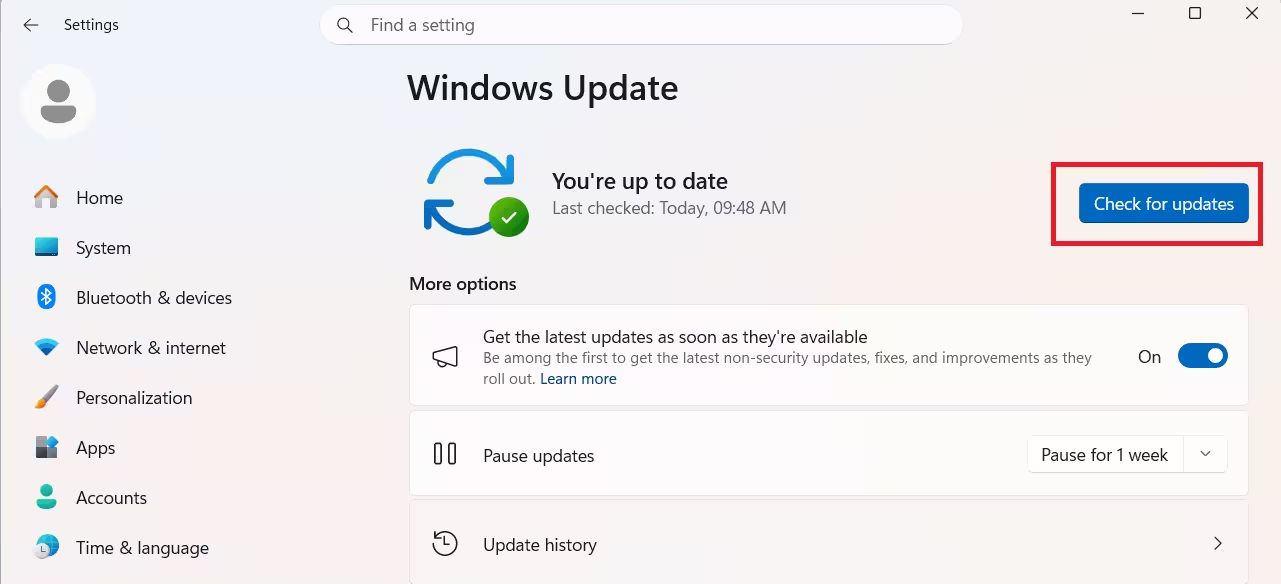
You can also grab the update directly from the Microsoft Update Catalog and install it manually. On the Windows Update page, the patch shows up under the generic label “2026-07 Update (KB5121767) (26200.8894),” which doesn’t mention the OOB status or that it’s Dell-specific, so don’t be confused if the naming looks vague.
How to Check Your Windows 11 Build Number
To confirm whether your PC already has the July update or needs KB5121767:
- Open Settings > System > About.
- Check the build number under Windows specifications.
- Compare it against build 26200.8875 or 26100.8875 (original July update) versus 26200.8894 or 26100.8894 (KB5121767).
Frequently Asked Questions
Is KB5121767 a security update?
No. It’s an out-of-band fix targeting a specific performance and power issue on affected Dell hardware. It does carry forward all security fixes from the July 2026 update as part of its cumulative package.
Will KB5121767 install automatically on my PC?
It can, if you have the “Get the latest updates as soon as they’re available” toggle enabled in Windows Update settings, even on PCs that were never affected by the Dell issue.
What if I already installed it and I’m not on an affected Dell model?
Microsoft says there’s no cause for concern. The update won’t cause problems on unaffected hardware, it’s simply unnecessary for those systems.
Does KB5121767 require a restart?
Yes. Like any cumulative Windows update, KB5121767 needs a restart to finish installing. Once it downloads, it shows as pending a restart in Windows Update until you reboot.
Can I uninstall KB5121767 if it causes new problems?
Yes. Go to Settings > Windows Update > Update History > Uninstall updates, find KB5121767 in the list, and remove it. Keep in mind this also rolls back any fixes bundled with the update, so your PC returns to its pre-KB5121767 state.

