Call of Duty: Black Ops 6 players have run into a frustrating error that blocks them from joining friends' lobbies. The error message reads: "Join failed because you are on a different version."
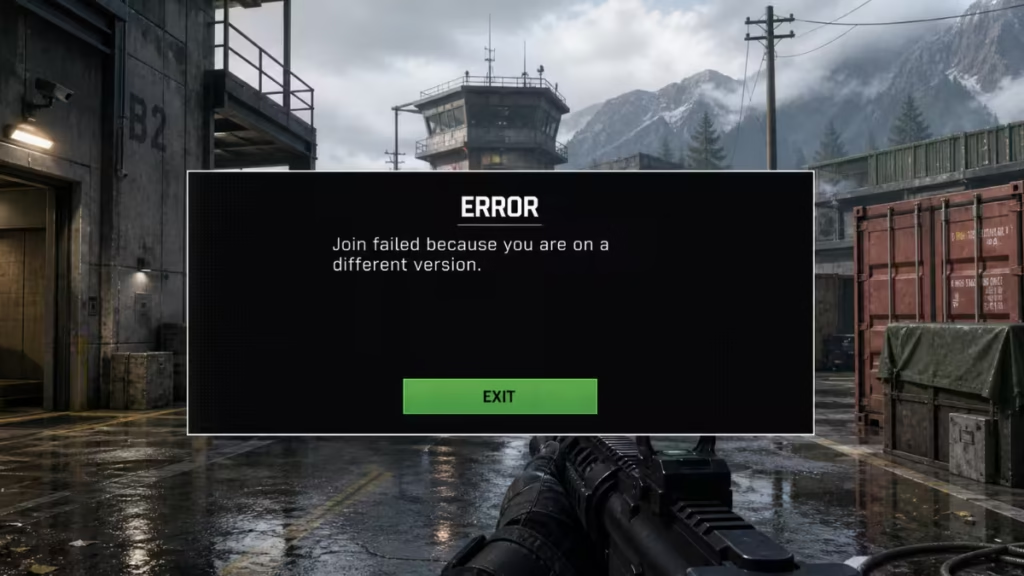
This issue affects players on PC, PlayStation, and Xbox, and tends to spike after every major update or season launch. This guide covers every confirmed fix to get you back into the action.
What Causes the "Join Failed Different Version" Error in BO6?
The error appears when your game's version does not match the version on the live servers. Several things can trigger it:
- Pending Updates: A new patch has dropped, but your game has not updated yet. This is the most common cause.
- "Update Requires Restart" Notifications: Call of Duty sometimes flags your game as outdated without requiring a download. In these cases, simply restarting the game is enough to sync your version.
- Game Crashes or Unexpected Disconnects: If BO6 crashes mid-session, your game client can lose sync with the live server version.
- Corrupted Game Files: Background files may have failed to install correctly after the latest update.
- Cross-Platform Inconsistencies: Players on different platforms sometimes face version syncing delays.
- COD HQ Issues: Some players report problems specifically when launching BO6 through COD HQ.
- Server-Side Issues: On major update days (such as a new season launch), the error can stem from the developer's end and requires a fix from Treyarch rather than from your side.
How to Fix the "Join Failed Different Version" Error in BO6
Fix 1: Restart the Game First
The simplest fix is also the most effective one. Restart BO6 before trying anything else. Call of Duty frequently uses an "update requires restart" process rather than a traditional download, meaning your game is already up to date but needs a relaunch to register the new version. Most players who encounter this error resolve it with this single step.
Fix 2: Check for and Install Updates
If restarting alone does not work, check your launcher for a pending update:
- Exit BO6 completely
- Open your game launcher (Battle.net, Steam, PlayStation Store, or Xbox Store)
- Check for any available updates and download them
- Restart your PC or console
- Relaunch BO6 and retry joining a lobby
Important: If you are trying to play with a group of friends, every party member needs to follow these steps. The error will persist if even one player in the group is running an older version. Have everyone close the game, update, and relaunch before attempting to form a party.
Fix 3: Restart the Game and COD HQ
If you launch BO6 through COD HQ, closing both applications fully and relaunching COD HQ before opening BO6 has resolved the issue for many players, especially after a crash.
- Close BO6
- Close COD HQ entirely
- Relaunch COD HQ
- Launch BO6 and attempt to join again
Fix 4: Verify Game Files (PC Only)
Corrupted or incomplete background files can cause BO6 to flag a version mismatch even after updating. Verifying your files forces the launcher to detect and repair these:
On Steam:
- Open Steam
- Right-click BO6 and select Properties
- Go to Installed Files
- Click Verify Integrity of Game Files
On Battle.net:
- Open Battle.net
- Select BO6
- Click Scan and Repair
- Let the process complete, then restart your PC and relaunch BO6
Fix 5: Try Joining a Different Party Member's Lobby
Instead of joining one specific friend, try joining a different member of the group. Once inside a lobby, leave it and then attempt to join your original friend's session. This workaround bypasses the version check that triggers the error in some cases.
Fix 6: Reinstall Shaders
Shader reinstallation has fixed the error for some PC and console players:
- Open BO6 and navigate to Graphics Settings
- Find the Reinstall Shaders option
- Wait for the process to complete
- Restart the game and try joining again
Fix 7: Change Party Privacy Settings
Switching your party privacy to Friends Only (instead of Open or Invite Only) has worked for some players as a short-term workaround.
Fix 8: Restart All Devices
If none of the above fixes work, perform a full restart of your hardware:
- Restart your PC or console
- Restart your router and modem
- Reconnect and relaunch BO6
Some players have also resolved the issue by switching to a mobile hotspot, which resets the network connection entirely.
Fix 9: Reinstall the Game (Last Resort)
If all other methods fail, uninstall and reinstall BO6. On some platforms, reinstalling only the Multiplayer component (rather than the full game) has resolved the error without requiring a full reinstall.
Additional Fixes Reported by the Community
Players in the BO6 community have shared a few more workarounds that have worked in specific cases:
- Repeatedly attempt to join: Spamming the join button has worked for some players when the error appears intermittently.
- Switch game modes: Joining a Warzone match and then switching back to Multiplayer or Zombies has cleared the error for some.
- Host a private match first: Starting a private match and then inviting friends can bypass the version check.
- Use a VPN: Switching to a different IP address or VPN connection has helped in isolated cases.
What If None of These Fixes Work?
If you have tried every fix above and the error persists, the issue may be on Treyarch's end. This has happened before on major update days, including the Season 2 launch, when the error appeared for large numbers of players simultaneously. In those cases, the only option is to contact Activision Support or wait for Treyarch to release a hotfix.
Treyarch has acknowledged awareness of this recurring error, and patches that address it typically arrive within a few days of a report spike.