Microsoft has released new Windows 11 Release Preview builds — Build 26100.7701 and Build 26200.7701 (KB5074105) — to Windows Insiders running versions 24H2 and 25H2. The update delivers a mix of new features, accessibility improvements, performance fixes, and security upgrades through both gradual rollout and normal rollout channels.

A gradual rollout means features arrive in phases and may not appear immediately on every device. Normal rollout changes apply broadly once the update reaches general availability.
Cross-Device Resume Brings Phone-to-PC Continuity
Microsoft continues to expand Cross-Device Resume, allowing users to pick up activities started on their Android phones directly on a Windows PC.
You can now:
- Resume Spotify playback on your PC after listening on your phone.
- Continue working in Word, Excel, or PowerPoint from where you left off.
- Pick up browser sessions across devices.
- Open files from the Microsoft Copilot app on Android and continue editing them in Microsoft 365 apps or a web browser.
Support currently includes Android phones from HONOR, OPPO, Samsung, Vivo, and Xiaomi. Vivo users can also resume browsing sessions from Vivo Browser. Offline files stored only on the phone are not supported.
This feature aims to reduce friction for users who frequently switch between mobile and desktop workflows.
Windows MIDI Services Gets Major Modernization
The update significantly improves MIDI support on Windows, targeting musicians and audio developers.
Key improvements include:
- Enhanced support for MIDI 0 and MIDI 2.0.
- Built-in translation between legacy MIDI 1.0 systems.
- Shared MIDI ports across apps.
- Custom port naming and loopback routing.
- Performance optimizations and stability fixes.
Microsoft provides the MIDI App SDK and tools — including MIDI Console and MIDI Settings — as a separate download. Since these tools are currently unsigned, Windows may show a security warning during installation.
Narrator, Voice Access, and Voice Typing Improve Accessibility
Several accessibility features receive practical upgrades:
- Narrator now lets users control which UI details are spoken and the order they are announced, reducing unnecessary audio clutter.
- Voice Access introduces a streamlined setup flow to help users quickly select microphones and download speech models.
- Voice Typing adds a configurable “wait time before acting” setting, improving accuracy for different speaking speeds.
These changes focus on making voice and screen-reader interactions more predictable and easier to customize.
Smart App Control No Longer Requires a Clean Install
Users can now toggle Smart App Control (SAC) on or off without reinstalling Windows.
To change the setting:
- Open Windows Security.
- Go to App & Browser Control.
- Select Smart App Control and toggle it as needed.
When enabled, SAC blocks untrusted or potentially harmful apps automatically. This change removes a major barrier that previously limited adoption.
Windows Hello Expands to External Fingerprint Sensors
Windows Hello Enhanced Sign-in Security (ESS) now supports peripheral fingerprint readers, not just built-in sensors.
To enable it:
- Connect a supported fingerprint reader.
- Open Settings → Accounts → Sign-in options.
- Follow the enrollment prompts.
This makes hardware-based biometric security available on desktops and custom PCs, including Copilot+ systems.
Settings App Adds a Device Card
The Settings home page now shows a Device card displaying key hardware specifications and usage details. Users can tap the card to open System → About for deeper device information.
Microsoft resumed this rollout after temporarily pausing it during a previous release cycle. Availability currently applies to U.S. users only.
Stability Fixes Across Start Menu, Explorer, and Login
Microsoft also addressed several usability and stability issues:
- Fixed truncated shutdown warnings in the Start menu.
- Corrected Start menu placement issues in Arabic and Hebrew layouts.
- Improved File Explorer responsiveness on network locations.
- Resolved Explorer.exe hangs during login that prevented the taskbar from loading.
- Fixed desktop icon movement during file interactions.
- Corrected keyboard setting label mismatches.
- Prevented system freezes when launching elevated Windows Terminal from non-admin accounts.
- Improved lock screen responsiveness.
These refinements target everyday reliability rather than headline features.
Secure Boot and Cryptographic Security Strengthened
In the normal rollout phase, Microsoft updated the Secure Boot chain for Windows 11 version 24H2. Devices with the Windows UEFI CA 2023 certificate now replace the older 2011-signed boot manager.
Microsoft warns that resetting Secure Boot databases incorrectly can trigger Secure Boot violations. In rare cases, users must create Secure Boot recovery media to restore access.
The update also improves DPAPI domain backup key management, allowing administrators to control automatic key rotation frequency. This strengthens cryptographic protection and reduces reliance on older encryption methods.
Additional Bug Fixes in the Release
Other fixes include:
- Black screen issues in isolated multiuser environments.
- Narrator failing to start during Windows ISO installations.
- Startup crashes related to Boot Manager debugging.
- iSCSI boot failures causing “Inaccessible Boot Device” errors.
- Compliance warnings in Windows SDK runtime libraries.
These corrections improve enterprise stability and developer tooling reliability.
How to Get the Update
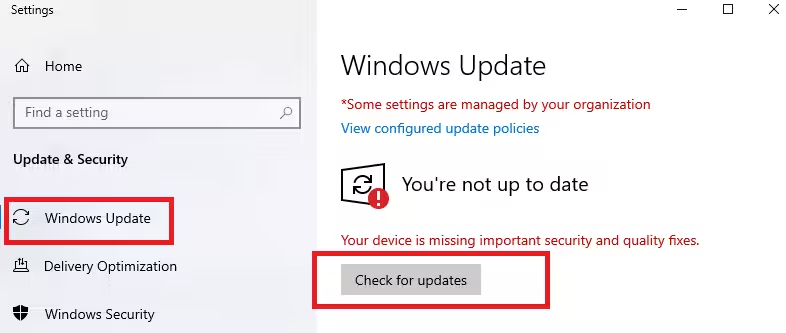
If you are enrolled in the Windows Insider Release Preview Channel, the update appears automatically through:
Settings → Windows Update → Check for updates
Feature availability depends on device type, region, and rollout phase.
Microsoft continues to deliver these changes in stages, so some features may take time to appear across all eligible systems.

