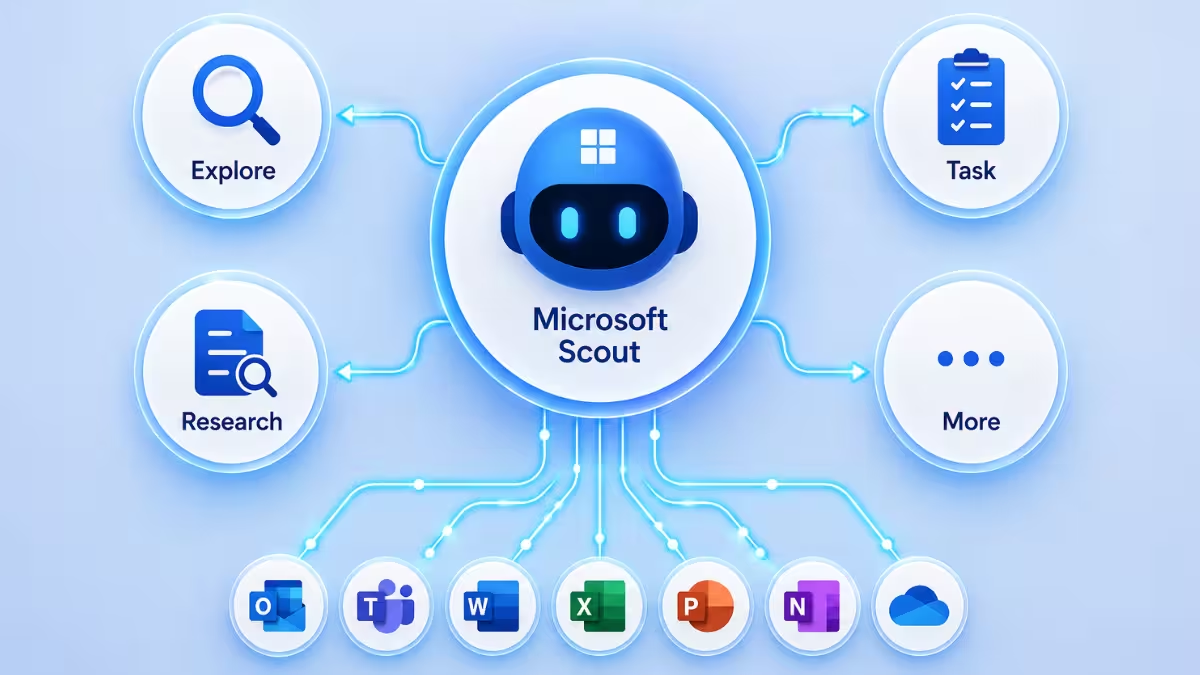
Some requests are too big or too varied for Microsoft Scout to handle as one continuous thread. When that happens, it launches specialized sub-agents that work independently in the background and report back once they’re done. This guide covers what each agent type does, when Scout decides to delegate, and how to trigger delegation yourself.
What Are Microsoft Scout Sub-Agents?
A sub-agent is a separate, focused instance of Scout with its own instructions and its own isolated context. Instead of trying to juggle a large codebase search, a test run, and a security review all in the same conversation thread, Scout can hand each piece off to a sub-agent built for that specific job. Each one works independently in the background, and Scout folds the results back into your conversation once they finish.
The Five Sub-Agent Types
| Agent Type | What It Does | When to Use It |
|---|---|---|
| Explore | Fast codebase research across multiple files and modules | Understanding unfamiliar code, tracing data flows, analyzing architecture |
| Task | Runs builds, tests, lints, and installations | Running a test suite, building a project, installing dependencies |
| Code review | Analyzes code changes for bugs and security issues | Reviewing diffs, checking for logic errors before committing |
| Research | Thorough web and repository searches with citations | Investigating technical questions, comparing libraries, finding docs |
| General-purpose | Full toolset for complex multi-step work | Refactoring across files, implementing features, complex migrations |
Each type is scoped to a specific kind of work. Explore and Research sound similar at a glance, but Explore digs through your own codebase while Research reaches outward to documentation, repositories, and the web. Knowing what each type does is only half the picture though, the more useful question is how Scout actually decides to launch one in the first place.
How Microsoft Scout Delegation Works
Scout doesn’t ask permission before delegating in most cases. The process runs in four steps:
- Scout identifies that a task would benefit from parallel execution or an isolated context
- It launches one or more sub-agents with specific instructions
- The sub-agents work independently in the background while your conversation continues
- When they finish, Scout incorporates their results back into the conversation
This means you can keep working, or ask Scout something else entirely, while a sub-agent handles a longer task in parallel rather than blocking the whole conversation until it’s done.
Research Agents for Complex Investigations
Research agents deserve a closer look since they handle a specific kind of workload: questions that need multiple sources searched in parallel. These agents search repositories, fetch documentation, verify claims, and compile detailed findings with citations. They’re the right fit for broad, open-ended questions like:
- “What are the best practices for implementing OAuth 2.0 with PKCE?”
- “Compare the pros and cons of these three CSS-in-JS libraries.”
- “Find the documentation for this API endpoint and explain how pagination works.”
A narrow, single-fact question usually doesn’t need a research agent. Scout reserves this for investigations broad enough that a single search wouldn’t give a complete answer. The three examples above are all things Scout would likely delegate on its own, without you having to ask for it directly. But you can also request delegation yourself instead of leaving that decision to Scout.
How to Request Delegation Explicitly
You don’t have to wait for Scout to decide delegation is worthwhile. You can ask for it directly in your prompt, especially when you want two things happening at once. For example: “Research how other teams implement caching, while you also start setting up the Redis configuration.” Unlike the research examples above, this kind of request explicitly signals that you want parallel work rather than one task finishing before the next starts.
Benefits of Microsoft Scout Sub-Agent Delegation
Without sub-agents, Scout would have to work through a large task step by step in a single thread, and a long codebase exploration or an extensive research question would tie up the whole conversation until it finished. Delegation solves that by isolating each piece of work into its own context, so a code review doesn’t get mixed up with a test run, and a research agent’s citations don’t clutter a straightforward build task. It also means Scout can run several of these in parallel instead of one after another, which is where the real time savings come from on genuinely complex requests. A few common questions come up once you start relying on delegation regularly.
Frequently Asked Questions
Do I need to manually choose which sub-agent type Scout uses?
No. Scout identifies the right agent type based on the task and launches it automatically. You only need to specify a type yourself if you want to request delegation explicitly for a particular kind of work.
Can Microsoft Scout run more than one sub-agent at the same time?
Yes. Sub-agents work independently in the background, and Scout can launch more than one at once for genuinely parallel work, such as researching an approach while also setting up related configuration.
What’s the difference between an Explore agent and a Research agent?
Explore searches across your own codebase, files, and modules to help you understand existing code. Research searches the web and repositories more broadly, with citations, for questions that need outside information rather than something already in your project.
Will I see progress while a sub-agent is working?
Scout incorporates the sub-agent’s results into your conversation once it finishes rather than streaming updates throughout. You can continue working or ask something else while it runs in the background.
Is a General-purpose agent used for most tasks?
No. General-purpose is reserved for complex, multi-step work like refactoring across files or implementing a full feature, where no single specialized agent type covers the whole job. Simpler tasks are more likely to go to a specific type like Task or Code review.

