Microsoft released KB5089573 to fix the KB5089549 install failure that blocked the May 2026 Patch Tuesday update on Windows 11 24H2 and 25H2 devices. Installing KB5089573 resolves the problem completely, and no further workarounds are required.
What Triggered the KB5089549 Install Failure
The Windows 11 May 2026 update fails due to insufficient EFI System Partition space when a device has 10MB or less free space on the EFI System Partition (ESP). Because KB5089549 could not complete the required boot-related changes, Windows rolled back the installation during the reboot phase.
Most affected users reported the update stalling at around 35 to 36 percent during reboot. Windows then displayed: “Something didn’t go as planned. Undoing changes.” Error code 0x800f0922 appeared in Windows Update history after the rollback.
Microsoft confirmed the issue as a known problem on May 18, 2026, affecting both Windows 11 24H2 and 25H2 systems.
How to Fix the KB5089549 0x800f0922 Error
Microsoft fixed the KB5089549 install failure through KB5089573, a non-security preview update for Windows 11. The steps below install KB5089573 and clear the error.
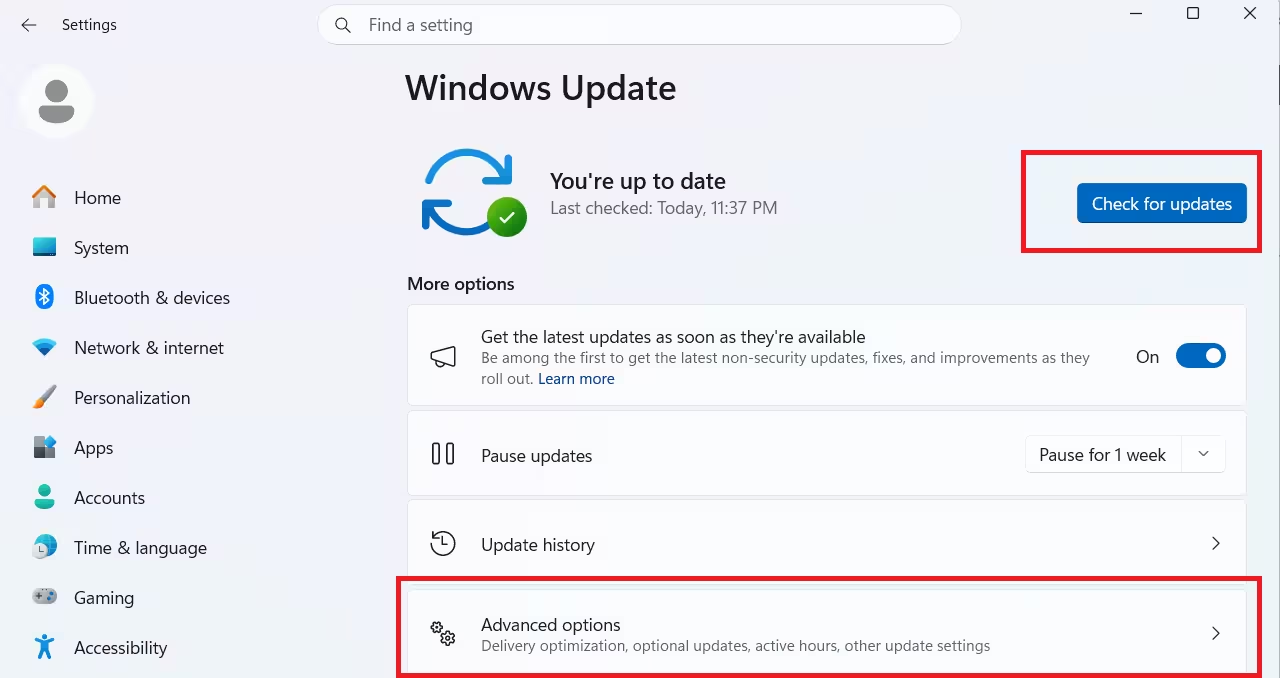
- Open Settings and select Windows Update.
- Click Advance Options.
- Scroll to Optional updates and look for KB5089573.
- Select KB5089573 and click Download and install.
- Let the device restart when prompted.
After the restart, KB5089549 should install without triggering error 0x800f0922.
Why Earlier Workarounds Fell Short
Before KB5089573 shipped, Microsoft offered two manual workarounds: Windows Registry edits and Known Issue Rollback (KIR). Neither option was practical for most users. Incorrect Registry modifications can introduce additional system problems, and the KIR process requires several steps that less experienced users may find difficult to follow. KB5089573 replaces all of those steps with a single update install.
What Else KB5089573 Brings
Beyond fixing the KB5089549 install failure, KB5089573 delivers several other improvements. The update introduces the Windows 11 Low Latency Profile feature, Shared Audio, enhancements to Task Manager, and Windows Search upgrades.
What If You Skip the Preview Update
KB5089573 is an optional preview update, so installing it is not mandatory right now. Microsoft plans to include the same fix in the June 9, 2026 Patch Tuesday cumulative update. Users who do not install preview updates manually will receive the fix automatically at that point.
Via Neowin
Related Guides
- Windows 11 May 2026 Update Fails Due to Insufficient EFI System Partition Space: How to Fix It
- How to Fix Windows 11 Audio Muted After Update and Notifications Not Working (24H2 / 25H2)
- How to Create a macOS Bootable USB on Windows 11 (TransMac + DiskPart)
- Windows 12 Release Date: What Microsoft Is Not Telling You

