DEV ERROR 0xDBE46539 appears in Call of Duty: Black Ops 6 when the game fails to load the correct asset files. Most PS5 players encounter the error while launching multiplayer or joining a match. The message usually includes a long asset file name, which signals that the game is loading the wrong content pack.
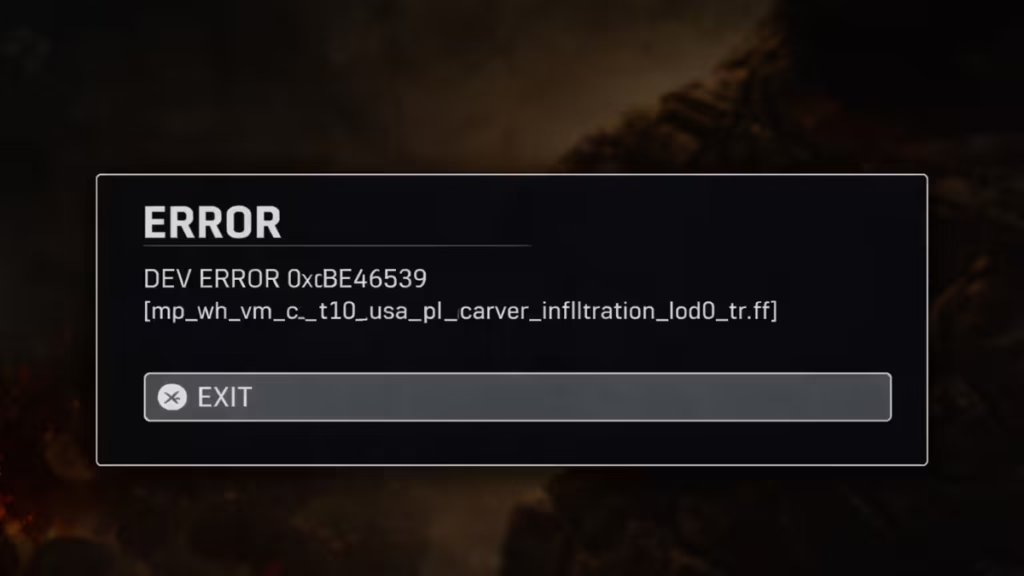
In many cases, the issue occurs because the Call of Duty HQ launcher installs extra content packs, such as Warzone or files tied to another COD title. When Black Ops 6 tries to load those mismatched assets, the game throws a DEV error and stops loading the match. The fixes below help you restore the correct files and launch the game normally.
Fix 1 – Restore PS5 Licenses (Most Effective Fix)
Restoring licenses forces the PlayStation system to refresh the ownership data for all installed content. This step often fixes the DEV ERROR immediately because the console reloads the correct Black Ops 6 files.
Follow these steps:
- Open Settings on your PS5.
- Select Users and Accounts.
- Scroll to Other.
- Choose Restore Licenses.
- Wait for the process to complete.
- Restart Call of Duty: Black Ops 6.
Many players resolve the error with this single step.
Fix 2 – Remove Incorrect Call of Duty Content Packs
Sometimes the system installs content packs meant for another Call of Duty version. Black Ops 6 then loads the wrong files and crashes with DEV ERROR 0xDBE46539. Removing the incorrect add-ons fixes the conflict.
Follow these steps:
- Open Settings on your PS5.
- Go to Storage.
- Select Console Storage.
- Open Games and Apps.
- Find Call of Duty in the list.
- Delete any add-ons labeled:
- COD 7
- COD 7 Multiplayer
- Warzone packs tied to another COD title
After removing these add-ons, restart the game.
The game should now load the correct assets and launch normally.
Fix 3 – Restart the Game and Console
A full restart clears temporary memory conflicts that can prevent content packs from loading correctly.
Steps:
- Close Call of Duty: Black Ops 6.
- Restart your PS5 console.
- Launch the game again.
If the problem came from a temporary asset loading issue, the game should work normally after the restart.
Why DEV ERROR 0xDBE46539 Appears in Black Ops 6
This error usually appears when Black Ops 6 loads the wrong asset files. The Call of Duty launcher installs multiple game modules under one platform. Sometimes the console installs content from Warzone or another COD title, which conflicts with Black Ops 6.
When the game attempts to load those mismatched files, the system cannot validate the asset path. The engine then throws a DEV ERROR and stops the match from loading.
Restoring licenses or removing the incorrect content packs forces the game to reload the correct assets.
Additional Tips to Prevent the Error
You can avoid the error in the future by following these tips:
- Install only the Black Ops 6 multiplayer packs you actually use.
- Remove unused Warzone or extra COD modules from storage.
- Keep both the game and PS5 system software updated.
- Restart the console after large Call of Duty updates.
These steps help prevent content mismatches inside the COD launcher.
FAQs
What is DEV ERROR 0xDBE46539 in Black Ops 6?
DEV ERROR 0xDBE46539 appears in Black Ops 6 when the game loads incorrect asset or content files, usually due to mismatched Call of Duty content packs installed through COD HQ.
How do I fix DEV ERROR 0xDBE46539 in Black Ops 6?
You can fix DEV ERROR 0xDBE46539 by restoring PS5 licenses, removing incorrect COD content packs, and restarting the game so it reloads the correct Black Ops 6 assets.
Why does DEV ERROR 0xDBE46539 appear on PS5?
The error usually appears because the console installs extra Call of Duty modules such as Warzone or other COD content that conflicts with Black Ops 6 files.
Does restoring PS5 licenses fix DEV ERROR 0xDBE46539?
Yes. Restoring PS5 licenses refreshes ownership data and forces the system to reload the correct Black Ops 6 content packs, which often resolves DEV ERROR 0xDBE46539.
Do I need to reinstall Black Ops 6 to fix DEV ERROR 0xDBE46539?
No. Most players fix DEV ERROR 0xDBE46539 without reinstalling the game by restoring licenses or removing incorrect COD content packs.