A security researcher discovered that BasedApparel.com, an online clothing store co-founded by FBI Director Kash Patel, was serving a ClickFix-based macOS infostealer to visitors. The attack used a fake Cloudflare verification page to trick users into running malicious commands in macOS Terminal, silently stealing browser credentials and cryptocurrency wallet data.
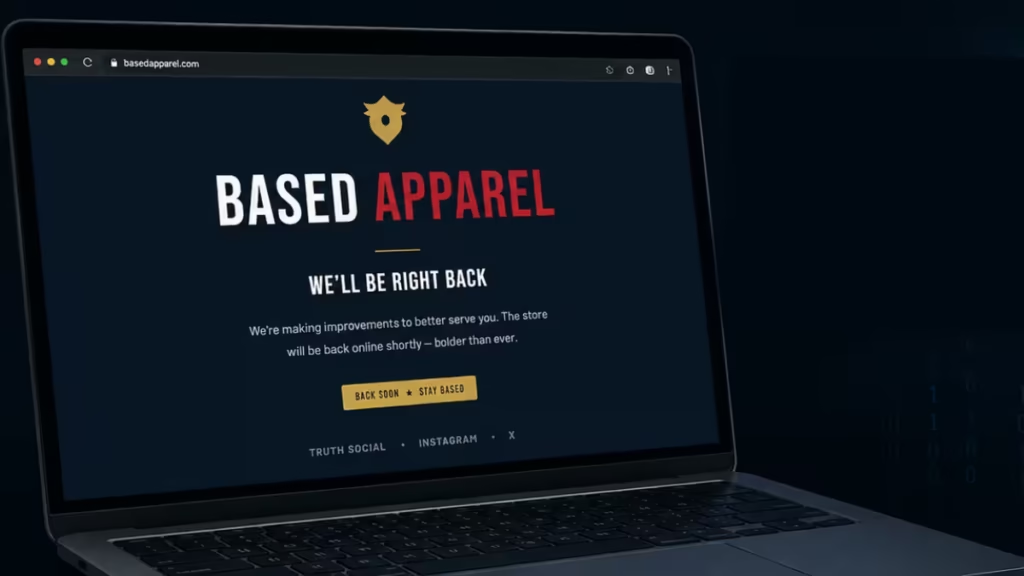
The site has since gone offline. At time of writing, it displays a “We’ll be right back” message.
What the Researcher Found
A researcher using the alias “debbie” spotted the attack while browsing BasedApparel.com after reading about the site online. She shared video proof on X along with a breakdown of the payload.
“The ClickFix attack just kinda popped up when I was browsing it,” debbie told PC Mag. “I took a quick look and it’s just a classic infostealer, wrapped twice in base64. It’s interesting that it’s written in AppleScript though.”
The attack targeted only macOS users. Windows visitors to the site were not affected.
How the ClickFix macOS Infostealer Attack Worked
When a macOS user landed on BasedApparel.com, the site displayed a page designed to look like a Cloudflare CAPTCHA verification screen. The page showed a warning reading “Unusual Web Traffic Detected” and asked the visitor to confirm they were human.
The instructions told the user to follow three steps:
- Click the “Copy” button on the page
- Open Terminal on their Mac
- Paste and run the copied command
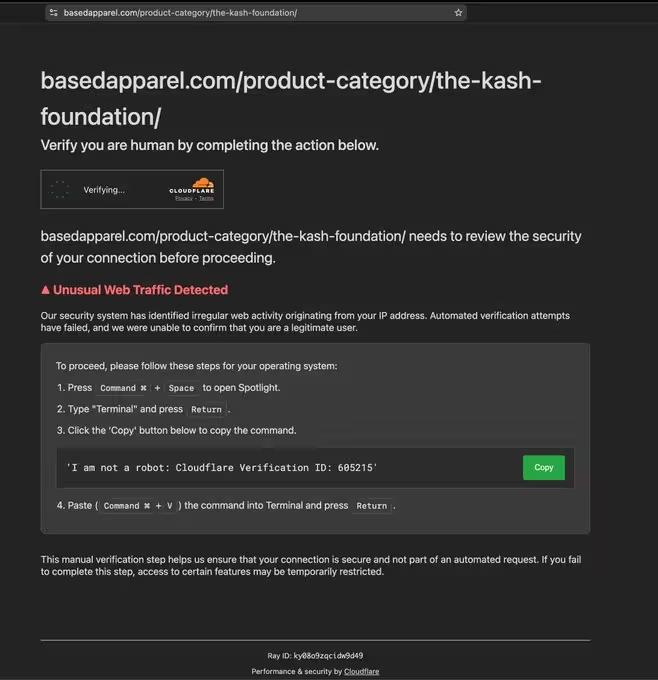
What the user expected to copy was the text “I am not a robot: Cloudflare Verification ID: 801470.” What the button actually copied was a long obfuscated string containing a hidden command. Pasting and running it in Terminal decoded the string and fetched a malicious shell script from an attacker-controlled domain.
This is the standard ClickFix technique. It requires no exploit or software vulnerability on the victim’s device. It works entirely through social engineering, counting on the user to follow instructions that look routine. Fake CAPTCHA pages and browser-locking tactics have become a common vector in 2026, scaling rapidly because the social engineering barrier is low.
What the Malware Steals
The shell script payload executes a series of commands through macOS Terminal. A successful run steals the following data:
- Saved credentials from Chromium-based browsers, including Chrome, Edge, and Brave
- Cryptocurrency wallet data
- Other stored account information
The stolen data gets packed into a zip archive and sent to an attacker-controlled domain.
debbie submitted the payload to VirusTotal, where 27 out of 61 antivirus engines flagged it as malicious, classifying it as a Trojan and infostealer. The detection rate confirms this is commodity malware, not a custom-built tool aimed at Patel-related targets specifically.
The Ghost CMS Connection
BasedApparel.com ran on two content management systems: WordPress with WooCommerce for the main storefront, and Ghost CMS for a separate news subdomain.
Security researchers had recently documented a critical SQL injection vulnerability in Ghost CMS, CVE-2026-26980, being actively exploited across more than 700 domains to deliver ClickFix attacks at scale. That vulnerability received a patch in February 2026, but unpatched installations remain a live attack surface.
The BasedApparel incident fits the broader Ghost CMS exploitation campaign. Attackers behind ClickFix operations have repeatedly targeted sites through stolen admin credentials, exposed control panels, and vulnerable CMS plugins. The Verizon 2026 Data Breach Investigations Report identified vulnerability exploitation as the top breach entry point this year, making unpatched CMS software a particularly high-risk exposure for site owners.
Apple Added a Warning in macOS Tahoe 26.4
Apple responded to the rise of Terminal-based ClickFix attacks with a new safeguard in macOS Tahoe 26.4. The update adds a warning when users paste commands into Terminal from Safari or other apps, flagging anything that could execute harmful instructions.
Mr. Macintosh documented the new behavior on X: “You will now be warned when you paste terminal commands from Safari or other apps, flagging anything that could harm your Mac.”
The protection does not block execution entirely. It gives users a clear warning before the command runs. For users already on macOS Tahoe 26.4, this is now a first line of defense against Terminal-based ClickFix attacks.
How to Stay Safe From ClickFix macOS Attack
ClickFix attacks succeed because they look legitimate. A real Cloudflare CAPTCHA never asks you to open Terminal or run a command. If any website presents that instruction, it is an attack.
- Update macOS: If you are on macOS Tahoe, install the 26.4 update to get the Terminal paste warning. The protection is not available on older versions.
- Never run commands you did not write yourself: No legitimate website verification requires you to open Terminal and paste anything into it.
- Check CAPTCHA pages carefully: Real Cloudflare CAPTCHAs ask you to click images or check a box. They never direct you to a command-line interface.
- React quickly if you ran a suspicious command: Change your browser-saved passwords immediately, revoke connected app sessions, and check your cryptocurrency wallets for unauthorized transfers.
- Keep your CMS and plugins updated: If you run a website, unpatched Ghost CMS or WordPress installations can be turned into malware delivery points without your knowledge. AI-powered social engineering techniques are also making it harder to spot when a trusted site has been weaponized.
ClickFix is not a sophisticated attack. It works because the instructions look routine and the Terminal window looks technical and official. No real service asks you to paste commands into your operating system to prove you are human. That single rule stops this attack every time.

