You received a Tremendous Visa card as a reward, but it will not work until you activate it and understand where it can and cannot be used. This guide covers both the physical and virtual Tremendous Visa card: activation, PIN setup, in-store and online spending, prohibited merchants, and digital wallet setup.
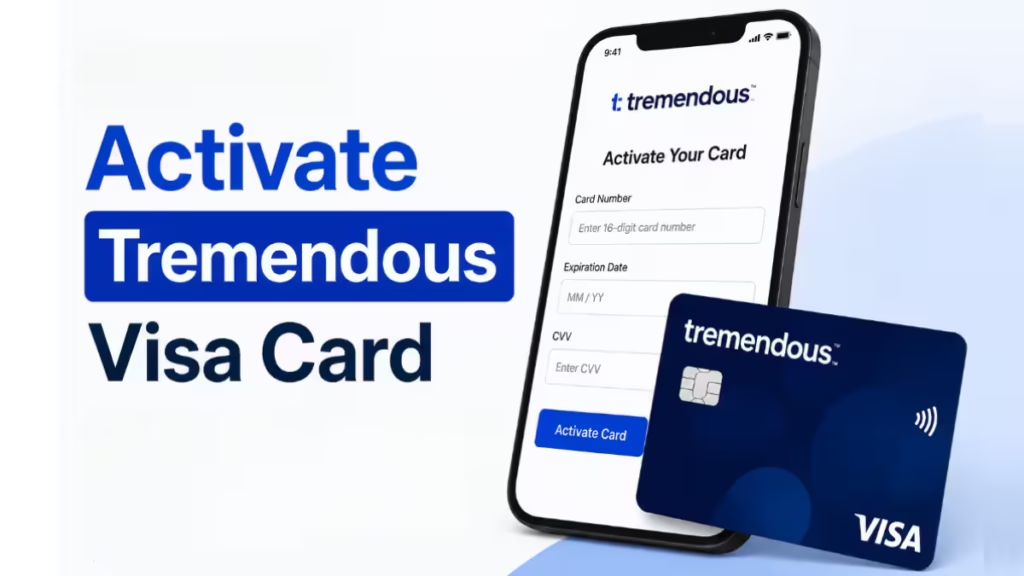
How to Activate Your Tremendous Physical Visa Card
Before you can use the physical card anywhere, you need to complete activation at the official Tremendous activation page.
- Go to reward.tremendous.com/visa-cards on any browser.
- Locate the 20-digit code printed on the back of your card.
- Enter the 20-digit code in the field provided.
- Follow the prompt to set a 4-digit PIN for your card.
- Once the PIN is saved, your card is active and ready to use.
You can return to the same activation page at any time to check your balance and review your transaction history.
Note: Your physical card arrives by USPS First Class mail in a plain white envelope with a Kansas return address. Delivery typically takes 1 to 3 weeks.
How to Set a PIN for Your Physical Visa Card
Virtual Visa cards do not have PINs. If you hold a virtual card and a checkout terminal asks for a PIN, make sure you selected “credit” at checkout, not “debit.” You should not be prompted for a PIN on a virtual card.
For physical cards, the PIN setup happens during activation:
- Visit reward.tremendous.com/visa-cards.
- Enter the 20-digit barcode from the back of the card.
- When prompted, enter and confirm your 4-digit PIN.
Keep this PIN private. You will need it for in-store chip-and-PIN transactions at some merchants.
How to Use Your Tremendous Visa Card In-Store
When you pay at a physical store with your Tremendous card, always select credit, not debit. Debit transactions can be declined even if your balance is sufficient.
Steps to pay in-store:
- Hand over or tap your card at the point of sale.
- When the terminal asks for the payment type, select Credit.
- Enter your PIN if the terminal requires it.
- Confirm the transaction amount.
For gas stations, pay-at-the-pump is restricted because stations place a preauthorization hold that may exceed your card balance. To buy gas with your Tremendous card, go inside and prepay directly with a cashier.
How to Use Your Tremendous Visa Card Online
Both physical and virtual cards work for online purchases wherever prepaid Visa cards are accepted.
- At checkout, select Credit as the payment method.
- Enter the 16-digit card number, expiration date, and CVV exactly as printed on your card.
- You can enter any billing address. The card is not tied to a specific address.
- Submit the order.
Your transaction total must not exceed the remaining balance on your card. If your purchase is larger than your balance, ask the merchant if they allow a split transaction so you can cover the remainder with a second payment method.
How to Access Your Tremendous Virtual Visa Card
Unlike the physical card, the virtual card does not arrive in the mail. You access it through a link in your reward email.
- Search your inbox for an email from [email protected].
- Open the reward email and click the link to your card page.
- Your card page shows the 16-digit card number, expiration date, CVV, current balance, and transaction history.
Your virtual card page is only accessible through that email link. Save the email or bookmark the card page for future reference.
How to Add Your Tremendous Visa Card to Apple Pay or Google Wallet
Physical Visa cards can be added directly to Apple Pay or Google Wallet. Virtual cards are not accepted at most brick-and-mortar stores unless you add them to a digital wallet first.
To add to Apple Pay:
- Open the Wallet app on your iPhone.
- Tap the + button in the top-right corner.
- Select Debit or Credit Card and follow the on-screen steps.
- Enter your card number, expiration date, and CVV when prompted.
To add to Google Wallet:
- Open the Google Wallet app on your Android device.
- Tap Add to Wallet, then select Payment card.
- Enter your card details manually.
Once added to a digital wallet, you can tap to pay at in-store terminals that support contactless payments. When paying this way, select credit at the terminal.
Where You Can Use Your Tremendous Visa Card
The physical Tremendous Visa card works at merchants in 215 supported countries. The virtual version works in 212 countries and regions. Both cards are accepted at most places that take prepaid Visa cards, including most online retailers, food delivery apps, and subscription services.
In specific markets, Amazon frequently declines prepaid cards:
- Amazon.co.uk in the UK
- Amazon.fr in France
- Amazon.de in Germany
If your preferred merchant does not accept your prepaid card, contact Tremendous support at [email protected] to exchange the card for a gift card.
Merchants That Do Not Accept Your Tremendous Visa Card
Certain categories are blocked on all Tremendous Visa cards, both physical and virtual:
- Money transfers
- Firearm-related businesses
- Tobacco businesses
- Marijuana-related businesses
- Outbound telemarketing
- Money services from non-financial institutions, including cryptocurrency exchanges
- Securities brokers or dealers
- Dating services
- Massage parlors
- Government-owned lotteries
- Government-licensed online casinos and online gambling sites
- Government-licensed horse or dog racing
- Betting, lottery tickets, casino gaming chips, off-track betting, and wagers at race tracks
- Charity donations (treated as cash-equivalent transactions and declined)
- Recurring subscriptions and installment payments, including bill payments (treated as cash transactions and declined)
- Pay-at-pump gas purchases
If you want to donate to charity, Tremendous offers dedicated charity options inside its platform. If you need to pay a recurring subscription, this card is not the right tool for that purchase.
How to Check Your Card Balance
For physical cards, visit reward.tremendous.com/visa-cards and log in with your card’s 20-digit code to see the current balance and transaction history.
For virtual cards, open the card page link from your original reward email. The page shows your balance and every transaction made on the card.
If you want to receive balance updates by email or text, register your card at card.tremendous.com.

