Microsoft has resolved a major Windows 11 outage that prevented core apps like Notepad, Paint, Snipping Tool, and Windows Security from opening. A server-side Microsoft Store activation bug triggered the error code 0x803F8001, leaving many PCs unusable for hours.
The issue surfaced suddenly when Store-based apps failed license validation during launch. Users reported constant pop-ups, frozen workflows, and repeated app crashes across both consumer and gaming systems.
How Windows 11 Apps Failed During the 0x803F8001 Outage
Users saw a repeating error message stating that the app was not available for their account and asking them to sign into the Microsoft Store. Even built-in Windows apps failed to open. Like
- Notepad, Paint, and Snipping Tool refusing to launch
- Windows Security showing a license validation error
- Alienware Command Center repeatedly triggering pop-ups
- Microsoft Store pages opening blank or failing to load
- Some PCs becoming effectively unusable due to constant focus stealing
One Reddit user explained that Alienware Command Center kept reopening and blocking normal desktop use. Others could not reinstall affected apps after uninstalling them because the Store failed to validate licenses.
Microsoft confirmed that the failure originated on its servers, not on individual PCs.
Microsoft Confirms Server-Side Root Cause
Microsoft told Windows Latest that a server-side Store activation bug disrupted license validation for Store-dependent apps. The company deployed a backend fix and confirmed that the problem is now fully resolved.
“We have fully resolved a Microsoft Store issue that impacted app activation for some users,” Microsoft stated.
Because the failure occurred on Microsoft’s servers, local troubleshooting did not reliably restore functionality while the outage remained active.
Why Error Code 0x803F8001 Appeared
The error code normally appears when the Microsoft Store cannot validate an app license or access activation services. In this incident, Store activation services failed temporarily across thousands of devices.
Windows Latest testing showed that even essential inbox apps failed to authenticate, including Windows Security. The error dialog often stole window focus every few seconds, making normal work nearly impossible.
Apps installed outside the Microsoft Store, such as Google Chrome, continued working normally because they do not depend on Store licensing infrastructure.
What Microsoft Recommends Now
Since Microsoft already patched the server-side problem, most affected systems should recover automatically without any manual action.
If an app still fails to open, Microsoft recommends:
- Restart the PC to refresh Store licensing services.
- Sign out and sign back into the Microsoft Store to re-sync account validation.
- Check Windows Update and install the latest cumulative updates if available.
- Avoid uninstalling core inbox apps, as reinstall attempts may fail during service instability.
During the outage, some users tried clearing Store cache or reinstalling apps, but those steps rarely helped because the root cause lived on Microsoft servers.
See also: How to Fix Outlook Classic Hanging After Windows Update KB5074109
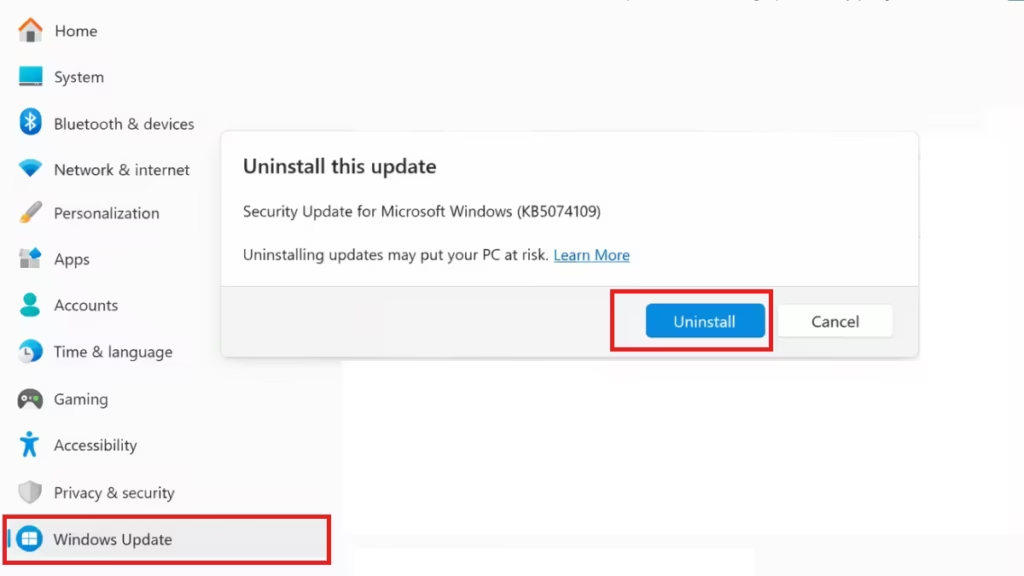
The January 2026 Patch Tuesday update (KB5074109) previously caused issues with Outlook Classic, Remote Desktop, and File Explorer customization.
Microsoft even advised some Outlook users to temporarily switch to webmail or uninstall the update until a permanent fix becomes available.
While Microsoft continues investigating those patch-related bugs, the Store activation failure now stands resolved.
Microsoft’s backend fix restored normal operation for Notepad, Paint, Snipping Tool, and other Store-based Windows apps affected by error 0x803F8001. Users should no longer see repeated activation errors or app launch failures.
If any apps still misbehave, a system restart and Store sign-in refresh typically restores full functionality. Microsoft continues monitoring January’s remaining Windows update issues separately.

