Many new Roku users abandon setup the moment Roku asks for payment details. This is a common point of confusion. A credit card is not required to create a Roku account or activate a Roku device. Setup is completely free, and you can finish it without entering any payment information.
This guide covers two methods that reliably let you create a Roku account without a credit card.
Method 1: Use the Official No-Payment Signup Link (Recommended)
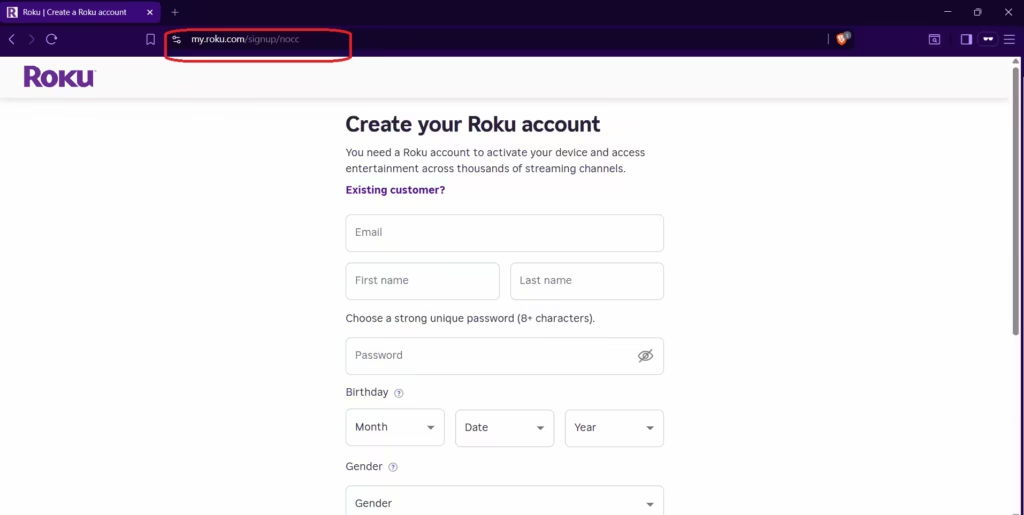
Roku maintains an official signup page that skips the payment screen entirely. This is the cleanest and fastest way to create your account without entering card details.
Steps
- Open a browser on your phone or computer.
- Go to the official Roku no-payment signup page: https://my.roku.com/signup/nocc
- Enter your email address, first name, last name, and a password.
- Click Create account.
- Open the confirmation email from Roku and click the verification link.
Your account is now active. Roku does not show the payment page at all when you use this link.
What You See After Signup
Once your account is created, Roku takes you to the account dashboard. You may see a section labeled Update payment methods or Add your payment method. This is optional. Your account is already fully set up.
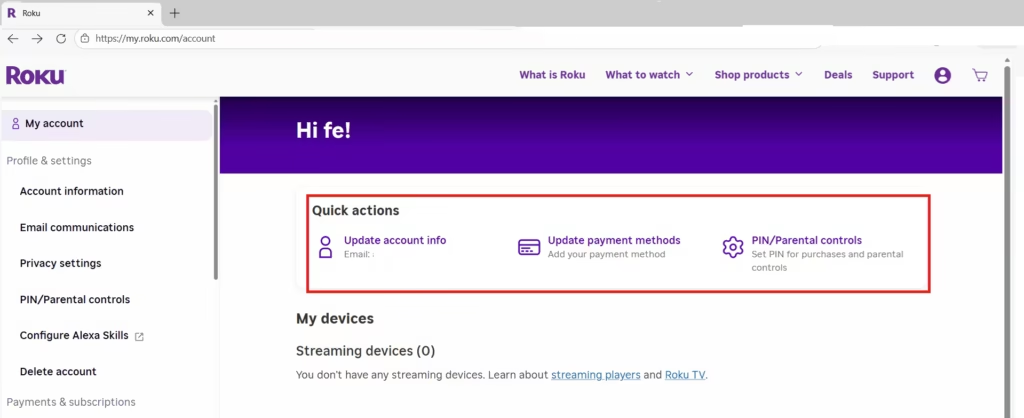
With your new account, you can:
- Activate any Roku device or Roku TV
- Install free streaming apps and channels
- Access all free content normally
Adding a payment method is only needed if you later decide to subscribe to a paid channel, rent a movie, or buy content through Roku Pay.
Method 2: Add a Payment Method, Then Remove It (Fallback)
Use this method only if Roku forces the payment screen during signup through the standard link and does not allow you to skip it.
Steps
- Go to https://my.roku.com/signup and complete the signup form.
- Add a payment method when Roku requires it (credit card or PayPal).
- Finish the setup process and reach your Roku home screen.
- Open a browser and go to https://my.roku.com/account.
- Sign in to your Roku account.
- Click Payment methods.
- Remove the saved card or PayPal account.
Roku continues to work normally after you remove the payment method. Free channels and device functionality are not affected.
Important Warning
Never pay a third-party website or phone service to "activate" your Roku device. Roku activation is always free. Any site asking for payment is not an official Roku service.
Frequently Asked Questions
Can I create a Roku account without a credit card?
Yes. Use the official Roku no-payment signup link at https://my.roku.com/signup/nocc. It skips the payment screen entirely and creates a fully working account without any card or PayPal details.
Why does Roku ask for payment information during signup?
Roku asks for payment details to make it easier to start free trials, subscriptions, or rentals later. It is optional and not required to activate a device or use free content.
Does Roku charge anything during account creation?
No. Roku does not charge money during account creation. Charges only apply if you subscribe to a paid channel, rent content, or make a purchase through Roku Pay.
Will Roku stop working if I remove my payment method?
No. Removing your payment method does not affect your device or account. Free channels, installed apps, and device features continue to work normally.
Do I need a payment method to activate a Roku TV or streaming stick?
No. Roku activation is always free. A payment method is never required to activate a Roku device.