You press the Windows key, type the first few letters of an app, hit Enter, and Microsoft Edge opens a Bing page instead of the app you wanted. Most Windows 11 users know this moment well. Microsoft now gives you a proper fix: a dedicated switch in Settings that strips web results out of Start menu search.
This guide shows you where the new toggle lives, how to turn it on, what changes afterward, and what to do if your PC doesn't show the option yet.
What Is the New Windows 11 Search Toggle for Web and Microsoft Store Results?
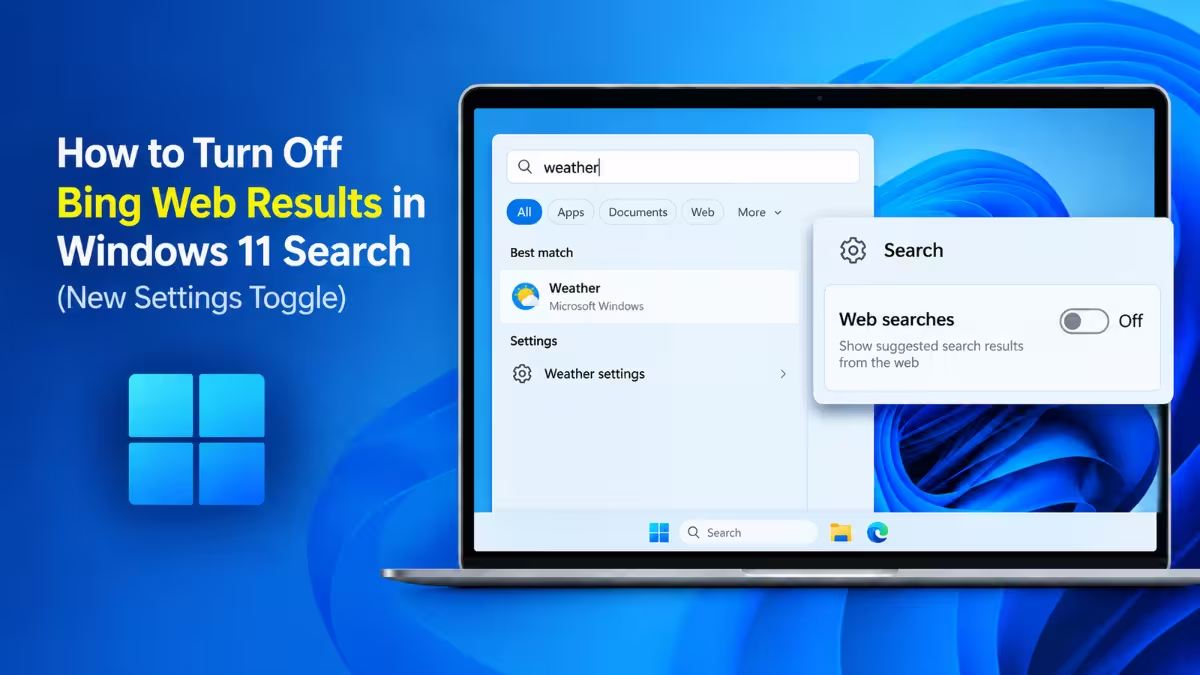
Windows Search normally mixes three kinds of results: things on your PC, suggestions from the web, and app listings from the Microsoft Store. The new setting splits these apart. You get two separate switches:
- Web searches: controls whether Bing (or your chosen search provider) adds online suggestions.
- Microsoft Store: controls whether Search recommends apps you haven't installed.
Turn both off and Windows Search sticks to your installed apps, files, folders, and system settings.
Microsoft labels the option "Web searches" rather than "Bing" because users in some regions, including Europe, can pick a different search provider.
How to Turn Off Bing Web Results in Windows 11 Search from Settings
If the update has reached your PC, follow these steps:
- Open Settings (press Win + I).
- Click Privacy & security.
- Open the Search page.
- Find the Show suggested search results section just below the indexing status.
- Switch off Web searches.
- Switch off Microsoft Store too if you don't want app download suggestions.
- Close and reopen Windows Search to apply the change.
Tip: You won't find this toggle by typing "web search" or "turn off Bing" into the Settings search box. Both queries return nothing. Type search instead and pick Suggested search results from the list.
How to Make Windows 11 Search Fully Local by Turning Off Account Results
Disabling web searches doesn't cut Windows Search off from the cloud completely. A section called Search my accounts sits on the same page, with toggles for your Microsoft account and Work or School account. Both stay on by default, so Search can still pull in content from OneDrive and Outlook.
If you want results from your PC only, switch both of these off as well.
Windows 11 Web Search Toggle Missing? How to Get It Sooner
Microsoft started a phased rollout of this feature in August and keeps widening it, but it hasn't reached every PC. To move your device closer to the front of the line:
- Open Settings > Windows Update.
- Turn on Get the latest updates as soon as they're available.
- Install any pending updates and restart.
Even with this switch on, the option may take a while to appear because Microsoft controls the rollout from its servers. If you don't want to wait, the Registry and Group Policy methods below work right now.
When Will the Bing-Free Search Option Reach All Windows 11 PCs?
Microsoft hasn't announced a date for full availability. The company keeps rolling the setting out in stages, so some PCs get it this week and others later, even with the latest updates option enabled.
Microsoft also has no plans to turn web results off by default. Bing suggestions stay on for everyone until you change the setting yourself.
How to Disable Web Search in Windows 11 Home Using the Registry
This older tweak removes web suggestions from Search on any Windows 11 edition, including Home. Create a restore point before you edit the Registry.
- Press Win + R, type
regedit, and press Enter. - Go to
HKEY_CURRENT_USER\Software\Policies\Microsoft\Windows - Right-click the Windows key, choose New > Key, and name it Explorer (skip this if it already exists).
- Select Explorer, right-click the right pane, and choose New > DWORD (32-bit) Value.
- Name it DisableSearchBoxSuggestions.
- Double-click it and set the value to 1.
- Restart your PC or restart Windows Explorer from Task Manager.
To undo it, delete the DisableSearchBoxSuggestions value and restart. This tweak also removes the Copilot entry from Search.
How to Disable Web Search in Windows 11 Pro Using Group Policy
Windows 11 Pro, Enterprise, and Education include the Local Group Policy Editor, which gives you a safer route than the Registry.
- Press Win + R, type
gpedit.msc, and press Enter. - Go to Computer Configuration > Administrative Templates > Windows Components > Search.
- Open Don't search the web or display web results in Search and set it to Enabled.
- Click Apply, then OK.
- Run
gpupdate /forcein an admin Command Prompt, or restart.
Once the Settings toggle reaches your PC, you can use that instead and leave these tweaks behind.
What Improves in Windows 11 Search Without Bing
Search gets faster and cleaner
The biggest win is speed. Windows no longer waits for a web round trip before showing results, so apps, files, and settings pop up almost instantly as you type. The Search home screen also loses its trending searches, quizzes, and news widgets. You see only your recent local searches, and you can remove any of those by hovering over them.
Local files take the top spot
Type a term like "pdf" with web results on, and Bing often grabs the Best match slot. With them off, a matching file on your PC takes that spot, complete with its location, last modified date, and quick actions such as Open and Copy path.
Better typo handling
Windows Search now forgives spelling slips in app names. Typing "Putlook" still finds Outlook. It doesn't guess well from abbreviations without vowels, though, so something like "ntpd" may come back empty instead of finding Notepad.
Plain-English settings searches still work
Ask something like "make text size bigger" and Search jumps straight to the right system setting. This matching runs locally and doesn't depend on Bing.
Third-party apps stay easy to reach
Search for "chrome" and you still get Google Chrome, its jump list actions like New Incognito window, and any web apps you installed through it. Only the extra web suggestions disappear.
What You Lose When You Disable Web Results in Windows 11 Search
Turning off web results has a few trade-offs worth knowing before you flip the switch:
- No quick math: Type a calculation and Search shows "No results found" instead of the answer. Open Calculator instead.
- No weather card: Searching "weather" opens or suggests your weather app rather than showing a forecast inline.
- More empty results: If nothing on your PC matches, you'll see "No results found" more often than before.
Does Windows 11 Search Still Use Bing After You Turn It Off?
The toggle reduces Bing's presence but doesn't erase it. The preview pane can still show a "Get quick help from web" link for some queries, and a WebView2 process tied to Edge keeps running in the background. Windows also sometimes surfaces its own internal files, such as settings cache text files, in the Documents section of results.
How to Fix Missing Local Files in Windows 11 Search (Indexing Settings)
A local-only search is only as good as its index. Windows uses Classic indexing by default, which covers Documents, Pictures, Music, and the Desktop. If you keep files elsewhere, switch to Enhanced mode under Settings > Privacy & security > Search so Windows indexes your whole PC.
If files still go missing, rebuild the index:
- Open Settings > Privacy & security > Search.
- Click Advanced indexing options.
- Click Advanced, then Rebuild.
Will Microsoft Disable Bing in Windows 11 Search by Default?
No. Microsoft keeps web suggestions on by default and leaves the choice to you. Anyone who wants a local-first Start menu has to change the setting manually on each PC.
Should You Disable Web Results in Windows 11 Search?
If you mostly use Start search to launch apps, open files, and jump to settings, turn web results off. Search feels faster, looks cleaner, and stops sending you to Edge by accident. If you rely on Search for quick sums or weather checks, you may prefer to leave it on, or keep Calculator and Weather pinned instead.
Frequently Asked Questions
Where is the option to turn off web results in Windows 11 Search?
Go to Settings > Privacy & security > Search and switch off Web searches under Show suggested search results.
Why can't I see the Web searches toggle?
Microsoft is rolling it out gradually. Turn on "Get the latest updates as soon as they're available" in Windows Update, or use the Registry or Group Policy method meanwhile.
Does turning off web searches make Windows Search fully offline?
Not entirely. Turn off the Microsoft account and Work or School account toggles under Search my accounts to stop OneDrive and Outlook results. A web help link and a background WebView2 process may still appear.
Can I keep Microsoft Store suggestions while hiding Bing?
Yes. The two toggles work independently, so you can leave Microsoft Store on and turn only web searches off.
Can I do math in Windows Search after disabling web results?
No. Inline calculations depend on web results, so use the Calculator app instead.
Does this work on Windows 11 Home?
Yes. The Settings toggle works on Home once it arrives, and the Registry method works on Home right now.
Related Guides
- Windows 11 26H2 Not Showing Up? How to Get the Update Manually
- Windows 11 26H2 Is Out: How to Get the 2026 Update on 25H2 and 24H2
- How to Clear Cache on Windows 11 (7 Easy Methods)
- PowerShell Commands to Clean Up Windows and Speed It Up Without a Cleaner App
- How to Stop Windows 11 From Installing Manufacturer Bloatware Apps Automatically