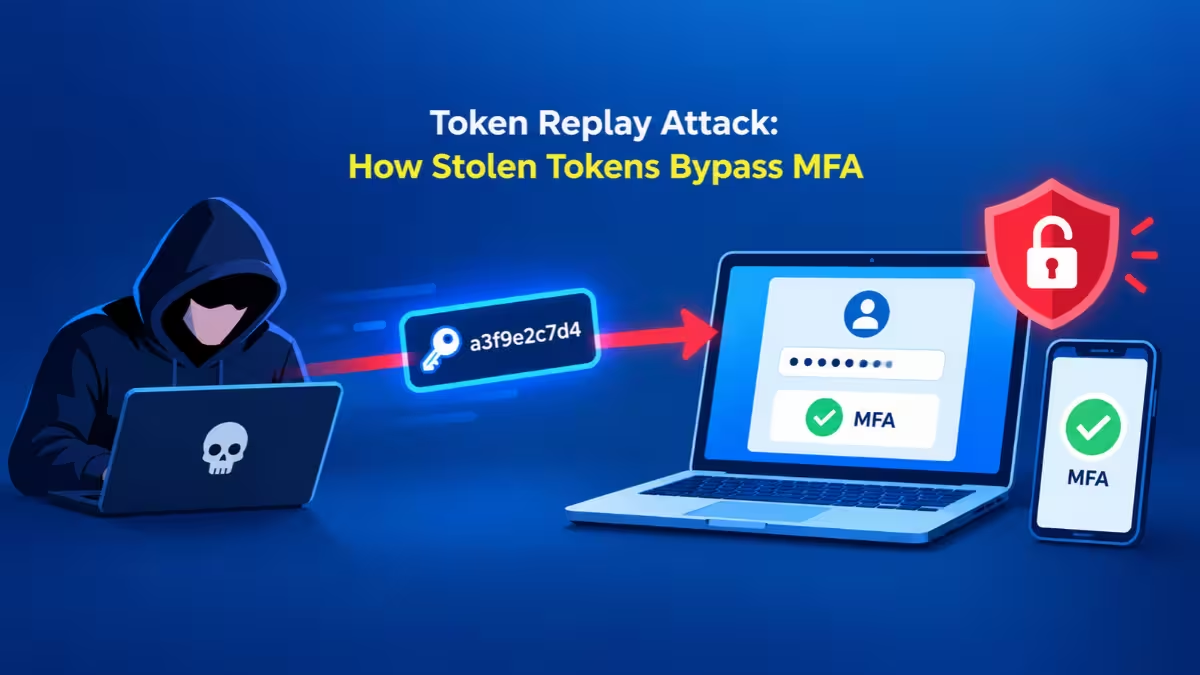
Strong passwords and multi-factor authentication (MFA) used to feel like the finish line for account security. Attackers have quietly moved past both. Instead of cracking a password, they now grab the token your account receives after you sign in, then reuse it from their own machines.
Two recent attack waves show how far this goes. One crew broke into 97 Microsoft 365 accounts across 79 organizations by replaying stolen sign-in tokens. Another group used leaked GitHub tokens to plant secret-stealing workflows in more than 850 GitHub accounts. Neither attack needed a password.
This guide explains what tokens are, how attackers steal and replay them, and what you can do to lock down Microsoft 365 and GitHub.
What Is a Cloud Token and Why Does It Skip MFA?
A token is the digital pass that proves you already signed in.
When you log in to Microsoft 365, GitHub, or almost any cloud app, the service checks your password and MFA once. After that, it hands your browser or app a token. Every later request carries that token, so you do not type your password again for each click.
Think of it like a wristband at a concert. Security checks your ticket at the gate, then you flash the wristband to move around. If someone copies your wristband, the staff inside cannot tell them apart from you.
Common token types include:
- Access tokens: Short-lived passes that let an app read your mail, files, or data, usually for about an hour or so.
- Refresh tokens: Longer-lived passes that let an app request fresh access tokens without a new login.
- Session cookies: Browser cookies that keep you signed in to a web portal.
- Personal access tokens (PATs): Developer keys for services like GitHub that act on your behalf from scripts and tools.
The key problem: a token gets issued after MFA succeeds. Whoever holds it skips the MFA step entirely.
How Does a Microsoft 365 Token Replay Attack Work?
Token replay means an attacker steals a valid token and uses it from a different device to impersonate you.
The Microsoft 365 campaign that ran from mid-July to late September shows the full playbook. The attacker split the job into two parts: one set of servers captured tokens, and a separate set of rented servers reused them.
How Attackers Capture Tokens After MFA
Attackers used three tricks to collect tokens from victims:
- Adversary-in-the-middle (AiTM) phishing pages. The victim clicks a link and lands on a page that looks like the Microsoft login screen. Behind the scenes, the page forwards everything to the real Microsoft site. The victim types the password, approves the MFA prompt, and signs in normally. The fake page silently keeps a copy of the token Microsoft sends back.
- Device-code phishing. The attacker starts a sign-in on their own device and gets a short code. They then trick the victim into entering that code on Microsoft's genuine device login page. The victim believes they are signing in to something harmless, but they actually approve the attacker's session.
- Social engineering. Phone calls, chat messages, or fake IT requests push users to complete one of the flows above.
Because the victim sees the real Microsoft page and a real MFA prompt, nothing looks wrong.
What Is Token Spraying?
Once the attacker held a pile of tokens, they replayed them in bulk from a block of rented servers. Researchers called this "token spraying," since it mirrors password spraying but uses stolen tokens instead of guessed passwords.
The numbers tell the story. The campaign generated more than 200,000 failed attempts but still landed 497 successful sign-ins. In some cases, the stolen session appeared on the attacker's server just four minutes after the victim approved MFA.
The attacker also rotated through six different server addresses over four phases, pausing a week or two between some of them. A block on one address stopped one phase at most, while the next phase simply moved to a fresh address.
How Attackers Keep Access After a Password Reset
Tokens expire, so the attacker worked fast to keep long-term access. They used three persistence tricks:
- Rogue devices. The attacker registered at least 48 fake computers in victims' Microsoft Entra directories. These used names like
DESKTOP-followed by eight hexadecimal characters, which looks close to a normal Windows name. A registered device can request new tokens and stays in the directory until an admin deletes it. - Swapped MFA methods. In 19 organizations, the attacker deleted the victim's MFA methods and added their own authenticator app, usually within three hours. In one case, an authenticator labeled "iPhone 13" appeared less than an hour after the hijack. With their own authenticator on the account, the attacker can pass MFA anytime, even after a password reset.
- Hidden inbox rules. The attacker created mailbox rules with throwaway names like "s", "d", "sss", or a single dot. These rules deleted mail, marked it as read, or moved it into folders nobody checks, such as RSS Feeds or Conversation History.
How Hidden Inbox Rules Enable Payroll Fraud
These rules set up business email compromise, where an attacker uses a trusted mailbox to steal money.
In one account, the attacker built a rule that grabbed any email mentioning payroll, direct deposit, bank, or bonus. Minutes later, they added a second rule that hid every reply from the company's outside accountant. The attacker then emailed the accountant about payroll from the real employee's mailbox. Any warning reply from the accountant would vanish before the employee saw it.
In another mailbox, a rule deleted all incoming mail while the attacker used the account to blast spam to hundreds of outside recipients.
How Do Stolen GitHub Tokens Leak Repository Secrets?
GitHub tokens face a different but related threat: attackers use leaked developer tokens to steal the secrets stored inside code repositories.
A campaign tracked since mid-September hit more than 850 GitHub accounts and planted over 13,500 malicious branches. It targeted everything from hobby projects to private company repositories.
Where the Tokens Come From
Attackers did not phish developers one at a time. They pulled GitHub tokens from:
- Infostealer malware logs. Malware on a developer's PC collects saved browser sessions, tokens, and credentials, then sells them in bulk.
- Earlier supply chain breaches. Tokens leaked in past compromises of popular tools and packages kept working because owners never revoked them.
A personal access token with repo write access lets anyone push code as you, no password or MFA required.
How the Secret-Dumping Workflow Works
GitHub Actions runs automated jobs (workflows) when code changes. Repositories often store secrets such as cloud keys, API keys, and deploy tokens for these jobs to use.
The attack chain runs like this:
- The attacker uses a stolen token to push a new branch with a name like
ci-sync-plus six random characters. - The branch adds a single workflow file named
sync-check.ymlwith the bland commit messageci: sync config. - The workflow reads every secret and environment variable the repository can access.
- It encodes those secrets in base32 and prints them into the Actions log. GitHub normally masks secrets in logs, but it only masks the exact original text, so the encoded version slips through.
- The attacker's tool downloads the log through the GitHub API and then deletes the workflow run within seconds to erase the evidence.
Some victims then saw follow-up activity in their cloud accounts, such as attackers browsing AWS Secrets Manager with the stolen keys.
Why Private Repositories Took the Bigger Hit
Public repositories had better luck. GitHub holds workflows from new outside contributors until a maintainer approves them, which stopped most runs on public projects.
Private repositories and GitHub Enterprise Server lack that same approval hold for pushes from an authenticated account. Since the attacker pushed with a real owner's token, the workflow ran automatically.
How to Check If Your Microsoft 365 or GitHub Token Was Stolen
Token theft leaves no failed MFA prompt and often no malware alert. You need to look for the small changes attackers leave behind.
Microsoft 365 and Entra ID
- Sign-ins from hosting providers or data center networks instead of home or office internet.
- Sign-ins using the Microsoft Office or Microsoft Authentication Broker app with an odd user agent such as plain
nodeor a bareMozilla/5.0. - Device-code sign-ins from users who never use TVs, conference room devices, or command-line tools.
- New devices named
DESKTOP-plus eight hex characters, especially if registered from a hosting IP. - MFA methods deleted and re-added within minutes.
- Inbox rules with one to three character names, punctuation-only names, or rules that send mail to RSS Feeds, RSS Subscriptions, or Conversation History.
- Conditional Access blocks with error code
AADSTS53003. This block fires after the password check passes, so it proves the attacker holds a working credential.
GitHub
- Unexpected branches matching
ci-sync-plus six characters. - A workflow file named
sync-check.ymlyou never wrote. - Commits with the message
ci: sync configfrom your own account. - Workflow runs that appear and disappear within seconds in the Actions history.
- API traffic from the
gheistuser agent in your audit logs.
What to Do After a Token Theft in Microsoft 365 and GitHub
A password reset alone will not remove an attacker who stole a token. They may still hold a valid access token, a rogue device, or their own MFA app.
For a Microsoft 365 Account
- Reset the user's password.
- Revoke all active sessions in Microsoft Entra ID. Without this step, a stolen access token can keep working for roughly 90 minutes.
- Review the user's registered devices and delete any the user does not recognize, especially ones registered from hosting IPs. Confirm with the user first, since some real laptops use similar names.
- Open the user's authentication methods and remove any authenticator they did not add.
- Delete suspicious inbox rules and check mail forwarding and mailbox delegates.
- Look for new enterprise applications that the account granted access to.
- Check the Sent Items folder for fake payment requests and warn any partner who received one.
For a GitHub Repository
- Revoke the token that pushed the malicious branch.
- Rotate every secret the repository could reach during the workflow run, including cloud keys, API keys, and deploy tokens.
- Delete the planted branches and workflow files.
- Review your cloud provider logs for activity that used the leaked keys.
- Scan the developer's PC for infostealer malware before issuing new tokens.
Deleting the branch does not undo the leak. Once a secret hits the log, treat it as public.
How to Prevent Token Theft in Microsoft 365 and GitHub
The best defense makes stolen tokens useless or impossible to capture in the first place.
Harden Microsoft 365
- Apply Conditional Access everywhere. Require MFA or block access for all users, all cloud apps, and all client app types, with no gaps for legacy clients. In the September burst of this campaign, organizations with full Conditional Access coverage blocked over a thousand replay attempts, while organizations without it got breached.
- Switch to phishing-resistant MFA. Passkeys, FIDO2 security keys, and Windows Hello for Business tie the login to the real website, so an AiTM page cannot relay them. Start with finance, payroll, and admin accounts.
- Block device-code flow. Use the Conditional Access authentication flows setting to turn it off, then allow it only for the specific accounts and devices that need it.
- Stop user app consent. Require admin approval before anyone grants a new app access to company data.
- Triage by credential validity, not by attack volume. The tenants with the most failed attempts are often the ones where defenses already work. Successful sign-ins and policy blocks after a valid password point to the real victims.
Harden GitHub
- Use fine-grained tokens. Limit each token to the specific repositories and permissions it needs, and set short expiration dates.
- Prefer short-lived credentials. Use OpenID Connect (OIDC) to give workflows temporary cloud access instead of storing long-lived cloud keys as repository secrets.
- Protect secrets with environments. Store sensitive secrets in GitHub environments with required reviewers, so a random branch cannot read them.
- Restrict which branches run workflows. Use branch protection and rulesets so new or unknown branches cannot trigger privileged jobs.
- Audit and revoke old tokens. Review personal access tokens under your developer settings and delete any you no longer use.
- Keep developer machines clean. Infostealer malware feeds these campaigns, so run endpoint protection and avoid cracked software or shady browser extensions.
MFA still matters, but it only protects the moment you sign in. Attackers now target what you get after signing in. Treat every token like a password: limit what it can do, keep its lifetime short, watch where it gets used, and revoke it the moment something looks off. Combine that with phishing-resistant MFA and full Conditional Access coverage, and a stolen token loses most of its value.
Frequently Asked Questions
Can attackers bypass MFA without my password?
Yes. If an attacker steals the token your account receives after you complete MFA, they can reuse it without knowing your password or approving another prompt. AiTM phishing pages and device-code phishing both work this way.
Does changing my password log out an attacker?
Not always. A password change can kill refresh tokens and sessions, but an already issued access token may stay valid until it expires. You also need to revoke sessions and remove any devices or MFA methods the attacker added.
What is device-code phishing?
The attacker starts a sign-in on their own device, gets a short code, and convinces you to enter it on Microsoft's real login page. By entering the code, you approve the attacker's session and hand them valid tokens.
How do I find hidden inbox rules in Outlook?
Open Outlook settings, go to Mail, then Rules, and review every rule. Watch for rules with very short or odd names, rules that delete or mark mail as read, and rules that move mail to RSS Feeds, RSS Subscriptions, or Conversation History.
Does phishing-resistant MFA stop token theft?
It stops the most common capture method. Passkeys and FIDO2 keys check the real website address, so a fake relay page cannot complete the login. It will not help if malware steals tokens directly from your device, so endpoint security still matters.
What should I do if my GitHub token leaked?
Revoke the token right away, rotate every secret the affected repositories could access, delete any branches or workflows you did not create, and check your cloud logs for use of the leaked keys.
Related Guides
- Megalodon GitHub Malware Infects 5,500+ Repositories via Fake CI/CD Commits
- How Hackers Steal Microsoft 365 Login Credentials with Link-Wrapping Exploits
- Error 500121: How to Fix Microsoft Authenticator MFA Sign-In Failure (8 Fixes)
- Locked Out of Microsoft 365 Admin Account Due to MFA Lockout (Error 500121 Recovery Guide)