A marketer used to wait days for a design team to turn one campaign idea into a visual draft.
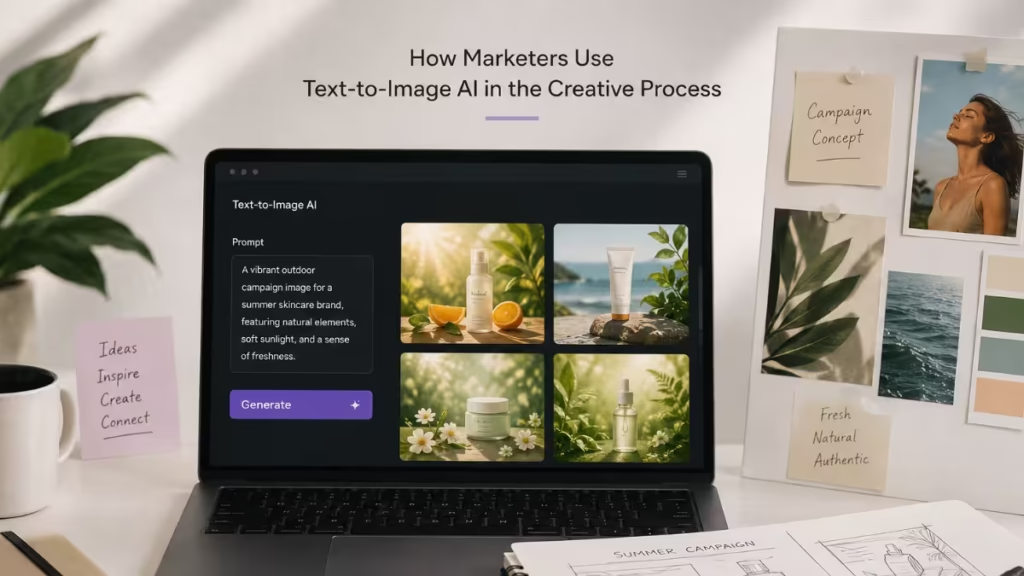
Text-to-image AI models now turn that same written prompt into a usable visual in seconds, which is why marketing teams lean on them earlier and more often in the creative process.
Platforms like Midjourney, Adobe Firefly, and OpenAI's DALL-E have made this shift possible by putting fast, prompt-based image generation directly into a marketer's workflow.
Why Marketers Turn to Text-to-Image AI
Marketers work under tight deadlines and even tighter budgets for creative production.
Text-to-image models let a small team generate multiple visual directions without booking a photographer or waiting on a design queue.
- Faster iteration on campaign concepts before committing budget to final production
- Lower cost for early drafts, mockups, and internal pitches
- Easier testing of visual styles across audiences and platforms
Best Text-to-Image AI Platforms for Marketers
Each platform handles prompts differently, so the right choice depends on the type of visual a campaign needs.
- Midjourney: Known for strong artistic and stylized output, useful for campaign concepts, mood boards, and social visuals that need a distinct look. Access runs through Discord or a web interface, and output tends to need less prompt refinement to look polished.
- Adobe Firefly: Built into the Adobe ecosystem, making it easier to move generated images straight into Photoshop or Illustrator for brand-guideline edits. Firefly is trained on Adobe Stock and licensed content, which makes commercial-use terms more straightforward for campaign work.
- OpenAI's DALL-E: Handles specific, descriptive prompts well and integrates directly into ChatGPT, which suits quick concept generation during planning sessions. It works well for marketers who already draft copy in ChatGPT and want a visual in the same session.
- Google's Imagen: Available through Google's Gemini apps, Imagen produces high detail and accurate text rendering within images, which helps for mockups that include labels or signage.
- Stable Diffusion: An open-source model that developers can self-host or fine-tune, giving marketing teams with technical resources more control over style consistency across large batches of images.
How to Pick One
The choice usually comes down to three factors: how the team already works, what kind of visual is needed, and how licensing terms fit the campaign's use case.
- Teams already inside Adobe's Creative Cloud tend to get the smoothest workflow from Firefly
- Teams that want stylized, high-impact visuals for social or ad creative often lean on Midjourney
- Teams needing quick drafts alongside AI-written copy benefit from DALL-E inside ChatGPT
- Teams with in-house developers who need scale and customization look at Stable Diffusion
Practical Workflow: From Brief to Final Asset
A clear workflow keeps AI-generated visuals consistent with brand guidelines instead of producing one-off images that do not fit anywhere else.
- Start with a creative brief that defines the product, audience, and tone
- Write specific prompts that include style, lighting, and composition details, tailored to whichever platform is in use, since Midjourney, DALL-E, and Adobe Firefly each respond differently to the same wording
- Generate several variations and shortlist the ones closest to the brand look
- Refine the chosen image with follow-up prompts or light manual editing
- Run the final asset through a brand review before it goes into any campaign
Where Marketers Actually Use These Images
Text-to-image output rarely replaces final campaign photography, but it fills gaps earlier in the process.
- Drafting product mockups before a physical photoshoot happens
- Producing ad creative variants for A/B testing across platforms
- Building storyboard frames for video or social content planning
- Generating seasonal or localized visuals for regional campaigns
- Creating placeholder thumbnails while final assets are still in production
What to Watch Before Publishing AI-Generated Visuals
Speed is the main draw, but a few checks prevent avoidable problems down the line.
- Confirm the platform's license allows commercial use for the intended campaign
- Check generated images against brand color, font, and style guidelines
- Review closely for visual artifacts that AI models sometimes introduce in hands, text, or fine detail
- Avoid using AI visuals in contexts where photorealism of real people or products is required, since accuracy still varies by model
Frequently Asked Questions
Can marketers use text-to-image AI for final campaign assets, not just drafts?
Some brands do publish AI-generated visuals directly, particularly for social content and internal materials, but many still route final customer-facing assets through a design or photography review first.
Do text-to-image tools replace photographers or designers?
No. They speed up the early creative stages, but final production, especially for product photography, still benefits from professional input for accuracy and brand fit.
What is the biggest risk of using text-to-image AI in marketing?
Licensing and commercial-use terms vary by platform, so checking the specific tool's policy before using an image in a paid campaign matters more than the visual quality itself.
Read More