If you see the “Unable to initialize connection to Steam” login error in The Elder Scrolls Online, the game cannot authenticate your Steam session with the ESO servers. This issue usually happens because of server maintenance, Steam authentication failures, corrupted game files, or incorrect launcher settings.
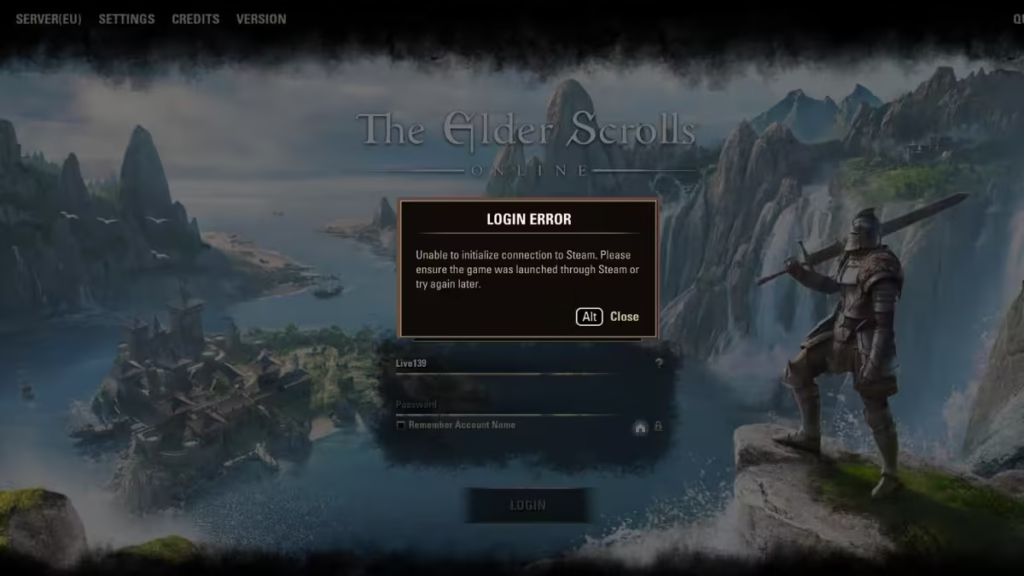
Check ESO Server Status First
Before changing anything on your PC, confirm that the problem is not coming from the servers.
Login errors often appear when the ESO megaservers undergo maintenance or experience heavy traffic. When servers go offline, the game cannot authenticate your account and the login process fails.
Visit the official ESO Service Alerts page and confirm the servers are online. If maintenance is active, you must wait until it finishes.
If the servers are working normally and the error still appears, continue with the troubleshooting steps below.
Fix 1: Restart Steam and the Game
A temporary authentication failure between Steam and ESO can trigger this login error.
Restarting Steam refreshes the authentication session and restores the connection.
Steps
- Close The Elder Scrolls Online completely.
- Exit Steam.
- Open Task Manager and close any remaining Steam processes.
- Launch Steam again.
- Start ESO from the Steam Library.
If Steam authentication caused the error, the game should log in normally after restarting.
Fix 2: Launch the Game Only Through Steam
Some players accidentally launch the game through the ESO launcher or desktop shortcut instead of Steam.
ESO requires Steam authentication when you own the game through Steam.
Steps
- Open Steam
- Go to Library
- Select The Elder Scrolls Online
- Click Play
Always launch the game from Steam if you purchased it through the platform.
Fix 3: Verify ESO Game Files
If restarting Steam does not solve the problem, corrupted game files may be preventing the login process.
Steam includes a built-in tool that automatically repairs damaged files.
Steps
- Open Steam Library
- Right-click The Elder Scrolls Online
- Click Properties
- Select Installed Files
- Click Verify Integrity of Game Files
Steam will scan the installation and download any missing files.
Fix 4: Clear the Steam Download Cache
Old or corrupted cache files can interfere with Steam authentication.
Clearing the download cache forces Steam to rebuild its connection settings.
Steps
- Open Steam
- Click Steam → Settings
- Select Downloads
- Click Clear Download Cache
- Restart Steam
Log in again and launch ESO.
Fix 5: Switch Steam to Offline Mode and Back
Refreshing Steam’s network session can resolve authentication problems.
Steps
- Open Steam
- Click Steam → Go Offline
- Restart Steam
- Launch ESO once
- Switch Steam back to Online Mode
- Restart Steam again
This process refreshes the authentication token between Steam and ESO.
Fix 6: Repair the ESO Launcher
If the launcher files become corrupted, the game may fail to authenticate your Steam account.
Steps
- Open the ESO Launcher
- Click Game Options
- Select Repair
- Allow the launcher to scan and repair files
Fix 7: Restart Your Network
Connection routing issues can interrupt communication between Steam and ESO servers.
Restarting your router refreshes the network connection.
Steps
- Turn off your router
- Wait 30 seconds
- Turn the router back on
- Restart your PC
- Launch Steam again
Fix 8: Delete the ESO Version File (Advanced Fix)
If the launcher fails to update properly, the version file may block authentication.
Steps
- Navigate to:
C:\Program Files (x86)\Zenimax Online\The Elder Scrolls Online\game- Delete the file:
game_player.version- Restart the ESO Launcher
The launcher will rebuild the file and download updates if necessary.
Fix 9: Check Your Steam Account Link
ESO requires your Steam account and ESO account to be linked correctly.
Login errors may appear if:
- Your ESO account is linked to another Steam account
- You launch ESO from a shared Steam library
- The game was installed during a free weekend
Confirm that the correct ESO account connects to your Steam profile.
Fix 10: Reinstall the Game
If none of the fixes above resolve the login error, reinstalling the game may help.
Steps
- Uninstall ESO from Steam Library
- Restart your PC
- Install the game again
- Launch it through Steam
Why This Error Happens
The Elder Scrolls Online login error usually occurs because of:
- Steam authentication failure
- Server maintenance
- Corrupted game files
- Cache problems
- Incorrect launcher method
Once the Steam authentication refreshes or the files repair, the login process usually works again.
FAQs
What does “Unable to initialize connection to Steam” mean in Elder Scrolls Online?
This error appears when The Elder Scrolls Online fails to authenticate your Steam session with the ESO servers during login.
Why does the ESO Steam login error happen?
The error usually occurs because of Steam authentication issues, server maintenance, corrupted game files, or network connection problems.
How do I fix the Elder Scrolls Steam connection error?
Restart Steam, verify ESO game files, clear the Steam download cache, and launch the game directly from the Steam library.
Can ESO servers cause the Steam login error?
Yes. If ESO megaservers are under maintenance or experiencing heavy traffic, the login authentication may fail temporarily.
Does verifying ESO files fix the Steam login issue?
Yes. Verifying the game files through Steam can repair corrupted files that prevent the game from connecting to Steam authentication services.
Should I reinstall ESO to fix the login error?
Reinstalling the game can fix persistent login errors if corrupted installation files or launcher issues are causing the problem.
Why must ESO be launched through Steam?
ESO requires Steam authentication when purchased through Steam, so launching the game outside the Steam client can cause login failures.
Can clearing Steam cache fix the ESO login problem?
Yes. Clearing the Steam download cache refreshes authentication data and can resolve Steam connection errors.

