The Redstone comparator is one of Minecraft’s most powerful circuit components, and also one of the most overlooked. Most players move on after learning about Redstone torches and repeaters, completely skipping a block that opens the door to storage detectors, signal analyzers, hopper clocks, and automated sorting systems. If you want to build anything beyond basic doors and lamps, learning the comparator is non-negotiable. This guide covers the full crafting recipe, all three operating modes, block measurement mechanics, and two practical builds you can set up right now.
What Is a Redstone Comparator?
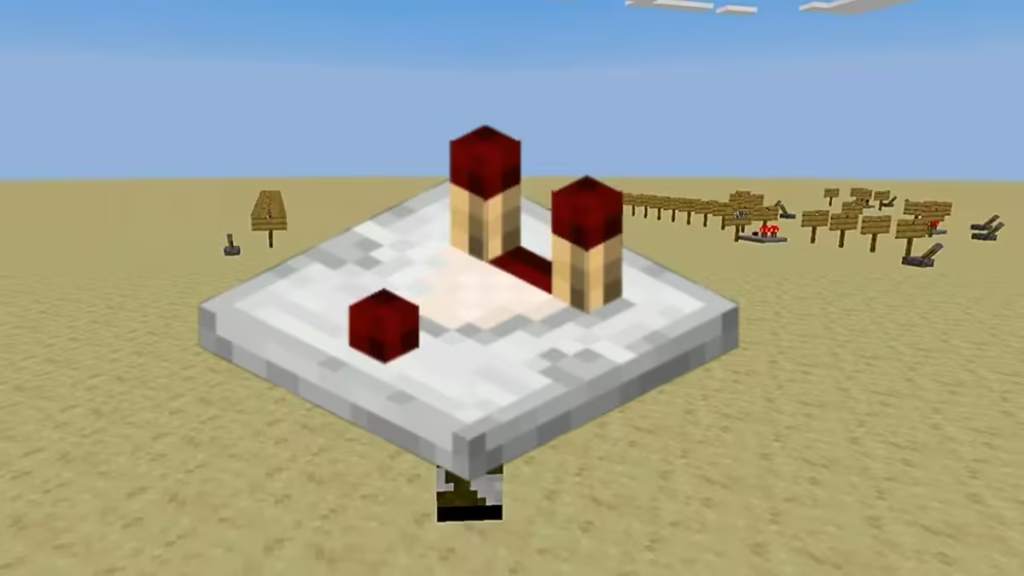
A Redstone comparator reads, maintains, compares, and measures Redstone signals. It outputs a signal from its front based on what it receives at its back and sides. Unlike a repeater, which simply extends or amplifies a signal, the comparator processes signal strengths mathematically, making it the foundation of logic-based Redstone circuits.
The block has two input pins at the back and one output pin at the front. The back pins light up whenever the comparator receives an incoming signal. The front pin acts as a mode toggle. When the front pin sits down, the comparator runs in comparison mode. When you click it to flip it up, it switches to subtraction mode.
One timing detail matters here: it takes 2 game ticks (0.1 seconds) for a signal to pass through a comparator from any direction. That 2-tick delay means the comparator does not respond to single-tick fluctuations, so 1-tick clock signals appear as always-off from the side input and always-on from the rear input.
Natural Generation
Between 2 and 9 Redstone comparators generate inside Ancient Cities, the deep underground structures in the Deep Dark biome where the Warden roams. You can mine a comparator instantly with any tool or even by hand, and it drops itself as an item. If lava flows into the comparator’s space, it gets destroyed without dropping.
Supported Platforms
The Redstone comparator is available across all major Minecraft platforms:
| Platform | Supported | Since Version |
|---|---|---|
| Java Edition (PC/Mac) | Yes | 1.5 |
| Pocket Edition (PE) | Yes | 0.14.0 |
| Xbox 360 | Yes | TU19 |
| Xbox One | Yes | CU7 |
| PS3 / PS4 | Yes | 1.12 |
| Nintendo Switch | Yes | Launch |
| Windows 10 Edition | Yes | 0.14.0 |
| Education Edition | Yes | Launch |
What You Need to Make a Redstone Comparator
Crafting a comparator requires three materials:
- 3 Redstone Torches – Craft each one by combining 1 Redstone Dust with 1 Stick in a crafting grid.
- 1 Nether Quartz – Mine Nether Quartz Ore with any pickaxe inside the Nether dimension. Alternatively, trade with an expert-level Stone Mason villager to get Nether Quartz in exchange for Emeralds.
- 3 Stone Blocks – Smelt Cobblestone in a Furnace to produce Stone, or mine Stone directly using a pickaxe enchanted with Silk Touch.
How to Craft a Redstone Comparator
Open a crafting table to access the 3×3 crafting grid, then arrange the ingredients in this exact layout:
- Row 1 (Top): Empty | Redstone Torch | Empty
- Row 2 (Middle): Redstone Torch | Nether Quartz | Redstone Torch
- Row 3 (Bottom): Stone | Stone | Stone
The three Stone blocks fill every cell of the bottom row. The Nether Quartz goes in the center cell of the middle row. One Redstone Torch flanks each side of the Nether Quartz in the same row, and a single Redstone Torch sits directly above the Nether Quartz in the top row. Both corner cells of the top row stay empty.
Once you place the materials in this pattern, the Redstone comparator appears in the result box. Drag it into your inventory to complete the craft. The recipe produces one comparator per craft.
In Creative mode, find the comparator under the Redstone tab in the Creative Inventory on Java Edition. On Bedrock Edition, it appears in the Items section.
Give Command (Skip the Craft)
If you want to skip crafting entirely, use the following command in any game mode with cheats enabled:
- Java Edition 1.13 and later:
/give @p comparator 1 - Java Edition 1.8 through 1.12:
/give @p comparator 1 0
How to Place a Redstone Comparator
Place the comparator on top of any opaque, solid-top-surface block by looking at that surface and placing the item. The arrow on the top of the comparator always points toward the front output. When placed, the comparator faces away from the player, so the output points in the direction you are facing.
In Bedrock Edition, you can also place comparators on walls and fences, which gives extra flexibility in compact builds.
How to Use a Redstone Comparator: All Three Modes
1. Maintain Signal Strength
When only the rear input receives a signal and neither side input carries power, the comparator passes the rear signal forward at exactly the same strength. This keeps the signal value intact across a circuit section, which matters whenever you need precise signal levels rather than just on/off states.
Use case: Carrying a specific signal strength value from a storage block across multiple blocks without letting a repeater reset the value to 15.
2. Compare Mode (Front Pin Off)
In comparison mode, the comparator checks the rear input strength against the strongest side input strength.
- If either side input strength equals or exceeds the rear input strength, the comparator output shuts off completely.
- If the rear input strength is greater than both side inputs, the comparator outputs the rear signal at full strength.
Formula: Output = Rear strength, if Rear > both Side inputs; otherwise Output = 0
Example: Rear input = 10, side input = 5. The comparator outputs 10. If the side input rises to 10 or above, the output drops to zero.
Use case: Building logic gates, locking mechanisms, and conditional triggers that only fire when a signal meets a certain threshold.
3. Subtract Mode (Front Pin On)
Click the comparator to flip the front pin up and enter subtract mode. The comparator takes the stronger of the two side inputs and subtracts it from the rear input strength. The result becomes the output. If the subtraction produces a negative result, the output is zero.
Formula: Output = max(Rear strength - max(Left, Right), 0)
Example: Rear input = 9, left side = 5, right side = 2. The output equals 9 minus 5, which is 4.
Example: Rear input = 4, left side = 6, right side = 7. The output equals max(4 minus 7, 0), which is 0.
Use case: Incrementing and decrementing signal values in calculators, countdown timers, and level-detection builds.
How to Measure Block Fullness with a Comparator
The comparator’s most useful feature in practical builds is its ability to read the contents of storage blocks and certain functional blocks. Place any supported block directly behind the comparator’s rear input, and the comparator outputs a signal proportional to how full that block is. An empty block outputs nothing. A completely full block outputs a signal strength of 15.
The comparator can also read through one intervening conductive block between itself and the measured block, which helps with compact circuit designs.
Storage Containers the Comparator Can Read
| Container | Slots | Max Signal |
|---|---|---|
| Chest | 27 | 15 |
| Large Chest | 54 | 15 |
| Trapped Chest | 27 | 15 |
| Barrel | 27 | 15 |
| Hopper | 5 | 15 |
| Minecart with Hopper (on Detector Rail) | 5 | 15 |
| Minecart with Chest (on Detector Rail) | 27 | 15 |
| Dispenser | 9 | 15 |
| Dropper | 9 | 15 |
| Shulker Box | 27 | 15 |
| Furnace | 3 | 15 |
| Blast Furnace | 3 | 15 |
| Smoker | 3 | 15 |
| Brewing Stand | 5 | 15 |
| Crafter | 9 | 15 |
| Decorated Pot | 1 | 15 |
| Copper Chest | 27 | 15 |
Non-Container Blocks with Measurable States
| Block | Output Behavior |
|---|---|
| Jukebox | Signal based on which music disc plays (1 to 15) |
| Beehive / Bee Nest | Signal equal to honey level (0 to 5) |
| Cake | 2 signal strength per remaining slice (full cake = 14) |
| Cauldron | 0 (empty), 1, 2, or 3 (full), always 3 with lava |
| Composter | 0 (empty) through 8 (ready to collect) |
| Chiseled Bookshelf | 1 to 6 based on last interacted slot; 0 if none |
| End Portal Frame | 0 (no Eye of Ender), 15 (Eye inserted) |
| Copper Bulb | 15 (lit), 0 (unlit) |
| Respawn Anchor | Signal based on charges remaining |
| Sculk Sensor | Signal based on vibration strength received |
| Lectern | Signal based on current page number |
| Item Frame | Signal based on item rotation angle |
| Command Block | Signal equal to success count of last command |
How Signal Strength Scales with Container Fullness
The comparator calculates output strength using a weighted average of all slots, based on each item’s max stack size. Items that stack to 64 contribute 1 unit per item. Items that stack to 16 (like Ender Pearls or signs) contribute 4 units per item. Items that stack to 1 (like minecarts or boats) contribute 64 units per item. The formula is:
Signal strength = floor(1 + (sum of all slot weights / number of slots / 64) x 14)
This means placing a mix of stackable and non-stackable items in one container produces signal levels that do not scale linearly.
How to Test Signal Strength Visually
Build this simple signal-strength tester to see exact output values from any block:
- Place a Redstone comparator on a solid block.
- Run a line of 15 Redstone Lamps in front of the comparator, each connected to the next with Redstone Dust.
- Place the block you want to test directly behind the comparator.
The number of lamps that light up equals the comparator’s output signal strength. A chest packed with 27 full stacks of 64-stackable items lights all 15 lamps. A chest with exactly one item lights only 1 lamp.
How to Build a Storage Detector
A storage detector triggers a visual or mechanical output the moment a storage block receives any item, then turns off when the block empties. This setup forms the basis of item collection alerts, hopper monitors, and automated sorting logic.
Materials needed: 1 Redstone comparator, 1 Hopper, 1 Redstone Lamp, 1 piece of Redstone Dust, and enough solid blocks to build on.
Steps:
- Place a Redstone comparator on a solid block.
- Place 1 piece of Redstone Dust directly in front of the comparator’s output (front side).
- Place a Redstone Lamp at the far end of the Redstone Dust.
- Place a Hopper directly behind the comparator on the back side. The hopper does not need to face toward the comparator, but it must sit directly adjacent to the back input.
When any item drops into or gets pushed into the Hopper, the Redstone Lamp turns on. When the Hopper empties, the lamp turns off. Swap the Redstone Lamp for any other triggered mechanism, such as a piston, a door, a dispenser, or a note block, depending on what you want the detector to do.
This same layout scales up into fully automated sorting systems by chaining multiple hopper-comparator pairs along an item routing line.
Frequently Asked Questions
What is a Redstone comparator in Minecraft?
A Redstone comparator is a circuit component that reads, maintains, compares, and measures Redstone signal strengths. It also detects the contents of storage blocks, making it essential for automation, sorting systems, and logic-based builds.
What is the difference between a Redstone comparator and a Redstone repeater?
A repeater extends, delays, and amplifies Redstone signals but cannot read block states or compare signal strengths. A comparator measures and compares signal strengths but does not amplify or delay a signal beyond its fixed 2-tick pass time.
Does a comparator spawn naturally in Minecraft?
Yes. Between 2 and 9 Redstone comparators generate naturally inside Ancient Cities in the Deep Dark biome, placed around the central portal-like structure.
Can you build a Redstone clock with a comparator?
Yes. Hopper-based Redstone clocks use a comparator to track item counts inside connected hoppers and trigger clock cycles based on those values. These clocks are more reliable and controllable than torch-based designs.
How many Redstone comparators generate in Ancient Cities?
Each Ancient City contains between 2 and 9 Redstone comparators placed naturally around the central structure.
Related Gaming Guides
- How to Make a Geyser in Minecraft
- How to Get Potent Sulfur in Minecraft
- 10 Best Minecraft Pocket Edition Seeds to Try Right Now
Game Error Fixes

