Every email your domain sends carries your reputation with it. When your SPF record is missing or broken, receiving servers cannot confirm the message actually came from you. Legitimate emails land in spam, newsletters bounce, and attackers can send messages that look like they came from your domain.
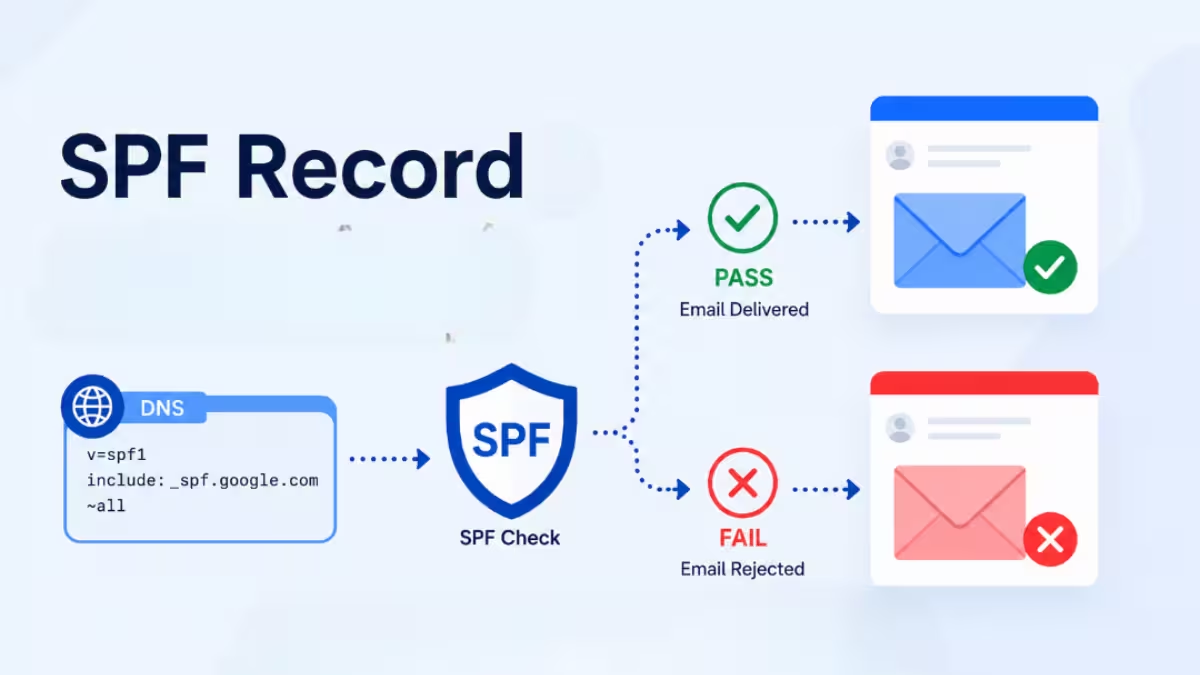
This guide explains what an SPF record is, how SPF verification works, how to write one correctly, and how to avoid the errors that quietly break email delivery.
What Is an SPF Record
SPF stands for Sender Policy Framework. It is a DNS TXT record that lists the mail servers allowed to send email for your domain. When a receiving server gets a message, it checks the sender domain’s SPF record to confirm the sending IP address appears on the approved list.
If the IP address is not listed, the receiving server can flag the message, reject it, or send it to spam. A correctly configured SPF record improves deliverability and protects your domain from spoofing attempts.
You can check any domain’s current SPF record using a free SPF lookup tool. It only takes a few seconds and shows exactly what is published in DNS.
How SPF Verification Works
SPF authentication follows a fixed sequence each time an email arrives:
- The sending domain publishes an SPF record as a DNS TXT entry, listing authorized sources through mechanisms like ip4, ip6, include, and a, along with a policy such as -all, ~all, or ?all.
- The sending server attaches a Return-Path address, also called the envelope sender, which identifies the domain responsible for delivery.
- The receiving server reads the domain from that Return-Path address.
- It queries DNS to pull the SPF record published by that domain.
- It checks the sending server’s IP address against each mechanism in the record, in order, until it finds a match or reaches the final policy.
- SPF caps this process at 10 DNS lookups. Going over that limit produces a PermError regardless of whether the sender is legitimate.
- The result lands in one of several categories: Pass, Fail, SoftFail, Neutral, None, PermError, or TempError.
- The receiving server combines this result with DKIM and DMARC outcomes to decide whether to deliver, quarantine, or reject the message.
One detail trips up a lot of administrators: SPF checks the Return-Path domain, not the visible From address shown to the recipient. These two domains often differ when you send through a third-party platform. SPF can pass while DMARC alignment still fails, and that mismatch directly affects whether the email reaches the inbox.
SPF Syntax Explained
A typical SPF record looks like this:
v=spf1 include:_spf.google.com include:spf.protection.outlook.com ip4:203.0.113.0/24 -allThis single line tells receiving servers which sources can send mail for the domain and what to do with anything else.
Version tag: Every SPF record starts with v=spf1. No other version exists. If this tag is missing or wrong, the entire record gets ignored.
Mechanisms: These define who can send mail, and they get evaluated left to right until something matches. The include mechanism shows up most often and causes the most trouble, because every include triggers its own DNS lookup. If a service you include points to three more domains internally, those lookups count against your limit too. The a mechanism authorizes whatever IP address your domain’s existing A record points to. It does not create a separate record of its own.
Modifiers: The redirect modifier hands off the entire SPF evaluation to another domain. Unlike include, which adds a policy on top of your own, redirect replaces your record completely. Use it only when one domain should fully inherit another domain’s SPF setup.
The 10 DNS Lookup Limit
SPF allows a maximum of 10 DNS lookups per check. Mechanisms that count toward this limit include include, a, mx, exists, and redirect. ip4, ip6, and all do not trigger lookups on their own.
Exceeding 10 lookups produces a PermError, and SPF fails for every email from that domain, even from senders who are completely legitimate. Large organizations using several email tools (a CRM, a support desk, a marketing platform, a transactional email service) hit this limit often without realizing it. The fix usually involves removing unused includes or flattening nested records into direct IP ranges.
The All Mechanism and SPF Policy
The qualifier attached to the all mechanism at the end of your record sets your overall policy for unlisted senders:
- -all (Fail) rejects anything not explicitly listed. This is the strictest and recommended setting once you have confirmed every legitimate sender is included.
- ~all (SoftFail) marks unlisted senders as suspicious but typically still lets the message through to spam. Useful while testing a new record.
- ?all (Neutral) takes no real position and offers minimal protection.
- +all (Pass) allows any server to send as your domain. Avoid this entirely, since it defeats the purpose of SPF.
SPF Record Mistakes That Break Email Deliverability
Multiple SPF records: A domain can only have one SPF record. If you publish two, receiving servers see this as a PermError and authentication breaks across the board. If you need to combine sources, merge them into a single record rather than publishing separate ones.
Too many includes: Each third-party service you add (email marketing tools, CRMs, support platforms) adds its own lookups. Stacking several of these pushes you past the 10-lookup ceiling quickly.
Missing senders: If you add a new platform to send transactional or marketing email but forget to update SPF, that platform’s messages will fail authentication.
Using +all: This setting authorizes any server on the internet to send as your domain, which removes any protective value SPF offers.
Forgotten legacy systems: Old on-premise mail servers that were replaced by a cloud provider often stay listed in the SPF record long after they stop being used. They do not usually cause failures on their own, but they waste lookups and complicate troubleshooting.
Why SPF Needs DKIM and DMARC
SPF only validates the Return-Path domain, not the address a recipient actually sees. It also breaks during email forwarding, since the forwarding server becomes the new sending IP and may not match the original SPF record. This is one reason DKIM matters as a backup, since DKIM signatures survive forwarding because they are attached to the message itself rather than tied to the sending server’s IP.
DMARC ties SPF and DKIM together and tells receiving servers how to handle messages that fail both checks. It also generates reports showing exactly which sources are passing and failing authentication for your domain, which is the only practical way to catch SPF problems before they affect deliverability at scale.
A complete email authentication setup uses all three protocols together: SPF to authorize sending IPs, DKIM to verify message integrity through forwarding, and DMARC to enforce policy and provide visibility.
Best Practices for a Healthy SPF Record
Keep the record under the 10-lookup limit by removing unused includes and avoiding nested includes wherever you can. Use ip4 or ip6 notation directly when a server’s IP address is stable, since static IP ranges do not cost a DNS lookup the way include does. Choose -all once you have verified every legitimate sender, rather than leaving the record on ~all indefinitely. Avoid the exists and ptr mechanisms, since both are deprecated or carry unnecessary risk. Review the record periodically, especially after adding or retiring any email service, since SPF is not a one-time setup and infrastructure changes regularly.
How to Check Your SPF Record
An SPF record checker confirms several things at once: whether a record exists at all, whether more than one record is published, how many DNS lookups the record triggers, and whether deprecated mechanisms like ptr are present. Running this check after any change to your email infrastructure catches problems before they affect delivery, rather than after customers report missing emails.
Related Guides
- How to Fix DNS Client Errors on Windows 11
- How to Connect Custom Domain to Blogger Using Cloudflare (DNS + HTTPS Setup Guide)
- 5 Best Email Clients for Mac in 2026 (Free and Paid Options)
- How to Fix 550 5.7.520 Outlook Error When Sending Emails (Message Blocked as Spam)
- How to Fix Outlook Not Receiving Emails on Laptop and Phone
- How to Add an IMAP Email Account to Outlook Without Errors
SPF is a small DNS entry with an outsized effect on whether your email reaches the inbox. A misconfigured record, whether through duplicate entries, an exceeded lookup limit, or an overly permissive policy, can silently damage your domain’s sending reputation. Pair SPF with DKIM and DMARC, audit the record whenever your sending infrastructure changes, and use a checker tool regularly to confirm everything still resolves correctly.

