If you use an iPhone, iPad, or Mac, chances are your storage fills up faster than expected. Photos, backups, and apps quickly eat into the free 5GB limit. That’s where Apple iCloud+ comes in—a simple upgrade that expands storage and adds privacy features.
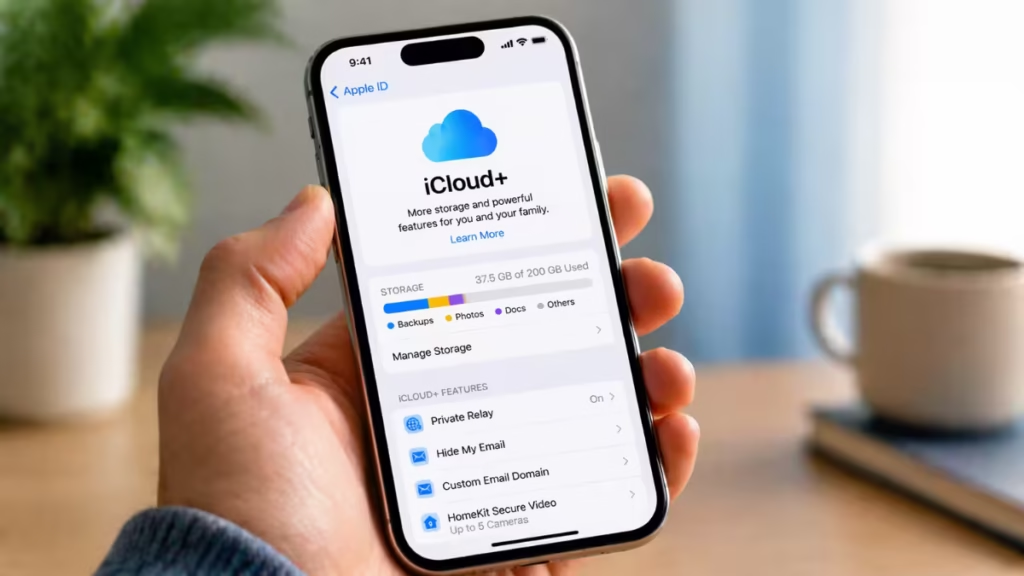
This guide breaks down iCloud+ pricing in 2026, what each plan includes, and which option actually gives you the best value based on real usage.
See also: How to Fix iMessage Activation Failed on iPhone
iCloud+ is Apple’s paid cloud subscription. It does more than just store files. It automatically backs up your data, syncs everything across devices, and adds privacy tools that run in the background.
With iCloud+, you get:
- More storage for photos, videos, and backups
- Automatic syncing across all Apple devices
- Privacy features like Private Relay and Hide My Email
- Family sharing for up to 5 members
Even the lowest plan includes all premium features—the only real difference is storage size.
iCloud+ Pricing Plans (Global / US)
Apple keeps pricing consistent and predictable. All plans are billed monthly, with no annual discounts.
United States Pricing (Reference)
| Plan | Storage | Monthly Price | Best For |
|---|---|---|---|
| Free | 5GB | $0 | Basic backups |
| Basic | 50GB | $0.99 | Light users |
| Standard | 200GB | $2.99 | Families |
| Premium | 2TB | $9.99 | Power users |
| Pro | 6TB | $29.99 | Creators |
| Ultra | 12TB | $59.99 | Heavy storage |
Pricing remains stable across regions, with only currency and taxes changing slightly.
See also: How to Enable iPhone Mirroring in the EU (What Works and What Doesn’t)
What iCloud+ Features You Actually Get
Every paid iCloud+ plan includes the same core features. The only difference between plans is storage—not functionality.
1. Private Relay
Routes your Safari traffic through encrypted relays and hides your IP address, reducing tracking from websites and network providers.
2. Hide My Email
Generates random email addresses that forward to your inbox, helping you avoid spam and protect your real email.
3. Custom Email Domain
Lets you use your own domain with iCloud Mail, giving you a more professional and personalized email setup.
4. HomeKit Secure Video
Stores encrypted footage from compatible security cameras without counting against your storage limit:
- 50GB → supports 1 camera
- 200GB → supports up to 5 cameras
- 2TB and above → supports unlimited cameras
5. Family Sharing
Allows you to share your storage plan with up to five people. Each user keeps their files, photos, and backups private while using the same storage pool.
Key takeaway: You’re not paying for better features at higher tiers—only for more storage capacity.
Which iCloud Plan Is the Best Value?
Choosing the right plan is not about picking the biggest option—it’s about matching storage to your actual usage. Most users either overpay or run out of space too quickly because they skip this step.
1. 50GB Plan ($0.99) — Entry-Level Option
This plan works for users with a single device who only need basic backups and limited photo storage.
Best for:
- One iPhone or iPad
- Contacts, messages, and light backups
Limitation: It fills up quickly if you take photos or record videos regularly, especially with modern high-resolution formats.
2. 200GB Plan ($2.99) — Best Overall Value
This is the most balanced plan and the right starting point for most users. It handles multiple devices, photo libraries, and shared usage without constant storage warnings.
Best for:
- Families and shared usage
- Multiple Apple devices
- Regular photo and video backups
Why it stands out:
- Supports Family Sharing
- Better cost per GB than 50GB
- Enough space for most real-world usage
3. 2TB Plan ($9.99) — Best for Heavy Users
This plan is designed for users who generate large amounts of data. If you record videos, store years of photos, or back up multiple devices, this tier removes storage anxiety completely.
Best for:
- 4K video storage
- Large photo libraries
- Multiple device backups
Key advantage: It offers the lowest cost per GB, making it the most efficient option for long-term use.
4. 6TB & 12TB Plans — High-End Use Only
These plans are built for niche use cases where storage needs go beyond personal usage.
Best for:
- Content creators and videographers
- Professional workflows
- Large-scale file storage
Most users will never need these tiers unless they handle massive media files or business-level data.
For most people, the 200GB plan hits the sweet spot, while the 2TB plan is the best upgrade once you outgrow it.
See also: How to Change Alarm Volume on iPhone Easily (Settings + Tips)
Hidden Costs You Should Know
iCloud+ looks simple, but a few factors affect your total cost:
- Auto-renewal: Subscription renews every month automatically
- Family usage: Shared storage fills faster than expected
- Data usage: Uploading large files can consume mobile data
- App storage: Some apps silently store data in iCloud
Managing storage regularly helps avoid unnecessary upgrades.
iCloud+ vs Other Cloud Storage Services
iCloud+ delivers the best experience inside the Apple ecosystem, but it is not designed to be the most flexible option across platforms. If you use multiple devices or need advanced collaboration, other services may fit better.
1. Google Drive
Offers more free storage and stronger collaboration features.
Strengths:
- 15GB free storage (higher than iCloud)
- Real-time editing with Docs, Sheets, and Slides
- Strong sharing and teamwork tools
2. Dropbox
Focuses on reliability and file syncing across devices.
Strengths:
- Fast and consistent file sync
- Deep integrations with third-party apps
- Ideal for workflow-heavy users
3. Microsoft OneDrive
Best suited for users already working within the Microsoft ecosystem.
Strengths:
- Tight integration with Word, Excel, and PowerPoint
- Good cross-platform support
- Included with many Microsoft 365 plans
Key Difference
- iCloud+ → Built for seamless Apple integration (automatic backups, device sync, simplicity)
- Other services → Built for flexibility, collaboration, and cross-platform use
Choose iCloud+ if you are fully invested in Apple devices. Choose alternatives if you need collaboration tools, broader compatibility, or advanced file management features.
How to Save on iCloud Storage
Upgrading your plan is not always the right move. In most cases, you can reduce costs by managing your storage more efficiently before paying for more space.
- Use Family Sharing to split a 200GB or 2TB plan
- Delete old backups and duplicate photos
- Turn off unnecessary app syncing
- Store non-essential files on Google Drive or OneDrive
Most users upgrade too early. Optimizing storage first often delays or completely avoids the need for a higher plan.