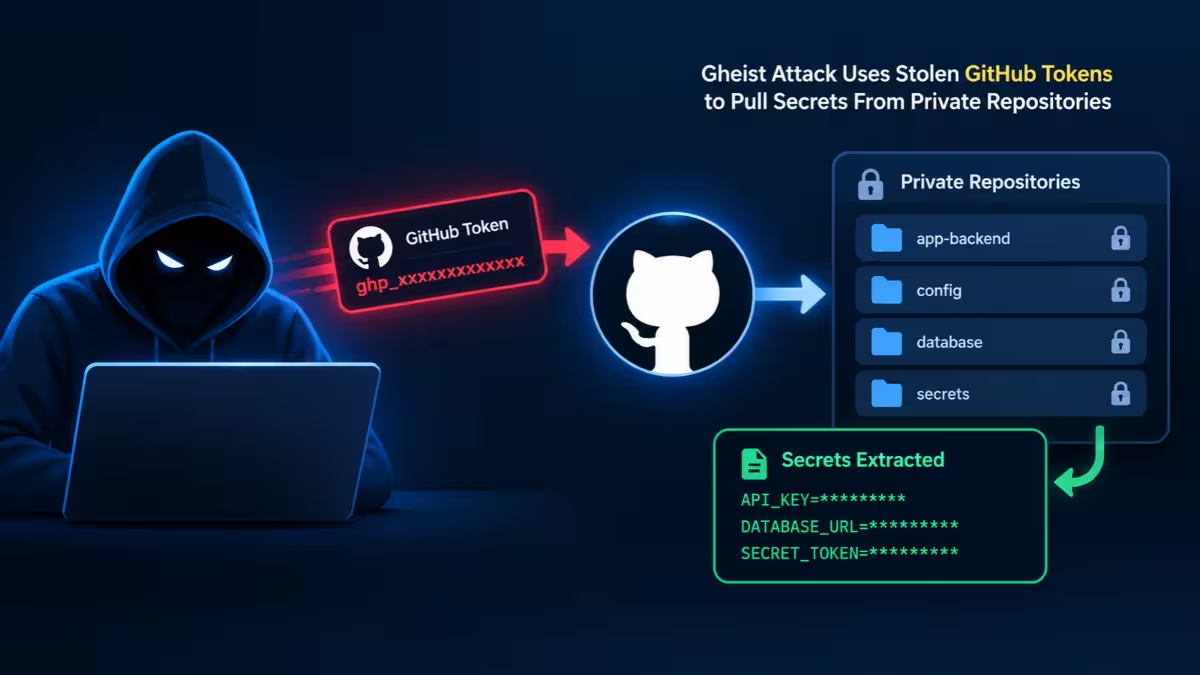
A new campaign called Gheist is turning stolen GitHub tokens into a quiet pipeline for cloud secrets. Security researchers at Wiz have linked it to more than 850 compromised GitHub accounts and over 13,500 malicious branches. The attackers do not need malware on your servers or a command server of their own. They only need one working token and GitHub Actions.
If your team stores secrets in GitHub, especially in private repositories, you should check your accounts today.
What Is the Gheist Campaign?
Gheist is an automated attack that abuses stolen GitHub tokens. The name comes from the user agent gheist, which its tool sends with every GitHub API request. For each token, the tool finds every repository the token can reach, plants a workflow, collects the secrets that workflow prints and wipes its traces. Researchers have tracked it since September 15, and it keeps changing.
Gheist Attack at a Glance
| Detail | What we know |
|---|---|
| Campaign name | Gheist (from the user agent its tool sends) |
| First tracked | September 15 |
| Scale | 13,500+ planted branches, 850+ accounts |
| Main target | Private repos and GitHub Enterprise Server |
| Branch pattern | ci-sync- plus six random characters |
| Workflow file | .github/workflows/sync-check.yml |
| Commit message | ci: sync config |
| Status | Still active and changing |
| Companies hit | Roughly a dozen, by Wiz's estimate |
How Attackers Steal the GitHub Tokens
Gheist does not break into GitHub itself. It reuses tokens that already leaked elsewhere. Wiz traced them to two main sources:
- Infostealer malware running on developer machines, which grabs saved tokens and browser sessions.
- Earlier supply chain breaches, including the Trivy scanner compromise in March, which exposed credentials in bulk.
An old personal access token often still carries full write rights to every repo its owner can reach. That makes one stolen token far more valuable than most teams assume.
How the Gheist Attack Works Step by Step
The tool follows a short, automated routine for every repository a token can open.
- It creates a new branch named
ci-sync-with a six-character random tail. - It commits one workflow file called
sync-check.yml. The commit carries no signature and shows the token owner as the author, so it looks like normal work. - The push triggers the workflow automatically. The workflow dumps environment variables and repository secrets into its own run log.
- It encodes the secrets in Base32. GitHub hides secrets in logs only when they appear exactly as stored. Encoded text slips past that mask and prints in full.
- It downloads the log through the GitHub API and deletes the run seconds later.
Because the data leaves through GitHub's own API, defenders see no strange domain and no unusual outbound connection. Firewalls and egress rules have nothing to block.
If a repo uses deployment environments, the tool lists them and pulls environment-scoped secrets too. Those are often production keys.
Why Private Repositories Stay Exposed
GitHub added a safety hold on July 28. Since then, it pauses suspicious workflow runs in public repositories until a collaborator approves them. Wiz checked public Gheist runs and found every one stuck waiting for approval. The payload never ran there.
That hold does not cover private repositories or GitHub Enterprise Server. In those environments, the planted workflows ran, finished and vanished. Many teams treat "private" as safe. Gheist shows that a private label means nothing once an attacker holds a valid token with write access.
In enterprise accounts, Wiz watched the tool rotate through several user and bot tokens within minutes and clone private repos before planting the workflow. A few hours later, someone used cloud credentials from the same companies to list secrets in AWS Secrets Manager.
Gheist Variants and the Self-Hosted Runner Payload
Wiz spotted two variants running side by side. You can tell them apart by the branch suffix:
- Tool A uses hexadecimal characters and a basic payload.
- Tool B uses base36 characters, adds a six-minute timeout, reads deployment environments and tailors its payload to each repo.
On October 19, Tool B gained a second job aimed at self-hosted runners. It scans the host for dozens of token formats, including API keys for AI services like Anthropic, Hugging Face, Groq and NVIDIA. It also hunts for private keys, .env files, Terraform state, shell history, cloud metadata credentials and Kubernetes tokens. It even uses the Docker socket to mount the host filesystem.
The good news: the researchers found this job buggy. It looks for the wrong runner key file, its credential regex breaks, and it fails to grab GCP and Azure tokens. Still, nobody should count on attackers staying careless.
Other Malware Campaigns Using the Same Accounts
The stolen accounts do not belong to Gheist alone. Wiz tied them to several other operations:
- Malware lures: On October 6, 391 accounts renamed around 1,461 repos to fake cracked-software names. That rename wiped 610 Gheist branches by accident.
- Free compute abuse: On October 18, 25 Gheist accounts each spun up a "Windows RDP Runner" repo within nine minutes.
- PolinRider: Some victims show signs of this DPRK-linked malware, which hides JavaScript loaders in build config files such as
vite.config.js. - Megalodon: 57 early Gheist accounts also fell to the Megalodon campaign in May.
This overlap suggests attackers trade or resell stolen developer tokens. One leak can feed several groups at once.
Do not confuse Gheist with GhostAction. That separate campaign uses different workflow files and sends stolen data to an external server.
Gheist Indicators of Compromise
Use these markers in your repository searches and log queries.
| Indicator | Value |
|---|---|
| User agent | gheist |
| Branch name | ci-sync- plus six characters, matching ^ci-sync-[0-9a-z]{6}$ |
| Workflow file | .github/workflows/sync-check.yml |
| Commit message | ci: sync config |
| Self-hosted runner files | .gdmp_pat, .gdmp_patg, .gdmp_sweep |
| Job log string | gdmp-pivot |
| Cloud log signal | OIDC role assumption with a ci-sync- branch in the subject |
A match on the branch name and workflow file together means the attacker workflow reached that repository. Move straight to the response steps below.
How to Check if Your Repos Were Hit
Run these checks across every org and repo you manage:
- Search for branches matching
^ci-sync-[0-9a-z]{6}$where the only change addssync-check.yml. - Search commit history for the message
ci: sync config. - Review GitHub audit logs for runs on
ci-sync-*branches that someone deleted within a minute of finishing. - Look for the user agent
gheistin API activity. - Check cloud audit logs if your workflows use OIDC. A role assumption with a
ci-sync-branch in its subject proves the attacker workflow ran, even without GitHub logs. - Inspect self-hosted runners for the files
.gdmp_pat,.gdmp_patgand.gdmp_sweep, and for the stringgdmp-pivotin job logs.
What to Do if You Find a ci-sync Branch
Deleting the branch or the run does not undo anything. The secrets already left. Take these steps:
- Rotate every secret the affected repo could reach, at the repository, organization and environment level.
- Revoke the tokens that pushed the bad commits.
- Scan the token owners' computers for infostealer malware. Otherwise, fresh tokens will leak again.
- Treat any self-hosted runner that executed a
ci-syncbranch as fully compromised, along with its cloud instance role. - Never approve a held
sync-checkrun, and never run code from these branches.
How to Protect GitHub Tokens and Secrets
These changes shrink the damage any single stolen token can cause:
- Replace long-lived personal access tokens with GitHub Apps or short-lived fine-grained tokens.
- Require reviewers on any environment that holds production secrets.
- Limit OIDC trust policies to protected branches or specific environments, so a random branch cannot assume your cloud role.
- Run self-hosted runners as throwaway hosts with no Docker socket access and locked-down metadata endpoints.
- Audit who and what can push to each repo, and rotate credentials after every security incident.
Gheist proves that a developer token is a key to your cloud, not just to your code. GitHub's new approval hold already stopped the attack in public repos, but private and enterprise repos remain open to anyone holding a valid token. Hunt for the ci-sync- branches now, rotate what was exposed and retire long-lived tokens before the next campaign finds them.
Frequently Asked Questions
What is Gheist?
Gheist is an automated campaign that uses stolen GitHub tokens to plant workflows that dump repository secrets into logs, then downloads and deletes those logs.
Are public GitHub repositories safe from Gheist?
Mostly yes. GitHub's approval hold, added July 28, stops these runs in public repos until a collaborator approves them. Private repos and GitHub Enterprise Server lack that hold.
Why can't firewalls stop it?
The stolen data leaves through GitHub's own API. No attacker domain or odd outbound traffic appears for a firewall to block.
Does deleting the malicious branch fix the problem?
No. Once the workflow runs, the secrets are gone. You must rotate them and revoke the tokens involved.
How did attackers get the tokens?
Mainly from infostealer malware on developer machines and from credentials exposed in earlier supply chain breaches.
Related Guides
- Nightmare-Eclipse vs Microsoft: GitHub Ban, Unpaid Bounties, and a July 14 Warning
- How to Install Android Apps from GitHub: A Complete Step-by-Step Guide
- GitHub Copilot Is Now Available in Microsoft Teams: Here's What It Does
- Kilo Code vs GitHub Copilot: Which VS Code AI Tool Is Better for Developers?
- How to Use GitHub Copilot to Refactor Code: A Step-by-Step Guide