Highlight:
- Chipset: Qualcomm Snapdragon 8+ SoC (Exact model not disclosed)
- Display: Curved display with 1.5k resolution
- Battery: 5800mAh with fast charging support (Expected)
- Design: Circular camera module with golden accents, available in Black and Green colors
Honor has officially released a teaser poster of its upcoming Honor X50 Pro 5G smartphone, showcasing its design and key specifications. According to the poster, the Honor X50 Pro 5G will boast a Qualcomm Snapdragon 8+ chipset, although the exact processor within the Snapdragon 8+ series is still undisclosed.
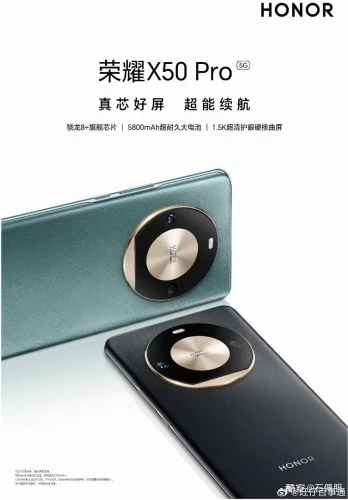
The device seen in circular camera island with golden accents on the rear, housing two cameras and an LED flash. The rear camera module’s design looks similar to the Honor X50, maintaining a visually cohesive identity.
The display is set to impress with a curved design and a 1.5k resolution, complemented by an eye-protection certification. It is speculated that the device will have an OLED display, and if that is true, then we can expect an under-display fingerprint scanner.
- Android Auto Signal Bars Missing? Here’s Why They’re Coming Back
- FC 27 FUT Tokens Explained: Champs Tokens, Gallery Tokens and Hall of FUT Rewards
- How to Hide Name and Profile Picture on Start Menu in Windows 11
- How to Change Class in Fire Emblem: Fortune’s Weave (Full Guide)
- Spotify Best Audio Quality: How to Get the Best Sound on Spotify
Honor X50 Pro 5G is seen in two distinct color options – Black and Green, and it is expected to offer some more color options. More details- specs and feature about the Honor X50 Pro is expected to surface in the near future.
Source: via

