A backup camera shows you the patch of ground right behind your car, the one your mirrors never reveal. You shift into reverse, a screen lights up, and you see what sits behind your bumper. The idea is simple, but a few clever tricks make it work smoothly. This guide explains each one, covers the differences between wired and wireless setups, and tells you what these cameras cannot do.
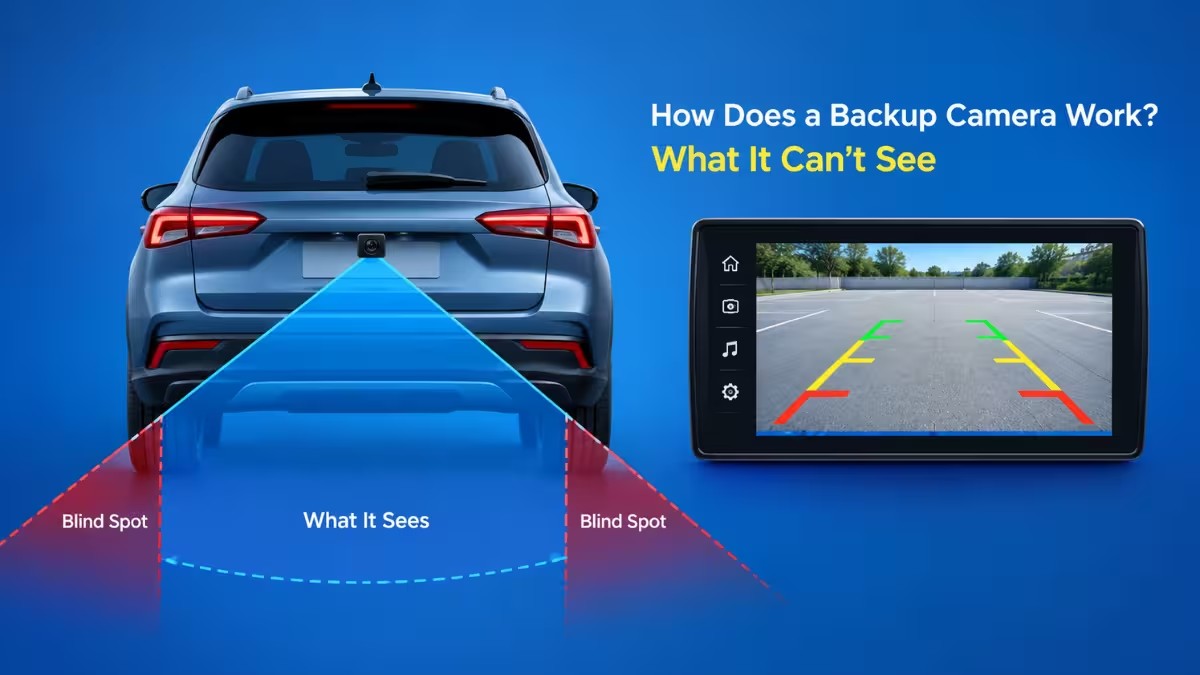
How Does a Backup Camera Turn On in Reverse?
Your car’s reverse lights get power only when the gear selector sits in reverse. A backup camera borrows that same signal. The camera’s power lead connects to the reverse light circuit, so the camera wakes up the moment you select reverse and shuts down when you leave it.
On factory systems, the infotainment unit also receives a trigger, either through a dedicated wire or over the vehicle’s data network. That trigger tells the screen to drop whatever it was showing and switch to the camera feed. When you pull forward, the screen returns to your map or music.
Many cameras keep the picture on for a few extra seconds after you leave reverse. That short delay lets you confirm the space around you before you drive off.
What Are the Main Parts of a Backup Camera System?
A backup camera system has three parts:
- Camera: A small unit mounted near the license plate, on the tailgate, or inside the bumper. It holds a lens, an image sensor, and a tiny circuit board.
- Display: Your dashboard touchscreen, a monitor clipped to the dash, or a rearview mirror with a built-in screen.
- Connection: A cable or a wireless link that carries the video from the camera to the display.
Most cameras use a CMOS sensor, the same kind of chip found in phone cameras. Some higher-end units use CCD sensors, which can handle dim light slightly better. Either type turns incoming light into a video signal.
Why Is the Backup Camera Image Mirrored?
The camera faces backward, so its right side points toward your passenger side. Without correction, the screen would show your car’s left side on the right edge, and you would steer the wrong way.
The system fixes this by flipping the video horizontally. Your view now matches what you see in your rearview mirror: objects on your right appear on the right of the screen. This flip happens either inside the camera or in the display unit.
Backup Camera Lens Angle and Night Vision
Backup cameras use wide-angle or fisheye lenses, usually between 120 and 180 degrees. A wide lens covers the full width of your bumper and a bit beyond, including curbs and cross traffic. The tradeoff is distortion near the edges, where objects can look stretched or farther away than they really are. Better cameras reduce this with multi-element glass or software correction.
For dark conditions, cameras rely on two techniques. Some carry infrared LEDs that light up the scene with invisible light, which produces a black and white image. Others use sensitive sensors and wide-aperture lenses that gather more of the available light, such as your brake lights or a nearby streetlamp. Premium models combine both and switch automatically.
What Do Backup Camera Guidelines Mean?
Many systems draw colored lines over the video. Static lines stay fixed and mark rough distances. Dynamic lines bend as you turn the steering wheel and show the path your car will follow. Dynamic guidelines need a link to the vehicle’s steering data, so you mostly find them on factory systems.
The color bands, often green, yellow, and red, do not follow a universal standard. A red line may mean one foot of clearance in one car and a foot and a half in another. Check your owner’s manual, then test the distances yourself in an empty lot.
Wired vs. Wireless Backup Cameras: Key Differences
If your car lacks a camera, you have two main kit types to choose from.
| Feature | Wired | Wireless |
|---|---|---|
| Video link | Shielded cable to the display | Wi-Fi or radio link, typically 2.4 GHz or 5.8 GHz |
| Picture | Stable, very little delay | Possible interference and a slight delay |
| Image quality | Direct signal | More compressed, which can lower resolution |
| Installation | Cable runs through the car body, a few hours for a confident DIYer | Quicker, no long cable run |
| Cost | A professional install can add several hundred dollars | Kits run from about $40 to over $400 |
Wireless units also differ in how they get power. If you splice the camera into your tail light wiring, it starts automatically in reverse. If it runs on a battery or a solar panel, you usually need to open a phone app to turn it on, which is less convenient.
Adding a Backup Camera With an OBD Programmer
Both kit types need a screen that accepts their video signal. Some trucks and SUVs already have a dash screen but no camera. For these, products like OBD Genie plug into the diagnostic port under the steering column (OBD-II) and change a setting in the vehicle’s computer so the screen accepts a camera input. You still have to mount the camera and wire it to the reverse light. Check compatibility first, since some newer vehicles use security gateways that may need an extra bypass module.
Are Backup Cameras Required on New Cars?
You only face this choice with older cars, because newer ones come with a camera built in. In the United States, a federal safety rule requires every new passenger vehicle under 10,000 pounds to include a rear visibility system. Compliance became mandatory on May 1, 2018. The camera must show a zone about 10 feet wide and 20 feet deep behind the car, and the rule aims to help drivers spot small children in that blind zone.
The rule covers manufacturers only. If your car predates the 2018 model year, you do not have to add a camera, but many owners do for the safety benefit.
What Are the Limitations of a Backup Camera?
The rule guarantees a view of that zone, not full protection. Even a compliant camera has real limits:
- It is passive: Most cameras do not detect objects or sound an alarm. They only show an image, so you must watch the screen.
- It has blind spots: A small child, a pet, or a low post can slip below the lens angle or hide at the edge of the image.
- Conditions matter: A dirty lens, heavy rain, fog, or direct sun glare can wash out the picture.
- It does not replace your mirrors: Check your mirrors and look over your shoulder before and during the move.
- It usually does not record: The feed is live only. Unless you buy a combined dashcam model, the camera captures nothing once you leave reverse.
Aftermarket cameras also lack the parking sensors and automatic braking that come with many new vehicles. Expect visuals only, unless the product clearly advertises extra sensing.
How to Clean and Maintain a Backup Camera
- Wipe the lens with a soft microfiber cloth and mild soapy water about once a week.
- Remove ice gently, and never scrape the lens with sharp tools.
- Seal exposed connectors with dielectric grease and heat-shrink tubing to block moisture.
- If the screen goes black or flickers, check the fuse first, then wiggle the camera connector to find a loose contact.
- Tighten loose mounting screws so vibration does not pull wires apart.
What Is Next for Backup Camera Technology?
Some of those limits are already shrinking, because camera systems are moving toward smarter detection. Expect higher-resolution sensors, better low-light performance, and AI that labels pedestrians, bikes, and objects on screen. Multi-camera setups already stitch together a bird’s-eye view, and processing inside the camera itself should cut delay and reduce false alarms. Tighter links with parking assist and automatic braking will turn the camera from a simple viewer into an active safety tool.
Which Backup Camera Type Should You Choose?
A backup camera works by pairing a reverse-light trigger with a wide lens, a small sensor, and a mirrored video feed. It removes a major blind spot and makes parking easier, but it works best alongside your mirrors and a quick look over your shoulder. For an older car, a wired kit gives the most reliable picture, while a wireless kit wins on easy installation.
Frequently Asked Questions
Do backup cameras work at night?
Yes, in most cases. Infrared LEDs or low-light sensors produce a usable image, though it will not match daytime clarity.
Can I add a backup camera to an older car?
Yes. You can install a wired kit, a wireless kit, or use an OBD programming tool if your vehicle already has a compatible display.
Does a backup camera replace my mirrors?
No. Use the camera, your mirrors, and a shoulder check together.
Why is the image mirrored?
The flip makes left and right on the screen match your rearview mirror, so steering feels natural.
Do wireless cameras lag?
They can show a slight delay compared with wired units, though most drivers barely notice it.
Read More
- How to Fix Inverted Camera on iPhone After iOS 18 Update
- Camera Not Working in Windows 11 or Windows 10: Every Fix Explained
- Laptop Camera Not Working in Windows 11? Try These Fixes
- How to Fix Camera Error 0xA00F4245 (0x80070005) on Windows
- How to Enable Camera on Surface Pro as an Administrator (Step-by-Step)
- Windows 11 KB5074105 Camera Issue Causes Webcam and Lock Screen Failures
